OPERATION
10
OPERATION
The control panel comes preset to show temperatures in Fahrenheit, but it can be switched to
display in Celsius.
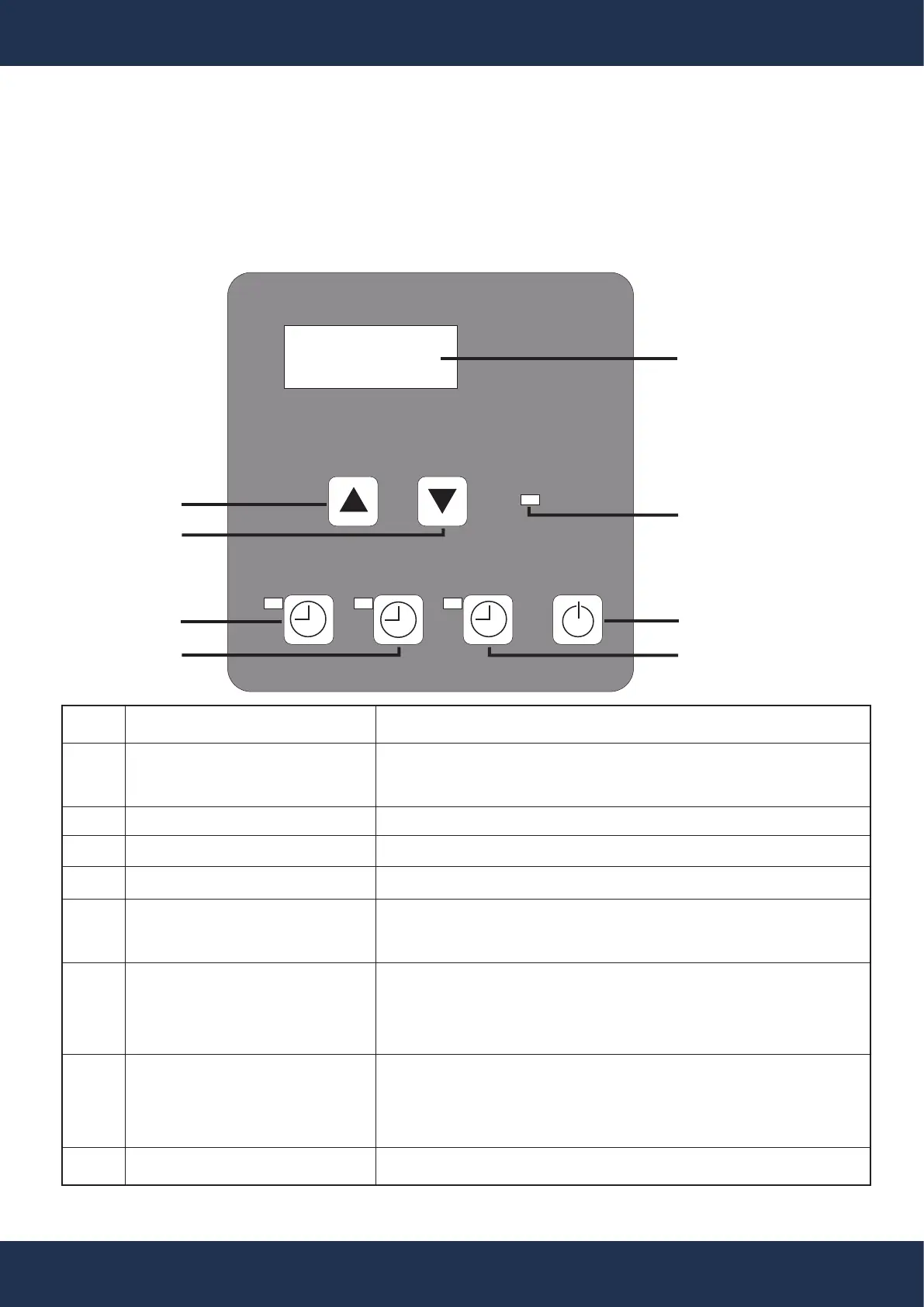
CONTROL PANEL OVERVIEW
Heating
1
4
3
6
2
7
8
1
0
5
ITEM
1
2
3
4
5
6
7
8
DESCRIPTION
View current temperature settings and adjust system
parameters here.
Illuminates the display for better visibility.
Elevate the set temperature or adjust settings.
Reduce the set temperature or adjust settings.
Long press (10 seconds) to toggle between Fahrenheit
(°F) and Celsius (°C) temperature displays.
Adjusts the running time using the up and down buttons.
Hold for 10 seconds to access and review the operation-
al parameters.
Set & adjust the clock with the up and down buttons.
Hold for 10 seconds to access and review temperature
parameters from the related temperature sensor.
Turn the system on or off with this control.
NAME
Temperature & Parameter
Display Screen
Indicator Light
Increase (Temp & Settings)
Decrease (Temp & Settings)
Temperature Unit Change
Timer for Operation
Clock Adjustment
Power Switch


 To Next Page