Quick Guide
CVP-305/303/301 Owner’s Manual
32
n You can instantly jump back to the Main display by “double-clicking” on one of the [A]–[J] buttons.
n Restoring the Piano settings
Press the piano-shaped [PIANO] button.
4
3
4
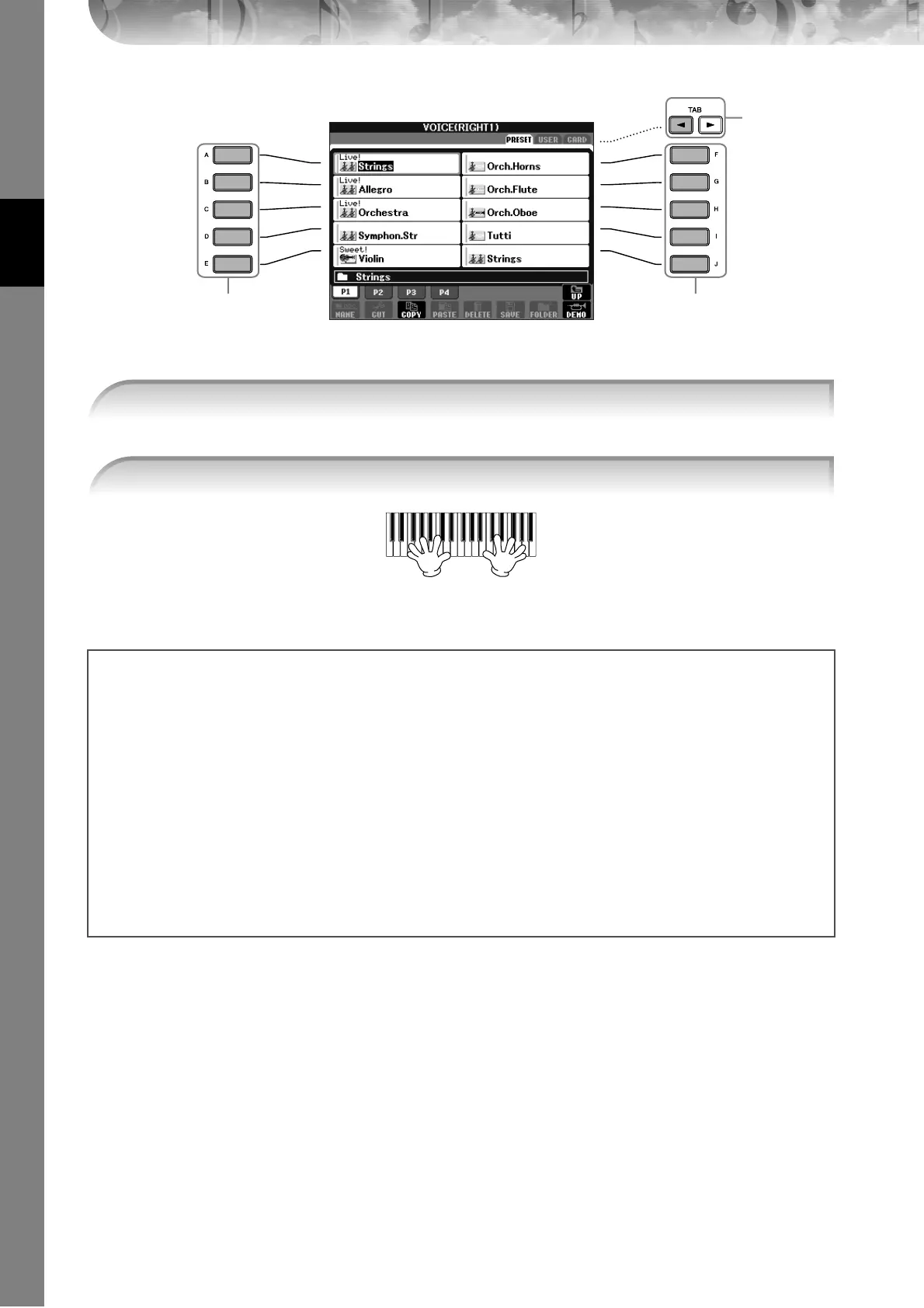
4 Press one of the [A]–[J] buttons to select the desired Voice.
5 Play the keyboard.
Recalling your favorite Voices easily
The CVP has a huge amount of high-quality Voices, covering an exceptionally broad range of instrument sounds—
making it perfect for virtually every musical application. However, the sheer number of Voices may seem overwhelm-
ing at first. To easily recall your favorite Voice, there are two methods:
● Save your favorite Voice to the USER display in the Voice Selection display and recall it by using
the VOICE [USER] button
1 Copy your favorite Voices from the Preset drive to the User drive.
Refer to page 64 for details on the copy operation.
2 Press the Voice [USER] button to call up the Voice Selection display and press one of the [A]–[J] buttons to
select the desired Voice.
● Register your favorite Voice to Registration Memory and recall it with the REGISTRATION MEM-
ORY [1]–[8] buttons
Refer to page 121 for details on Registration Memory operations.





 To Next Page