Using, Creating and Editing Voices
Playing Different Voices Simultaneously
CVP-305/303/301 Owner’s Manual
75
Playing Different Voices with the Left and
Right Hands (Right 1 and Left Parts)
You can play different Voices with the Left and Right Hands (Right 1 and Left parts).
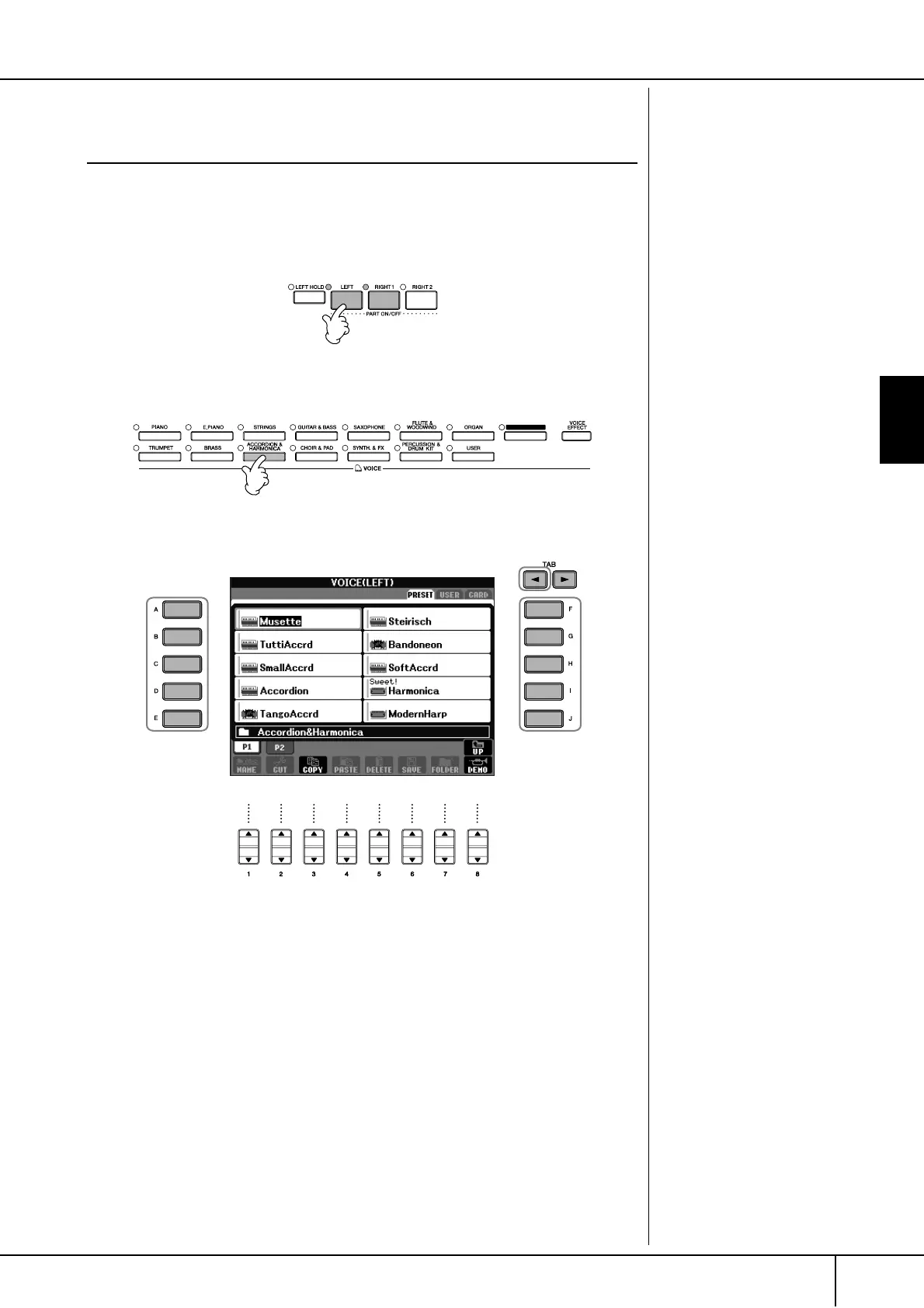
1 Make sure the PART ON/OFF [RIGHT 1] button is turned on.
2 Press the PART ON/OFF [LEFT] button to turn it on.
3 Press one of the VOICE buttons to call up the Voice selection display
for the Left part.
4 Press the TAB [
√
] button to select the PRESET display.
5 Press one of the [A]–[J] buttons to select a Voice.
6 Play the keyboard.
7 Press the PART ON/OFF [LEFT] button again to turn it off.
For the selected part, the Voice
name is highlighted in the Main
display.
ORGAN FLUTES
4
55
Switching the Left part on/off
with a pedal
You can use a pedal to switch the
Left part on/off (when the Left
part is appropriately assigned;
page 182). This is useful for turn-
ing the Left part on and off while
you play.
Specifying the split point (the
border between the right-
and left-hand range)
See page 100.





 To Next Page