Basic Operation
Basic Displays (Main Display and File Selection Display)
CVP-305/303/301 Owner’s Manual
60
9 BAR (current position of the Song or Style)
Displays the current position of the Song or bar and beat number from playback start of the Style.
) Registration Sequence
Appears when the Registration Sequence is active (page 124).
File Selection Display Configuration and Basic Operation
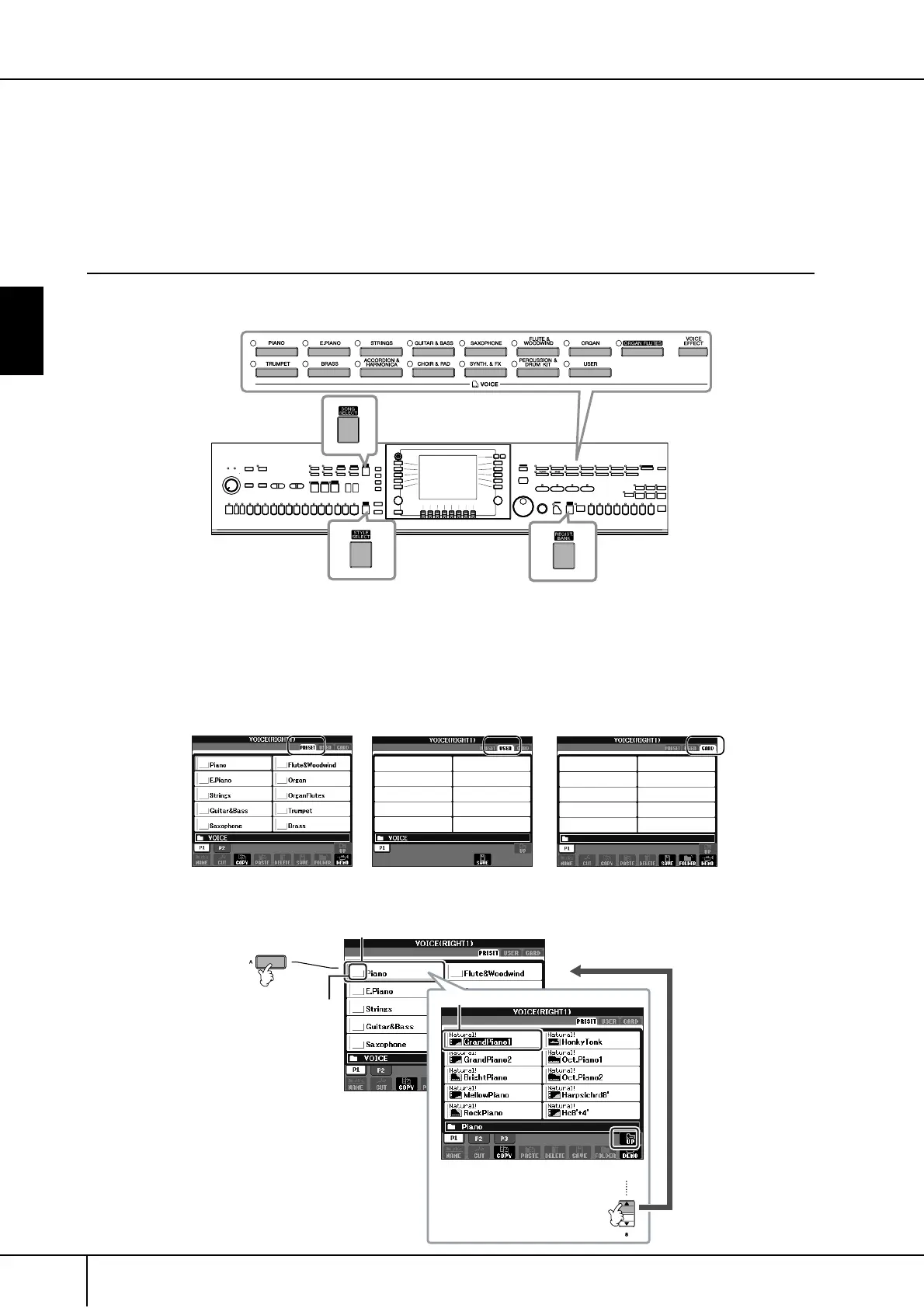
The File Selection display appears when you press one of the buttons shown below. From here you can select
Voices, Styles, and other data.
File Selection Display Configuration
• Location (drive) of data
• Data files and folders
The data, both pre-programmed and your own original, are saved as “files.” You can drop files into a folder.
VOICE category
selection buttons
SONG SELECT button
STYLE SELECT
button
REGIST. BANK
selection button
Preset
Location where pre-programmed
(preset) data is stored.
User
Location where recorded or
edited data is saved.
Card
Location where data on
SmartMedia card is saved.
Folder
Folder
Icon
File





 To Next Page