Quick Guide
CVP-305/303/301 Owner’s Manual
45
n The Style type and its defining characteristics are indicated above the Preset Style name. For details on the characteris-
tics, see page 97.
n You can instantly jump back to the Main display by “double-clicking” on one of the [A]–[J] buttons.
Use the left-hand section (lower part) of the keyboard to play the chords for sounding the Auto Accompani-
ment.
Try playing chords with your left hand and play a melody with your right hand.
n Chord Fingerings
There are seven different fingering methods you can use to specify chords (page 98).
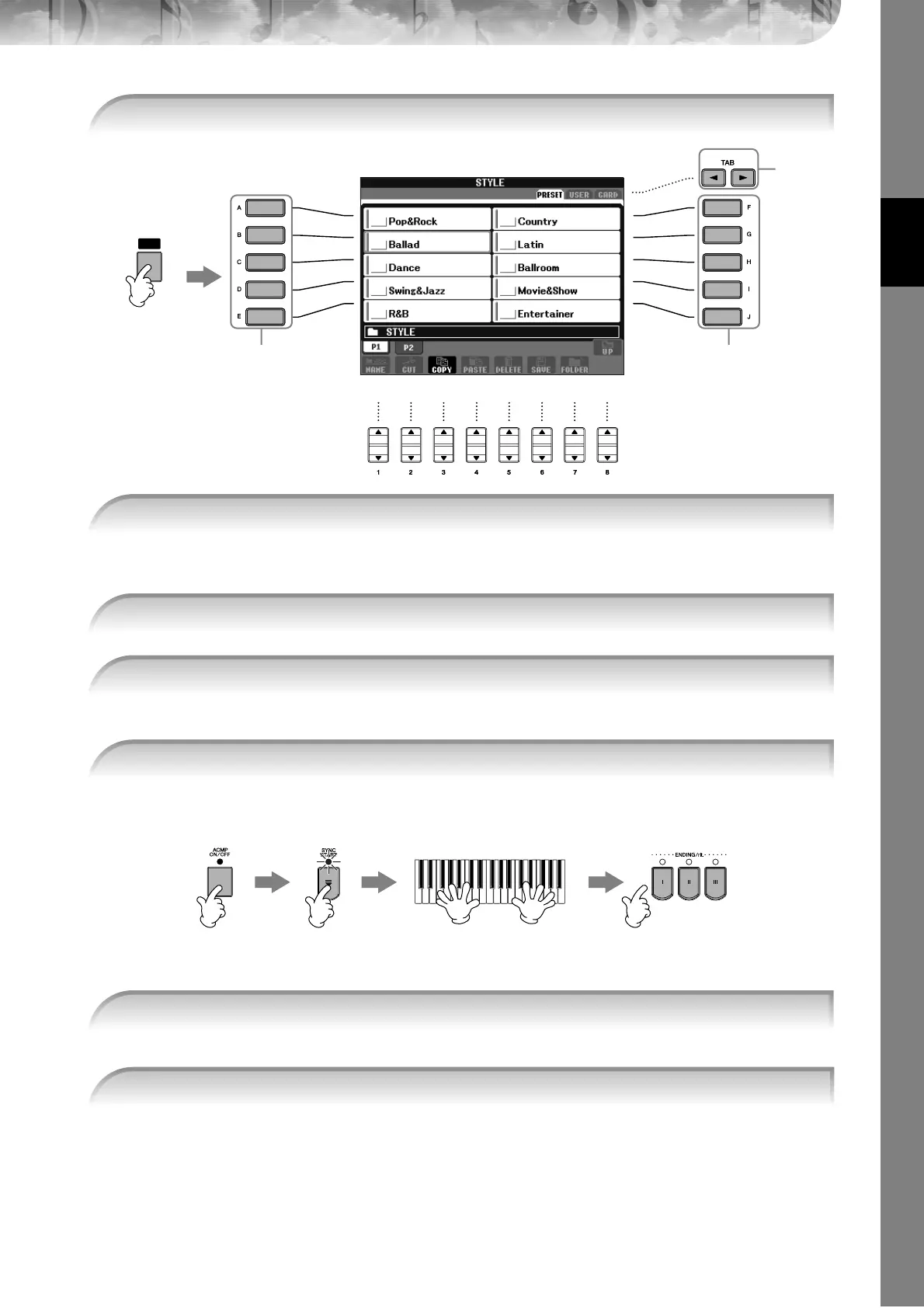
1 Press the [STYLE SELECT] button to call up the Style selection display.
STYLE
SELECT
1
3,
43,
4
2
2 Press the TAB [
√
] button to select the PRESET tab.
3 Press one of the [A]–[J] buttons to select the Style category “Country.”
4 Press one of the [A]–[J] buttons to select a Style “CountryPop.”
5 Press the [ACMP ON/OFF] button to turn on Auto Accompaniment.
5 67 8
6 Press the [SYNC START] button to set Auto Accompaniment to standby—letting you
simultaneously start the accompaniment as soon as you start playing.
7 As soon as you play a chord with your left hand, the Auto Accompaniment starts.





 To Next Page