46 CVP-509/505/503/501 Reference Manual
Songs – Recording Your Performances and Creating Songs –
4
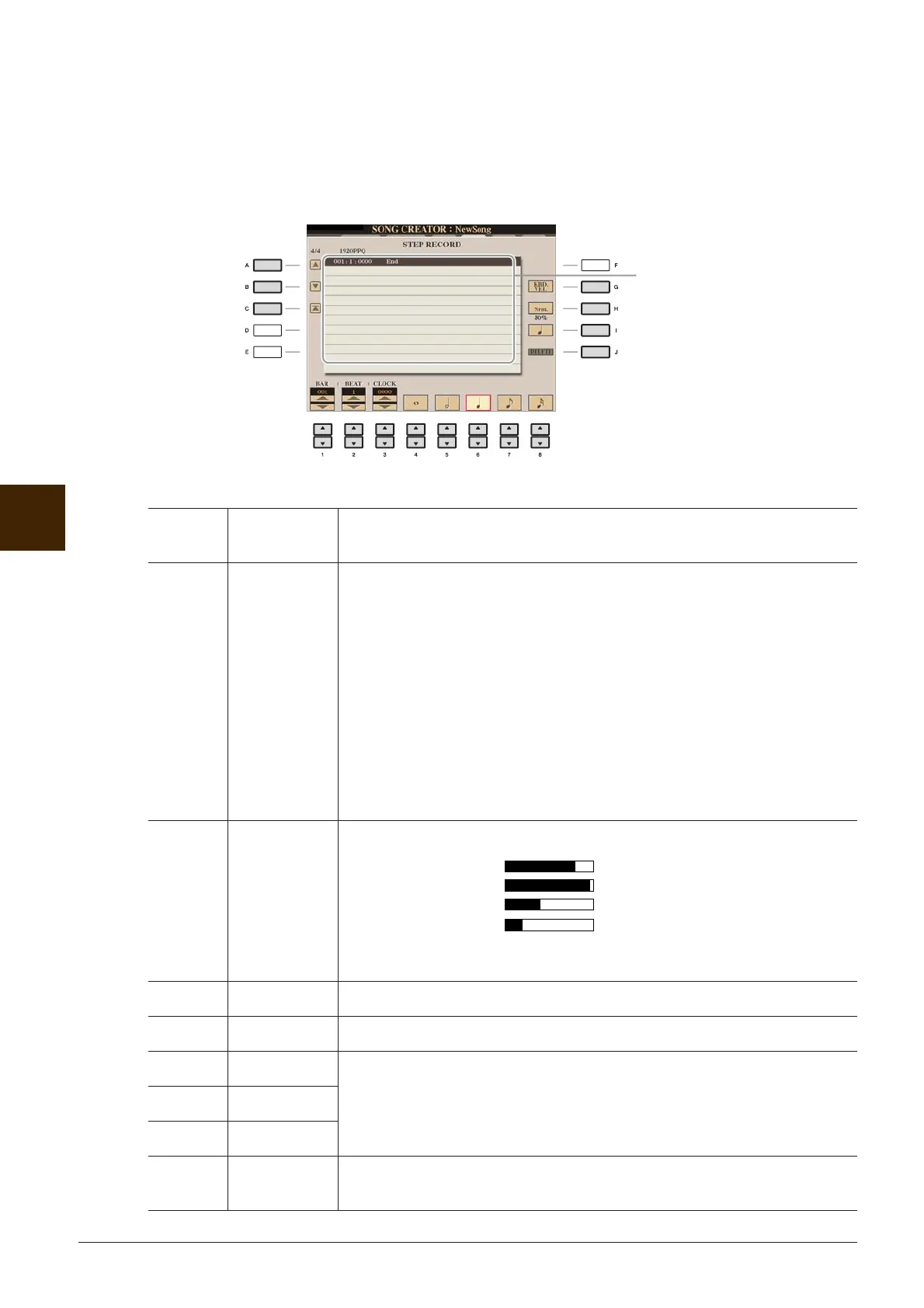
3 Press the [F] button to select the channel for recording.
4 Press the [G] (STEP REC) button to call up the STEP RECORD display.
5 Start Step Recording by using the [A]–[J] buttons and [1 ▲▼]–[8 ▲▼] buttons.
Refer to the example on page 47 for specific instructions.
[A]/[B]/
[C]
Moves the cursor in the list.
[G] Determines the velocity (loudness) of the note to be entered. The velocity
value can be specified within a range from 1 to 127. The higher the velocity
value, the louder the sound becomes.
KBD.VEL: Actual resulting velocity
fff: 127
ff: 111
f: 95
mf: 79
mp: 63
p: 47
pp: 31
ppp: 15
[H] Determines the gate time (note length) of the note to be entered.
Normal: 80%
Tenuto: 99%
Staccato: 40%
Staccatissimo: 20%
Manual: The gate time can be set to any desired percentage by using the
[DATA ENTRY] dial.
[I] Determines the note type to be entered: normal, dotted or triplet.
[J] DELETE Deletes the selected data.
[1 ▲▼]BAR Sets the position of the note to be entered.
[2 ▲▼] BEAT
[3 ▲▼] CLOCK
[4 ▲▼]–
[8 ▲▼]
Determines the note length to be entered: whole-note, half-note, quarter-
note, eighth-note or sixteenth-note.
When a note is input, the location
(bar: beat: clock), note name,
velocity and length are shown as a
list.






 To Next Page