11
Utility – Making Global Settings –
CVP-509/505/503/501 Reference Manual 95
Utility
– Making Global Settings –
Contents
CONFIG1 . . . . . . . . . . . . . . . . . . . . . . . . . . . . . . . . . . . . . . . . . . . . . . . . . . . . . . . . . . . . . . . . . . . . . 95
CONFIG2 . . . . . . . . . . . . . . . . . . . . . . . . . . . . . . . . . . . . . . . . . . . . . . . . . . . . . . . . . . . . . . . . . . . . . 97
SCREEN OUT . . . . . . . . . . . . . . . . . . . . . . . . . . . . . . . . . . . . . . . . . . . . . . . . . . . . . . . . . . . . . . . . . 98
MEDIA . . . . . . . . . . . . . . . . . . . . . . . . . . . . . . . . . . . . . . . . . . . . . . . . . . . . . . . . . . . . . . . . . . . . . . . 98
OWNER . . . . . . . . . . . . . . . . . . . . . . . . . . . . . . . . . . . . . . . . . . . . . . . . . . . . . . . . . . . . . . . . . . . . . . 99
SYSTEM RESET . . . . . . . . . . . . . . . . . . . . . . . . . . . . . . . . . . . . . . . . . . . . . . . . . . . . . . . . . . . . . . 100
• Factory Reset—Restoring the Factory Programmed Settings . . . . . . . . . . . . . . . . . . . . . . . . . . 100
• Custom Reset—Saving and Recalling Your Original Settings as a Single File . . . . . . . . . . . . . 101
1 Fade In/Out
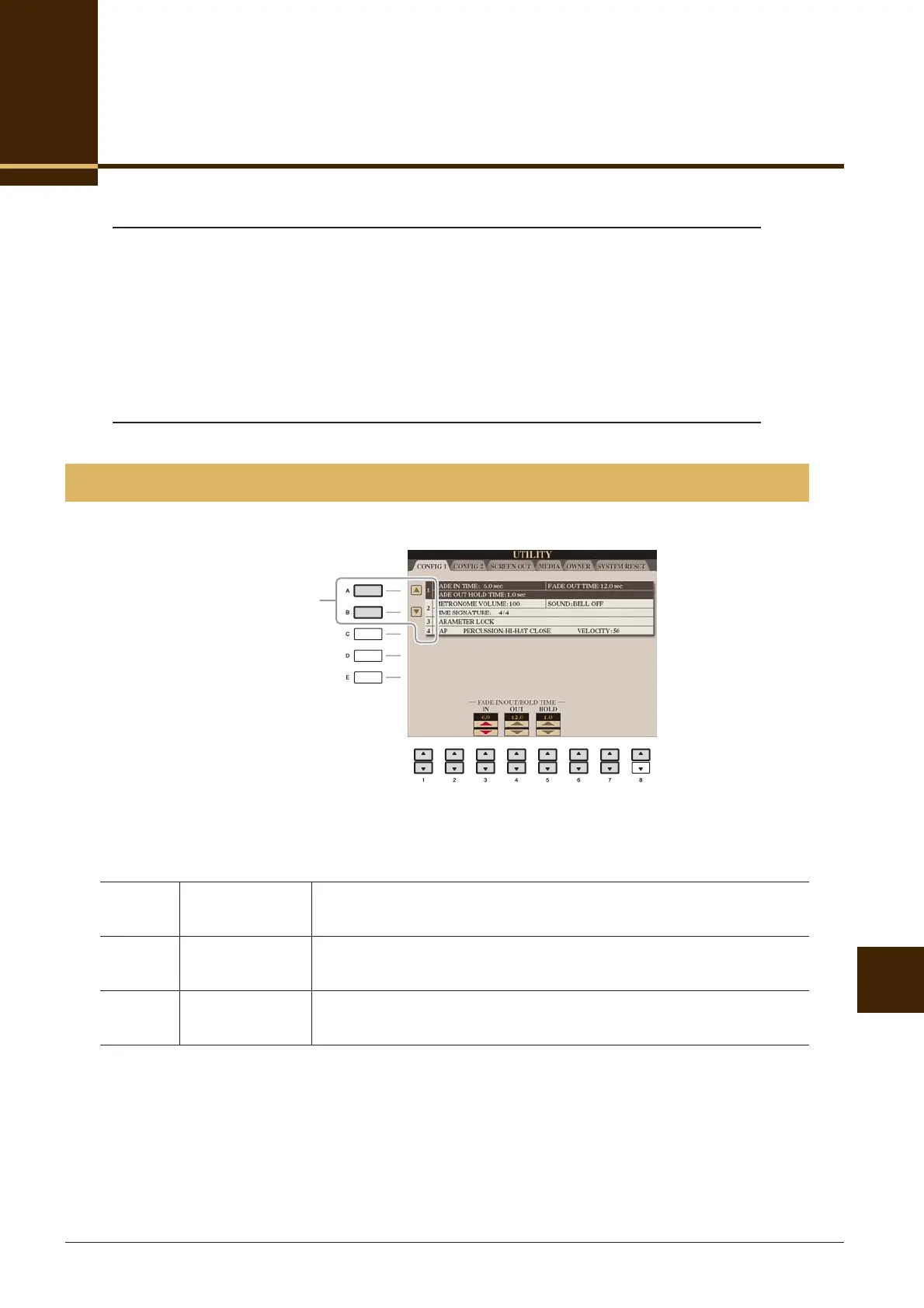
These parameters determine the behavior when the Style or Song playback is faded in/out.
CONFIG1
[3 ▲▼]FADE IN TIME Determines the time it takes for the volume to fade in, or go from mini-
mum to maximum (range of 0–20.0 seconds).
[4 ▲▼]FADE OUT
TIME
Determines the time it takes for the volume to fade out, or go from maxi-
mum to minimum (range of 0–20.0 seconds).
[5 ▲▼]FADE OUT
HOLD TIME
Determines the time the volume is held at 0 following the fade out (range
of 0–5.0 seconds).
Select the desired parameter:
1 Fade In/Out
2 Metronome
3 Parameter Lock
4 Tap






 To Next Page