CVP-509/505/503/501 Reference Manual 77
Internet Direct Connection – Connecting the CVP-509/505/503/501 Directly to the Internet –
9
You can “bookmark” the page you’re viewing, and set up a custom link so the page can be instantly called up
in the future.
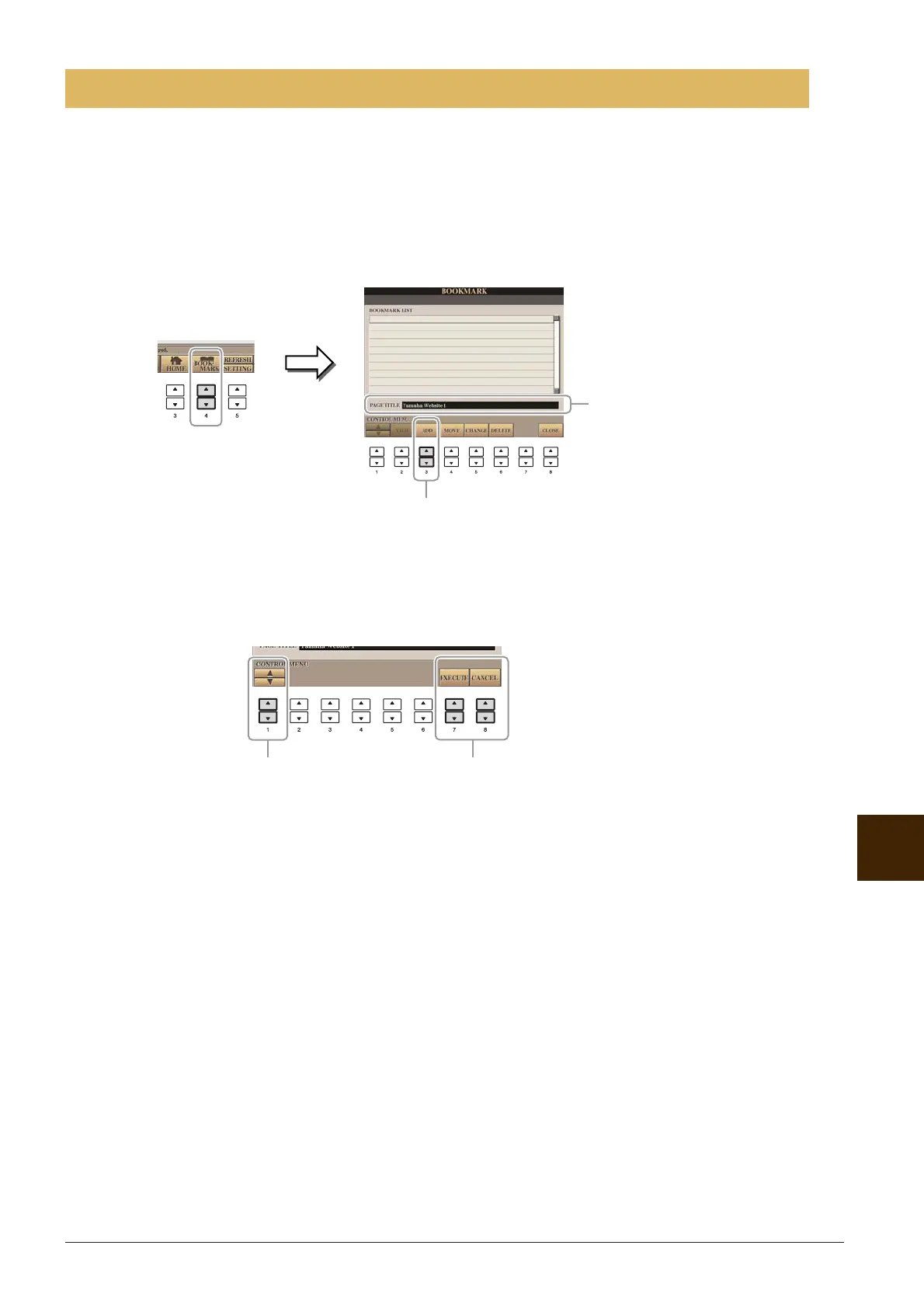
1 With the desired page currently selected, press the [4 ▲▼] (BOOKMARK) button.
The Bookmark display appears, showing a list of the currently saved bookmarks.
NOTE For information on Bookmark display, see page 78.
2 Call up the display for registering bookmarks by pressing the [3 ▲▼] (ADD) button.
3 Select the position of the new bookmark by pressing the [1 ▲▼] button.
4 To save the bookmark, press the [7 ▲▼] (EXECUTE) button, or press the [8 ▲▼]
(CANCEL) button to cancel.
5 Press the [8 ▲▼] (CLOSE) button to return to the browser.
The bookmarked page can be opened by pressing the [2 ▲▼] (VIEW) button in the Bookmark display.
Registering Bookmarks of Your Favorite Pages
2
The title of the currently
selected web page registered
to the selected bookmark is
shown below the list.
34






 To Next Page