78 CVP-509/505/503/501 Reference Manual
Internet Direct Connection – Connecting the CVP-509/505/503/501 Directly to the Internet –
9
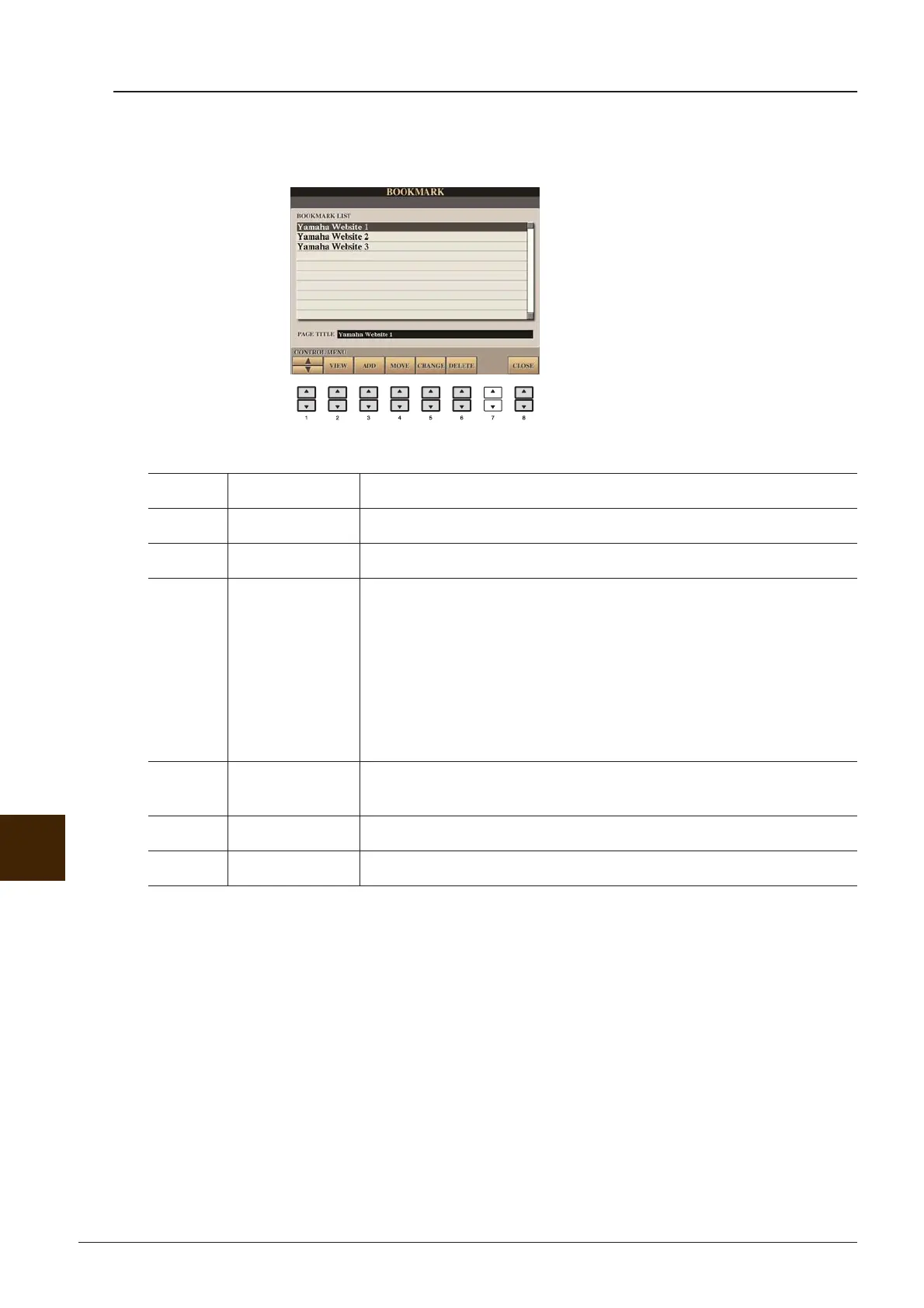
Editing Bookmarks
From the Bookmark display, you can change the names and rearrange the order of your bookmarks, as well
as delete unnecessary bookmarks from the list.
[1 ▲▼] (UP/DOWN) Moves the selection position in the Bookmark list.
[2 ▲▼] VIEW Opens the web page of the selected bookmark.
[3 ▲▼] ADD Used when saving a bookmark (page 77).
[4 ▲▼]MOVE Changes the order of the bookmarks.
1 Select the bookmark you wish to move, then press the [4 ▲▼]
(MOVE) button.
The lower part of the display changes, letting you select the new
position for the bookmark.
2 Select the intended position by pressing the [1 ▲▼] button.
3 Move the bookmark to the selected position by pressing the [7
▲▼] (EXECUTE) button.
[5 ▲▼] CHANGE Changes the name of the selected bookmark. Pressing this button calls up
the display for entering characters.
[6 ▲▼] DELETE Deletes the selected bookmark from the Bookmark list.
[8 ▲▼] CLOSE Closes the Bookmark display and returns to the browser display.




 To Next Page