58 CVP-509/505/503/501 Reference Manual
Songs – Recording Your Performances and Creating Songs –
4
Editing Chord Events, Notes, System Exclusive Events and Lyrics
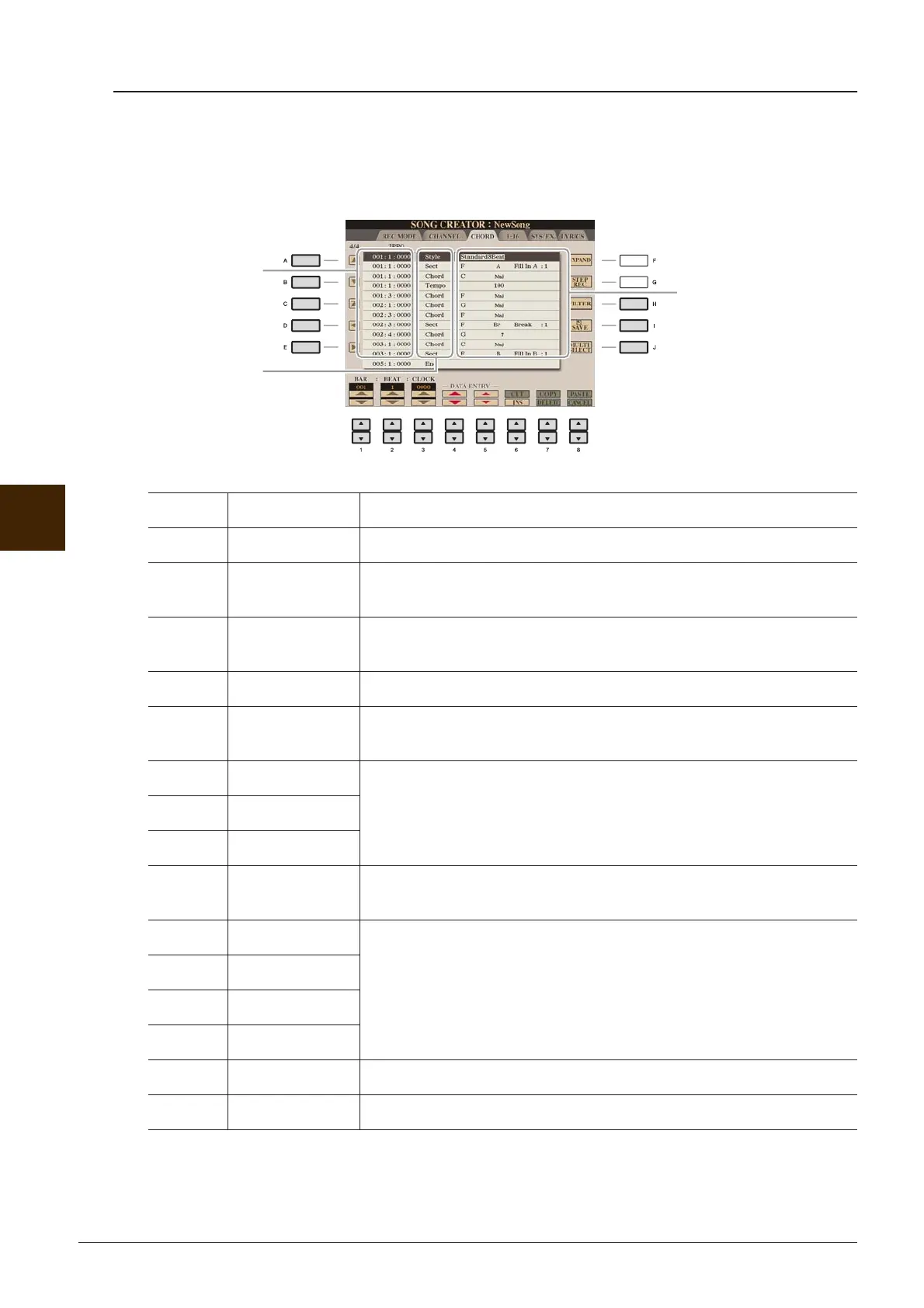
You can edit the chord events, note events, system exclusive events and lyrics in the same manner on the
corresponding display: CHORD, 1-16, SYS/EX and LYRICS. These displays are called “Event List display”
because some events are shown in a list view.
NOTE After you edit events in the CHORD tab display, press the [F] (EXPAND) button to convert the data into Song data.
NOTE Chord section data recorded with Realtime Recording cannot be indicated and edited on this display.
[A]/[B] Moves the cursor up/down and select the desired event.
[C] Moves the cursor to the top (beginning of the Song).
[D]/[E] Moves the cursor left/right and select the desired parameter of the high-
lighted event.
[H] FILTER Calls up the Filter display (page 60), letting you select only the events
you wish to be shown in the event list.
[I] SAVE Press to save the edited Song.
[J] MULTI
SELECT
Holding this button while using the [A]/[B] buttons lets you select multi-
ple events.
[1 ▲▼]BAR Determines the position (bar/beat/clock) of the data. One clock is equal to
1/1920th of a quarter note.
[2 ▲▼] BEAT
[3 ▲▼] CLOCK
[4 ▲▼]/
[5 ▲▼]
DATA ENTRY Adjusts the event value. For coarse adjustment, use the [4 ▲▼] buttons.
For fine adjustment, use the [5 ▲▼] buttons or [DATA ENTRY] dial.
[6 ▲] CUT Executes cut/copy/delete/paste operation.
[7 ▲] COPY
[7 ▼] DELETE
[8 ▲]PASTE
[6 ▼] INS (INSERT) Adds a new event.
[8 ▼] CANCEL Cancels editing and restores the original value.
Indicates the
event value.
Indicates the loca-
tion (position) of the
corresponding
event.
Indicates the event
type.
See page 59.
Event List display






 To Next Page