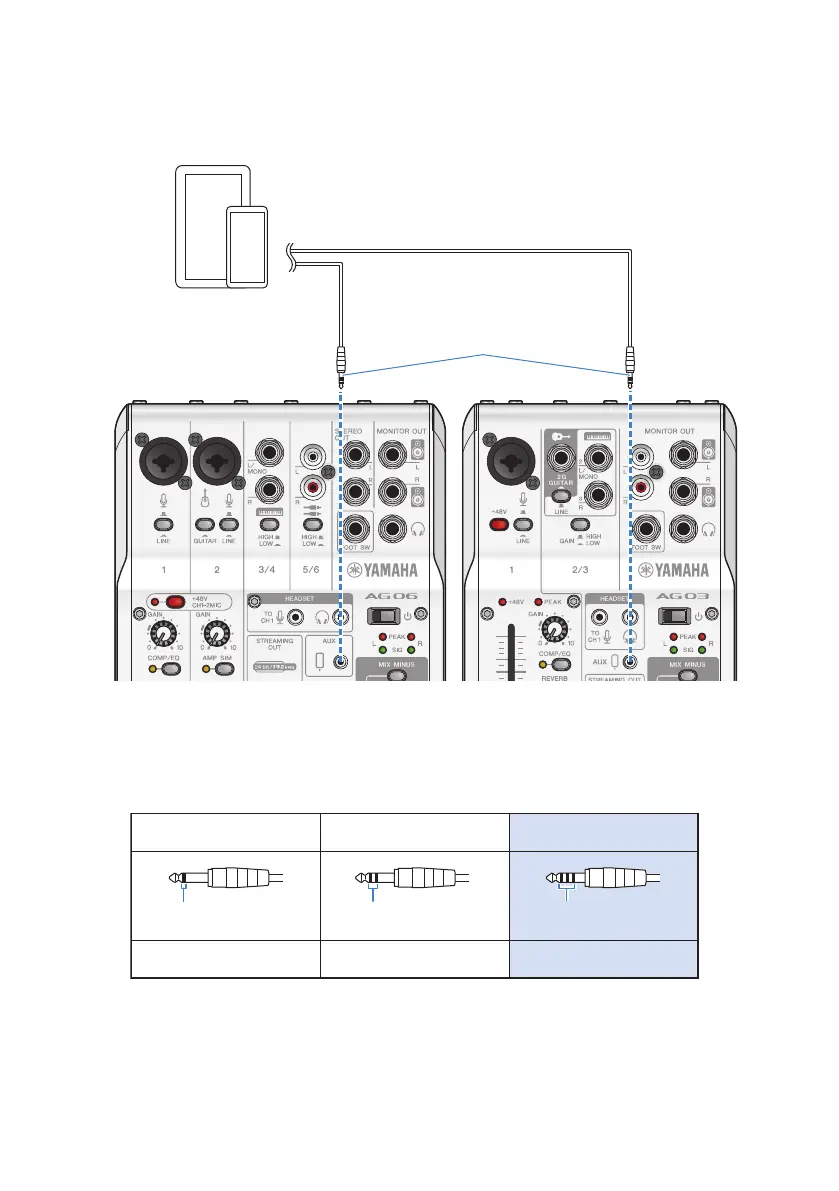
4 Using a 3.5 mm four-conductor stereo mini cable, connect the smartphone [P]
input/output jack on this product to the headset jack on your Android device.
4-conductor (TRRS), 3.5 mm
stereo mini cable
Android device
NOTE
(
You will need a conversion adapter cable if your Android device does not have a jack for connecting stereo mini plugs.
For example, for Android devices that use a USB-C port to input/output audio, you’ll need a USB-C to 3.5 mm four-
conductor (TRRS) earphone jack conversion adapter cable.
(
Use a four-conductor (TRRS) stereo mini cable, not a two- or three-conductor (TS/TRS) cable.
2-conductor (TS) 3-conductor (TRS) 4-conductor (TRRS)
No No Yes
One insulator band Two insulator bands Three insulator bands
Once connected, use your music playback or recording app to test whether the audio is being inputted and
outputted.
20
Getting ready to use this product > Connecting to Android devices


 To Next Page