Getting ready to use this product
Connecting to an iPhone/iPad
This explains what to do to power this unit, up through connecting to an iPhone/iPad. An external power
supply is required to connect to an iPhone/iPad.
What you need
(
USB power adapter or USB mobile battery (at least 5 V, 1 A)
(
Apple Lightning-USB3 Camera Adapter (when using an iPhone/iPad with a Lightning connector)
(
USB-C charging cable included with the iPad, or a commercially available USB-C to USB-C cable (when
using an iPad with USB-C connector)
NOTE
(
When using this product for streaming or otherwise using it for long periods of time, have a power supply on hand to power your
iPhone/iPad.
(
For a list of compatible operating systems, see the following Yamaha website.
AG03MK2: https://www.yamaha.com/2/ag03mk2/
AG06MK2: https://www.yamaha.com/2/ag06mk2/
Connecting
1 Make sure that the volume on this product and on the connected device is turned
all the way down.
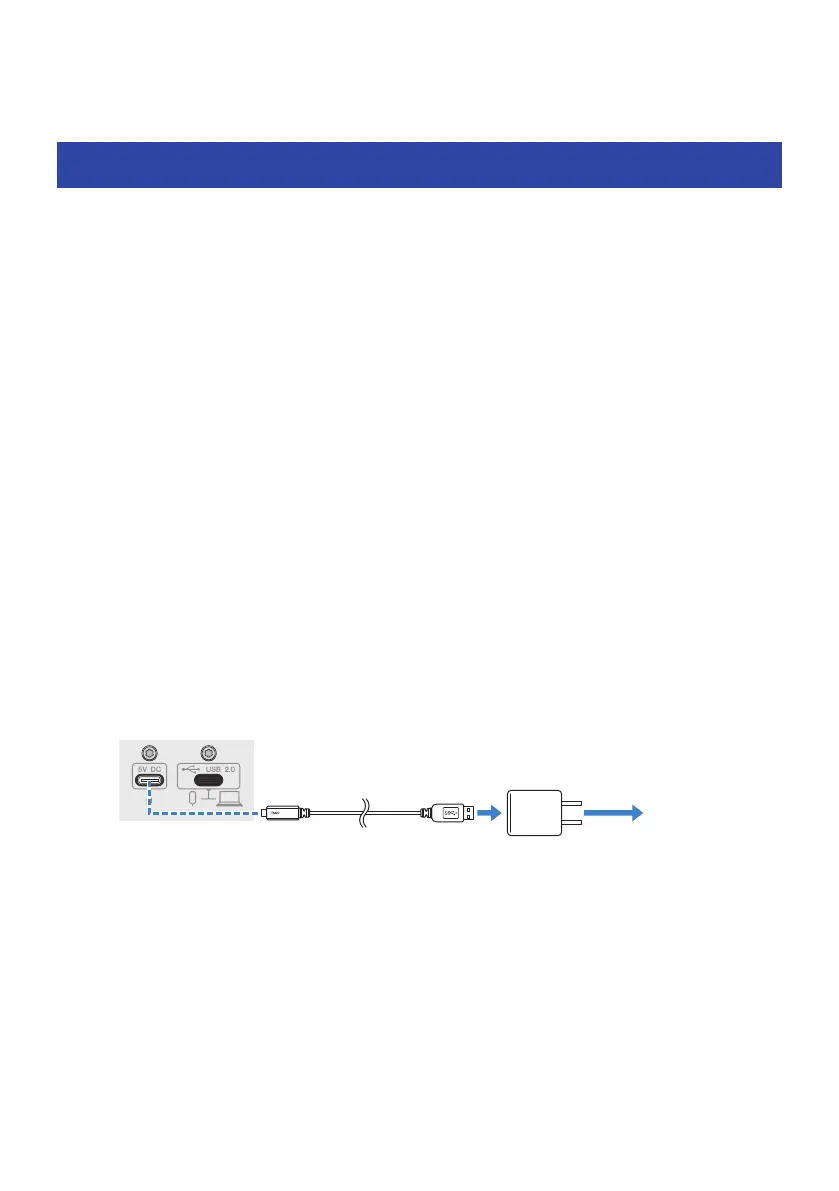
2 Connect a commercially-available USB power adapter, USB mobile battery or
similar device to the [5V DC IN] USB port on the rear of this unit.
To a
power supply
Rear panel
USB cable
(commercially available)
USB
power adapter
3 Turn the [z] (standby/on) switch on.
4 Check whether the LED of the [z] (standby/on) switch on this product is lit.
17
Getting ready to use this product > Connecting to an iPhone/iPad


 To Next Page