4 Configure the settings for the AG
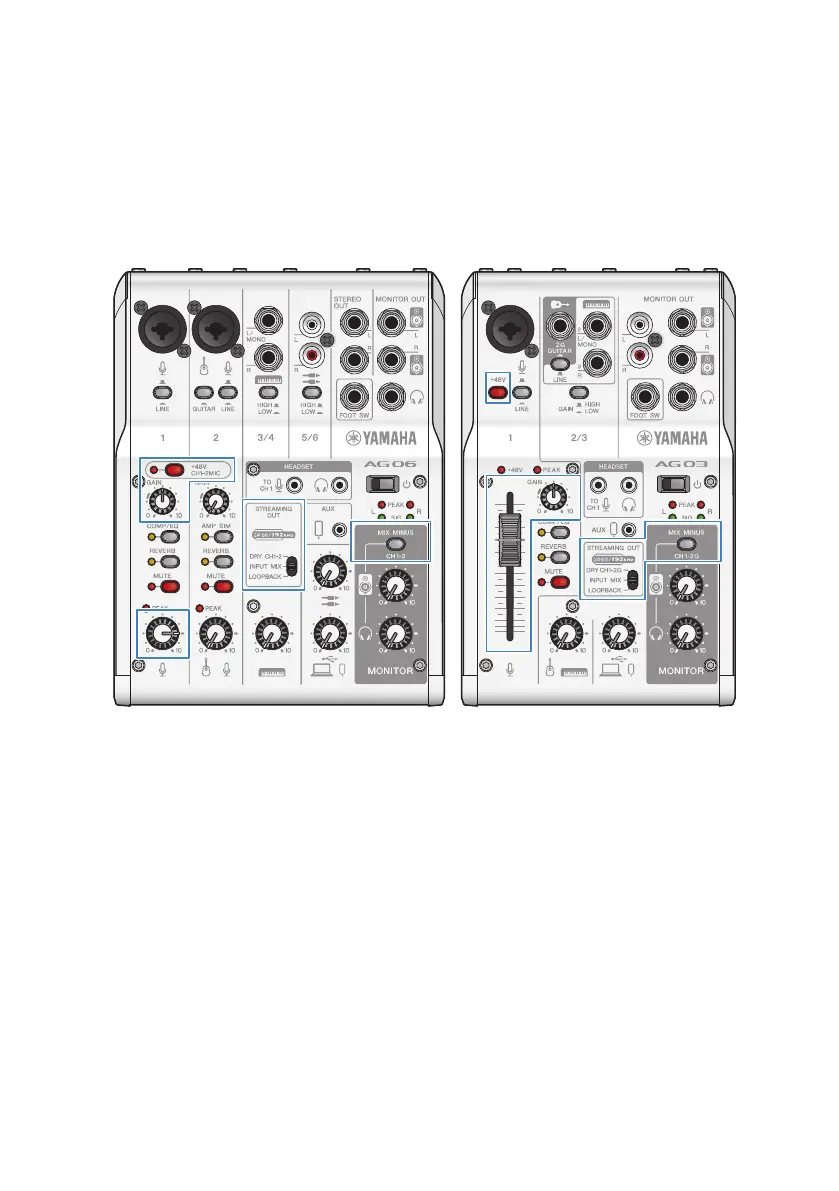
Make the settings for each switch on the front panel as follows.
(
Phantom [+48V] switch: on (when using a condenser mic)
(
Channel 1 [GAIN] knob: as appropriate (see illustration)
(
[STREAMING OUT]: [INPUT MIX]
(
[MIX MINUS]: off
5 Turn the [z] (standby/on) switch on.
Turn the [z] (standby/on) switch on.
6 Adjust the headphone volume
Adjust the volume using the headphone [H] knob while speaking into the mic. Adjusting the
volume using the headphone [H] knob has no effect on the volume of the livestreaming
audio.
7 Starting the livestream
Use the fader (only on the AG03MK2) or the level knob to adjust the respective volumes.
Launch the livestreaming app and check the balance for the listeners.
NOTE
See “Audio-related and other issues”(p.65) if you don’t hear any sound.
33
Using this product for livestreaming (17LIVE, Twitch, YouTube Live) > Using this product with an Android
device


 To Next Page