11
COMPACT DISC PLAYER OPERATIONS
English
To play CDs
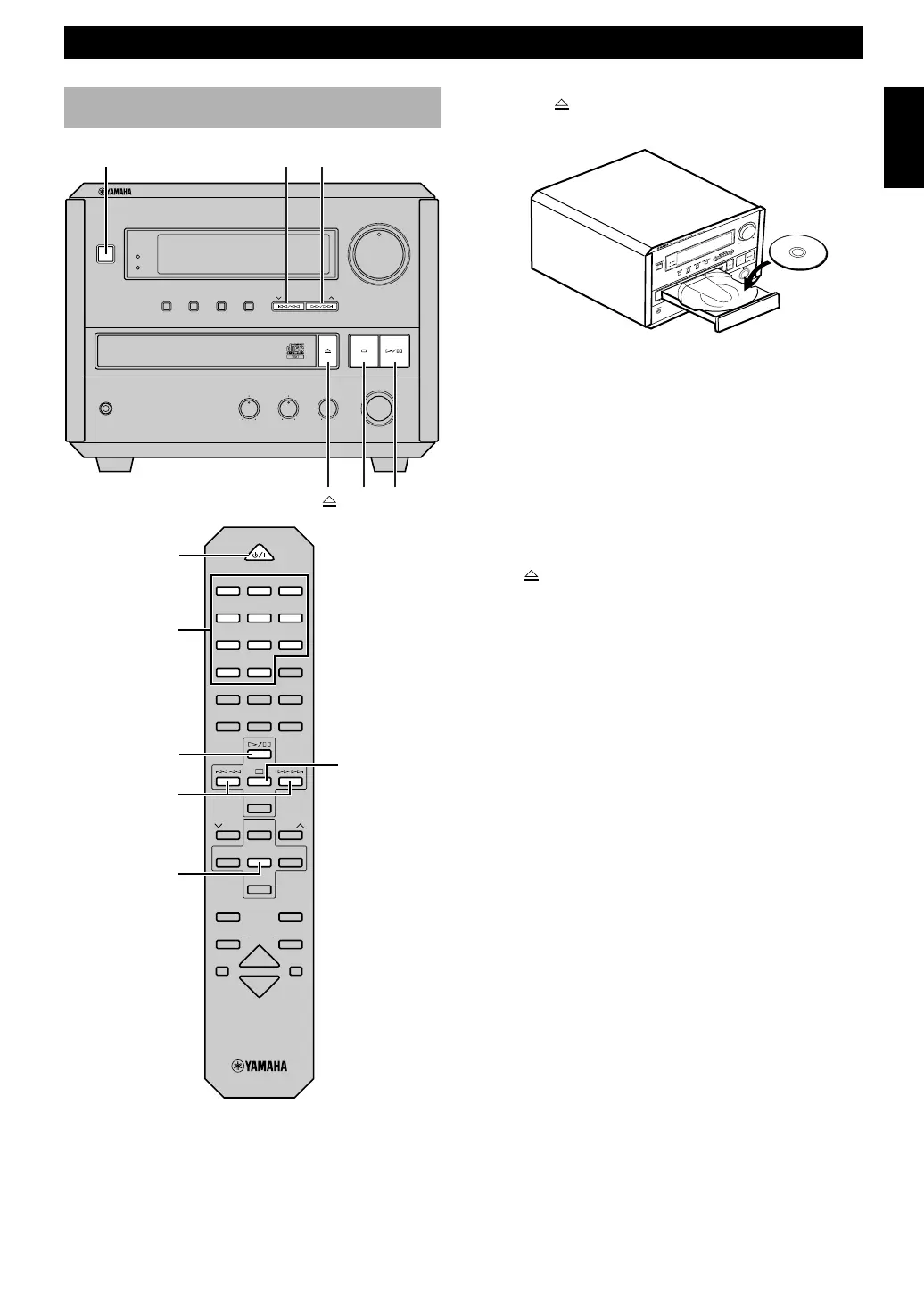
1 Press STANDBY/ON to turn on this unit.
2 Press CD on the remote control in order to operate
the CD player by the remote control.
CD play
3 Press to open the disc tray, and place a CD on the
tray.
4 Press ^ to start play.
This unit starts play.
To pause play
Press ^.
To resume play, press ^ again.
To stop play
Press &.
To eject the CD
Press to open the disc tray, and remove the CD from
the tray.
To play a specific track on the disc
(Skip)
Direct play
Select a desired track using the numeric button.
(Example: To select 35, press +10 three times so that
“3 –” appears in the display, then press 5.)
Skip play
Press ⁄/› to skip forward or $/! to skip
backward. Press once for each track to be skipped.
Notes
• You cannot enter a number that is higher than the last track
number on the disc.
• These operations can also be performed when the unit is in the
pause or stop mode.
• During stop mode, if ⁄/› or $/! is pressed, the
track number successively changes to higher numbers (or
lower numbers).
To advance or reverse playback
rapidly (Search)
Press and hold ⁄/› to advance playback rapidly, and
$/! to reverse playback rapidly.
Note
• This unit cannot play a CD-R or CD-RW disc unless the disc is
finalized. Please make sure to finalize the disc on the CD
recorder before playing on this unit.
^
&
^&
⁄/›$/!
$ !/⁄ ›
STANDBY/ON
POWER
CD
Numeric
buttons
NATURAL SOUND CD RECEIVER CRX-E150
STANDBY
DISPLAY
BASS
–
+
–
+
L
R
MIN
MIN MAX
HOUR
TIMERTIME ADJ
TREBLE BALANCE
INPUT
VOLUME
MEMORY AUTO/MAN'L PRESET/BAND PRESET/TURING
PHONES
STANDBY/ON
TIMER
POWER
1 2 3
123
4 5 6
456
7 8 9
78
0 +10 +100
REP
RANDOM
PROG
ABC
TEXT
/
TIME
R. TIME
DE
TAPE
DIRECTION
PRESET
TUNER
PRESET
MD CD TAPE
AUX
MD
REC
/
PAU SE
TAPE
REC
/
PAU SE
MODE
SLEEP
DISPLAY
DUBBING
VOLUME
START


 To Next Page