20
ADD KX-E100 AND/OR MDX-E100 TO YOUR SYSTEM
1 Insert the desired disc into the CD player, and load a
blank tape into the KX-E100.
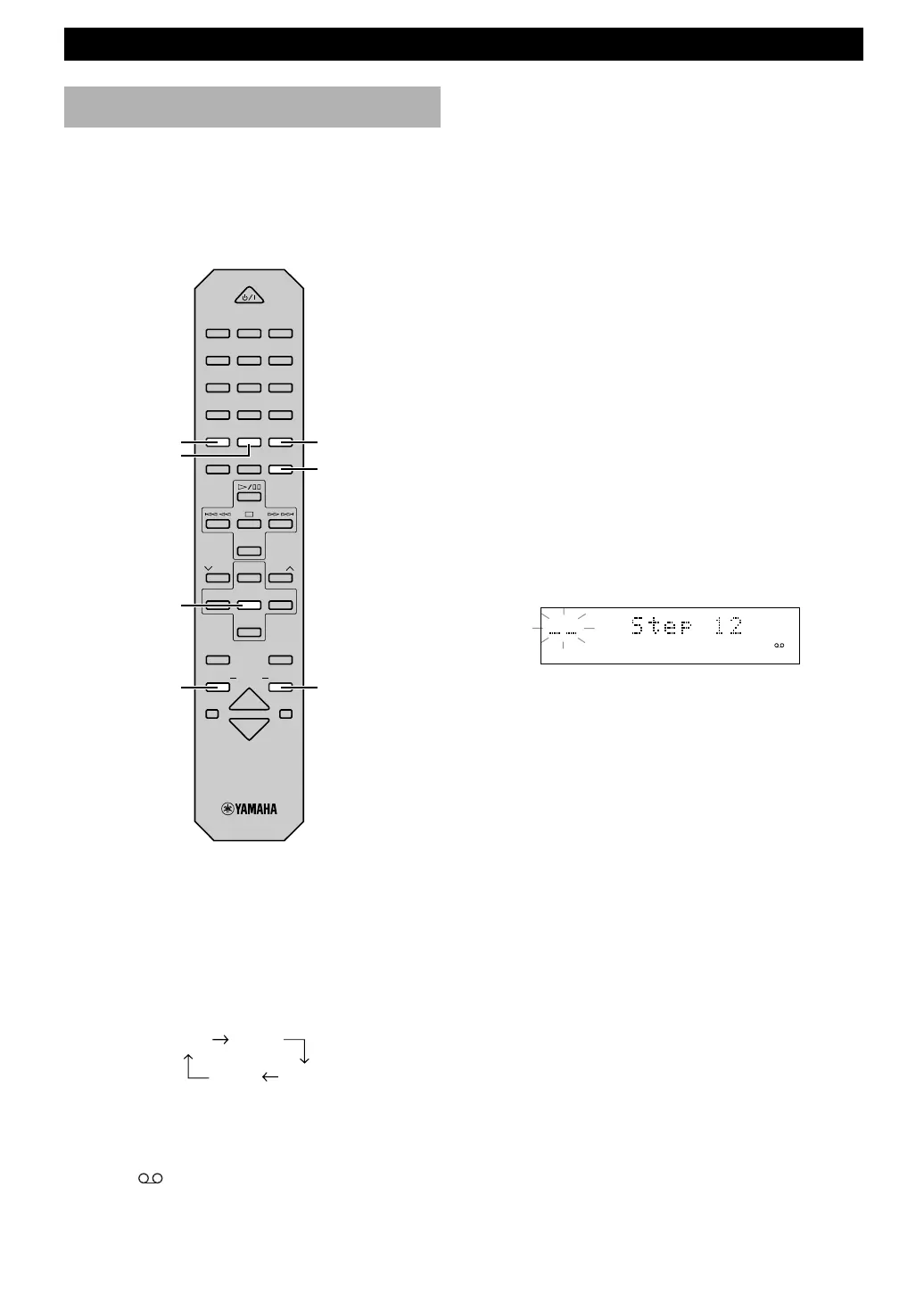
2 Press CD.
3 Press R.TIME repeatedly to select the length of tape
to be used. Each time you press R.TIME, the length
of the tape changes as follows:
• You can use numeric buttons to input the length of
the tape.
4 Press PROG to start programming.
•“A
B” appears in the display to indicate the
direction of the tape.
TAPE programming
By specifying the length of the tape, CDX-E150 programs
tracks or helps you to program tracks so they will fit onto
the tape with the least amount of unrecorded space
remaining at each end of the tape.
1 Manual TAPE programming
5 Select the desired track number using numeric
buttons.
• Repeat step 5 to continue programming tracks.
• The remaining time is shown on the display. If the
track is longer than the remaining time, “Adj
Over” appears on the display.
6 Press R.TIME to continue programming tracks on
side B.
• Repeat step 4.
7 Choose CD = TAPE by pressing DUBBING
MODE, and press DUBBING START to start
recording.
2 Automatic TAPE programming
1 Repeat steps 1 and 3 of “Manual TAPE
programming”.
2 Press REP to start programming.
• Programming is done in the order on the CD from
side A to side B. When complete, the following
display appears.
(Example) when 11 tracks has been programmed
You can change the program data following the steps
described on page 14, “To change program data”.
3 Choose CD = TAPE by pressing DUBBING
MODE, and press DUBBING START to start
recording.
To stop dubbing
Press & on KX-E100.
To cancel tape programming
Press & on CDX-E150 when dubbing is stopped.
Note
• If the loaded CD has more than 20 tracks, CRX-E150
programs only the first 20 tracks. The rest cannot be
programmed even if the length of the tape is sufficient.
DUBBING
START
DUBBING
MODE
PROG
R.TIME
REP
RANDOM
POWER
1 2 3
123
4 5 6
456
7 8 9
78
0 +10 +100
REP
RANDOM
PROG
ABC
TEXT
/
TIME
R. TIME
DE
TAPE
DIRECTION
PRESET
TUNER
PRESET
MD CD TAPE
AUX
MD
REC
/
PAU SE
TAPE
REC
/
PAU SE
MODE
SLEEP
DISPLAY
DUBBING
VOLUME
START
90 60
46 54
CD
PROG B


 To Next Page