EasyManua.ls Logo

Yamaha DS55 - Page 11

Yamaha DS55
39 pages
Print Icon
To Next Page IconTo Next Page
To Previous Page IconTo Previous Page
Loading...
THE
DUAL
PLAY
MODE
e
Assigning
Dual-mode
Voices
and
Setting
Detune
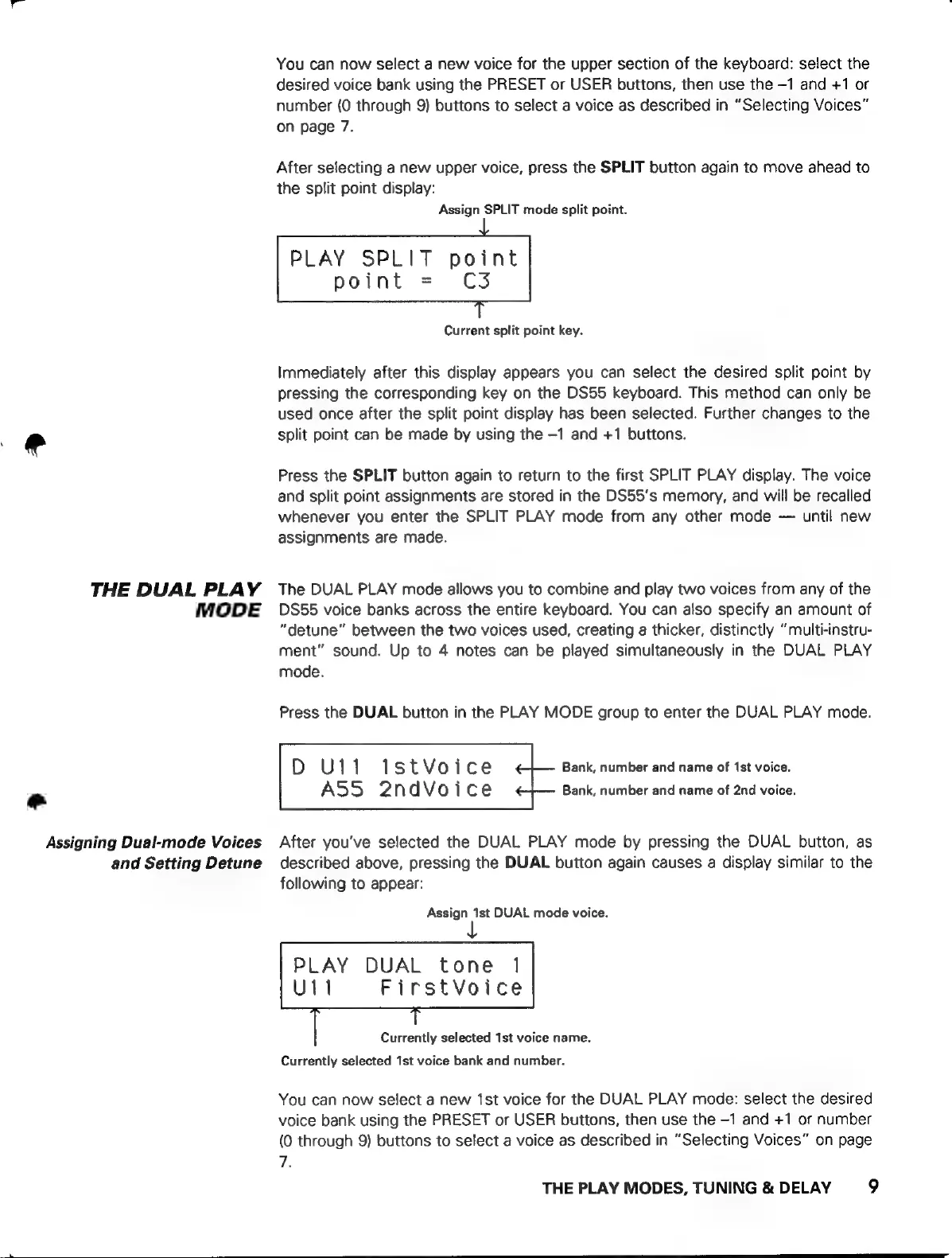
You
can
now
select
a
new
voice
for
the
upper
section
of
the
keyboard:
select
the
desired
voice
bank
using
the
PRESET
or
USER
buttons,
then
use
the
-1
and
+1
or
number
(0
through
9)
buttons
to
select
a
voice
as
described
in
“Selecting
Voices”
on
page
7.
After
selecting
a
new
upper
voice,
press
the
SPLIT
button
again
to
move
ahead
to
the
split
point
display:
Assign
SPLIT
mode
split
point.
PLAY
SPLIT
point
point
=
C3
Current
split
point
key.
Immediately
after
this
display
appears
you
can
select
the
desired
split
point
by
pressing
the
corresponding
key
on
the
DS55
keyboard.
This
method
can
only
be
used
once
after
the
split
point
display
has
been
selected.
Further
changes
to
the
split
point
can
be
made
by
using
the
-1
and
+1
buttons.
Press
the
SPLIT
button
again
to
return
to
the
first
SPLIT
PLAY
display.
The
voice
and
split
point
assignments
are
stored
in
the
DS55's
memory,
and
will
be
recalled
whenever
you
enter
the
SPLIT
PLAY
mode
from
any
other
mode
—
until
new
assignments
are
made.
The
DUAL
PLAY
mode
allows
you
to
combine
and
play
two
voices
from
any
of
the
DS55
voice
banks
across
the
entire
keyboard.
You
can
also
specify
an
amount
of
“detune”
between
the
two
voices
used,
creating
a
thicker,
distinctly
''multi-instru-
ment”
sound.
Up
to
4
notes
can
be
played
simultaneously
in
the
DUAL
PLAY
mode.
Press
the
DUAL
button
in
the
PLAY
MODE
group
to
enter
the
DUAL
PLAY
mode.
D
U11
1stVoice
Bank,
number
and
name
of
1st
voice.
ASS
2ndVoice
Bank,
number
and
name
of
2nd
voice.
After
you've
selected
the
DUAL
PLAY
mode
by
pressing
the
DUAL
button,
as
described
above,
pressing
the
DUAL
button
again
causes
a
display
similar
to
the
following
to
appear:
Assign
1st
DUAL
mode
voice.
PLAY
DUAL
tone
1
U11
FirstVoice
Currently
selected
1st
voice
name.
Currently
selected
1st
voice
bank
and
number.
You
can
now
select
a
new
1st
voice
for
the
DUAL
PLAY
mode:
select
the
desired
voice
bank
using
the
PRESET
or
USER
buttons,
then
use
the
-1
and
+1
or
number
(0
through
9)
buttons
to
select
a
voice
as
described
in
“Selecting
Voices”
on
page
7.
THE
PLAY
MODES,
TUNING
&
DELAY
9