EasyManua.ls Logo

Yamaha DS55 - Page 10

Yamaha DS55
39 pages
Print Icon
To Next Page IconTo Next Page
To Previous Page IconTo Previous Page
Loading...
THE
SPLIT
PLAY
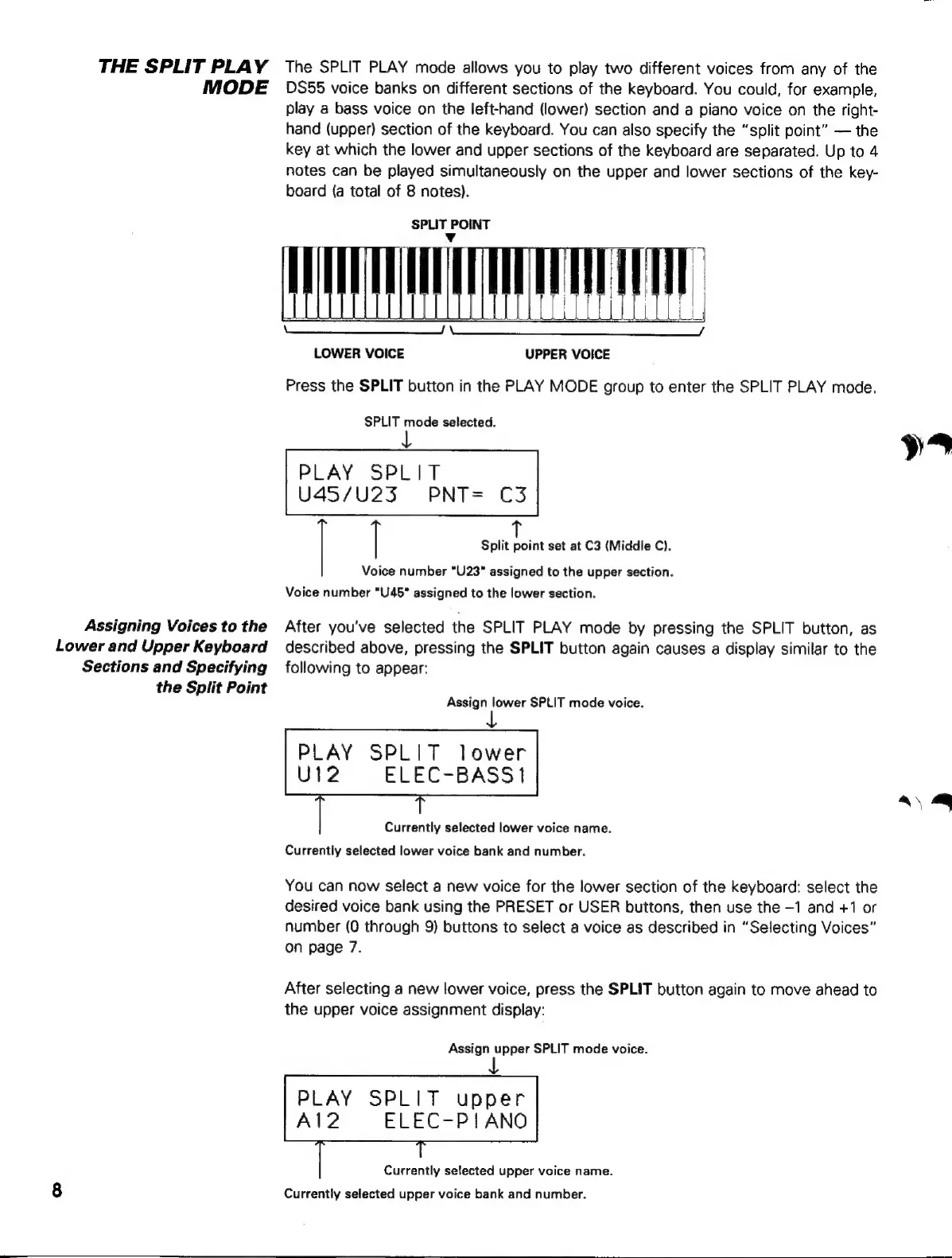
The
SPLIT
PLAY
mode
allows
you
to
play
two
different
voices
from
any
of
the
MODE
DS55
voice
banks
on
different
sections
of
the
keyboard.
You
could,
for
example,
play
a
bass
voice
on
the
left-hand
(lower)
section
and
a
piano
voice
on
the
right-
hand
(upper)
section
of
the
keyboard.
You
can
also
specify
the
“split
point”
—
the
key
at
which
the
lower
and
upper
sections
of
the
keyboard
are
separated.
Up
to
4
notes
can
be
played
simultaneously
on
the
upper
and
lower
sections
of
the
key-
board
{a
total
of
8
notes).
SPLIT
POINT
Yv
LOWER
VOICE
UPPER
VOICE
Press
the
SPLIT
button
in
the
PLAY
MODE
group
to
enter
the
SPLIT
PLAY
mode.
SPLIT
mode
selected.
ys
PLAY
SPLIT
U45/U23
PNT-
C3
|
|
Split
point
set
at
C3
(Middle
C).
Voice
number
'U23'
assigned
to
the
upper
section.
Voice
number
"U45"
assigned
to
the
lower
section.
Assigning
Voices
to
the
After
you've
selected
the
SPLIT
PLAY
mode
by
pressing
the
SPLIT
button,
as
Lower
and
Upper
Keyboard
described
above,
pressing
the
SPLIT
button
again
causes
a
display
similar
to
the
Sections
and
Specifying
following
to
appear:
the
Split
Point
Assign
lower
SPLIT
mode
voice.
PLAY
SPLIT
lower
U12
ELEC-BASSI
aq
Currentiv
selected
lower
voice
name.
Currentiv
selected
lower
voice
bank
and
number.
Vou
can
now
select
a
new
voice
for
the
lower
section
of
the
kevboard:
select
the
desired
voice
bank
using
the
PRESET
or
USER
buttons,
then
use
the
-1
and
+1
or
number
(0
through
9)
buttons
to
select
a
voice
as
described
in
“Selecting
Voices”
on
page
7.
After
selecting
a
new
lower
voice,
press
the
SPLIT
button
again
to
move
ahead
to
the
upper
voice
assignment
display:
Assign
upper
SPLIT
mode
voice.
PLAY
SPLIT
upper
A12
ELEC-PIANO
Currentiv
selected
upper
voice
name.
8
Currentiv
selected
upper
voice
bank
and
number.