EasyManua.ls Logo

Yamaha DS55 - Page 9

Yamaha DS55
39 pages
Print Icon
To Next Page IconTo Next Page
To Previous Page IconTo Previous Page
Loading...
E
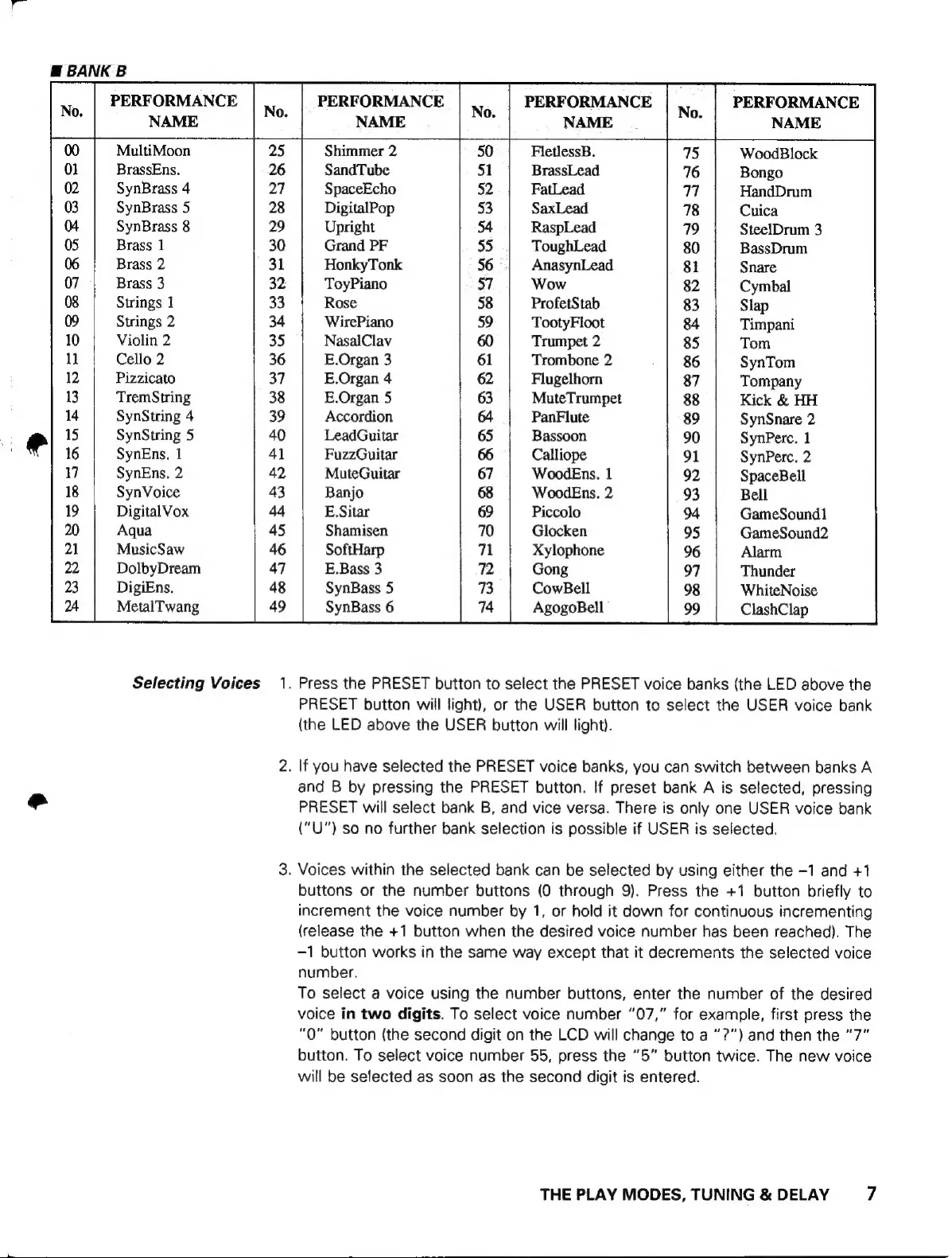
BANK
B
PERFORMANCE
NAME
PERFORMANCE
NAME
PERFORMANCE
NAME
PERFORMANCE
NAME
MultiMoon
BrassEns.
SynBrass
4
SynBrass
5
SynBrass
8
Brass
1
Brass
2
Brass
3
Strings
1
Strings
2
Violin
2
Cello
2
Pizzicato
TremString
SynString
4
SynString
5
SynEns.
1
SynEns.
2
SynVoice
Digital
Vox
Aqua
MusicSaw
DolbyDream
DigiEns.
MetalTwang
Selecting
Voices
1.
FletlessB.
BrassLead
FatLead
SaxLead
RaspLead
ToughLead
AnasynLead
Wow
ProfetStab
TootyFloot
Trumpet
2
Trombone
2
Flugelhorn
MuteTrumpet
PanFlute
Bassoon
Calliope
WoodEns.
1
WoodEns.
2
Piccolo
Glocken
Xylophone
Gong
CowBell
AgogoBell
Shimmer
2
SandTube
SpaceEcho
DigitalPop
Upright
Grand
PF
HonkyTonk
ToyPiano
Rose
WirePiano
NasalClav
E.Organ
3
E.Organ
4
E.Organ
5
Accordion
LeadGuitar
FuzzGuitar
MuteGuitar
Banjo
E.
Sitar
Shamisen
SoftHarp
E.Bass
3
SynBass
5
SynBass
6
WoodBlock
Bongo
HandDrum
Cuica
SteelDrum
3
BassDrum
Snare
Cymbal
Slap
Timpani
Tom
SynTom
Tompany
Kick
&
HH
SynSnare
2
SynPerc.
1
SynPerc.
2
SpaceBell
Bell
GameSound1
GameSound2
Alarm
Thunder
WhiteNoise
ClashClap
Press
the
PRESET
button
to
select
the
PRESET
voice
banks
(the
LED
above
the
PRESET
button
will
light),
or
the
USER
button
to
select
the
USER
voice
bank
(the
LED
above
the
USER
button
will
light).
.
If
you
have
selected
the
PRESET
voice
banks,
you
can
switch
between
banks
A
and
B
by
pressing
the
PRESET
button.
If
preset
bank
A
is
selected,
pressing
PRESET
will
select
bank
B,
and
vice
versa.
There
is
only
one
USER
voice
bank
(“U")
so
no
further
bank
selection
is
possible
if
USER
is
selected.
.
Voices
within
the
selected
bank
can
be
selected
by
using
either
the
-1
and
+1
buttons
or
the
number
buttons
(0
through
9).
Press
the
+1
button
briefly
to
increment
the
voice
number
by
1,
or
hold
it
down
for
continuous
incrementing
(release
the
+1
button
when
the
desired
voice
number
has
been
reached).
The
-1
button
works
in
the
same
way
except
that
it
decrements
the
selected
voice
number.
To
select
a
voice
using
the
number
buttons,
enter
the
number
of
the
desired
voice
in
two
digits.
To
select
voice
number
“07,”
for
example,
first
press
the
“0”
button
(the
second
digit
on
the
LCD
will
change
to
a
”?”)
and
then
the
“7”
button.
To
select
voice
number
55,
press
the
“5”
button
twice.
The
new
voice
will
be
selected
as
soon
as
the
second
digit
is
entered.
THE
PLAY
MODES,
TUNING
&
DELAY
7