PM5DV2/DSP5D Editor Owner’s Manual
11
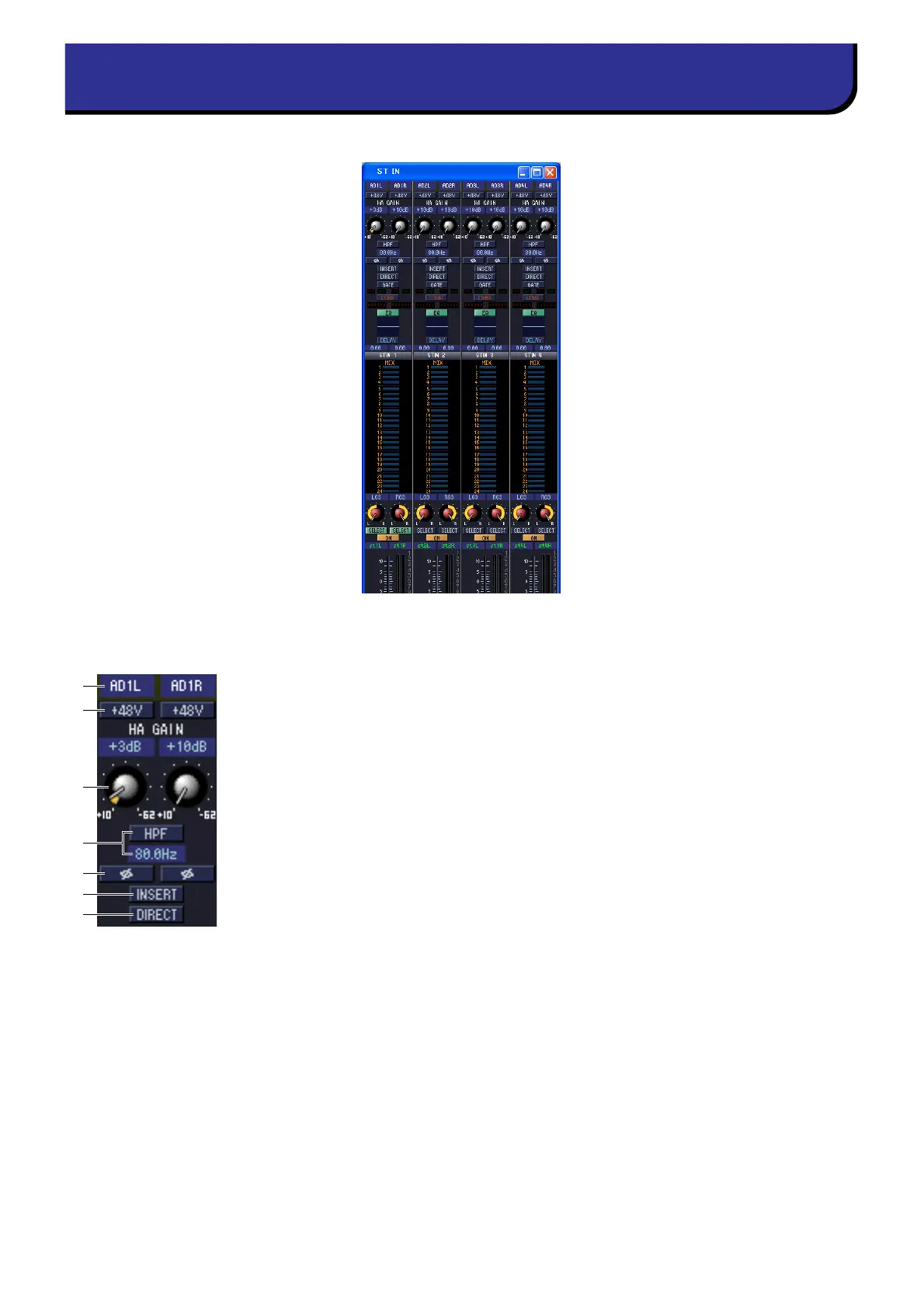
In this window you can view and edit the parameters of ST IN channels 1–4. You can use the [View] menu to choose
the parameters that will be displayed in the window.
A Input patch
Selects the input source that will be assigned to the ST IN channel. The input sources
that can be assigned are the same as for an input channel (➥ p.8).
B +48V
Switches on/off the phantom power (+48V) of the internal HA (PM5D-RH model and
DSP5D only) or of the external HA (AD824, AD8HR) patched to the ST IN channel.
C HA GAIN
Drag the knob in the screen to adjust the gain of the internal HA (PM5D-RH model
and DSP5D only) or of the external HA (AD824, AD8HR) patched to the ST IN chan-
nel.
D HPF (High Pass Filter)
Switches the high pass filter on/off. You can drag the numeric value up or down to edit
the cutoff frequency.
E Ø (Phase)
Inverts the phase of the signal after AD conversion.
F INSERT
Switches the INSERT PATCH path between enabled/disabled.
G DIRECT
Switches the output to the DIRECT OUT PATCH port between enabled/disabled.
ST IN window
5
6
7
1
2
3
4











 To Next Page