PM5DV2/DSP5D Editor Owner’s Manual
34
❏ Pan / Fader
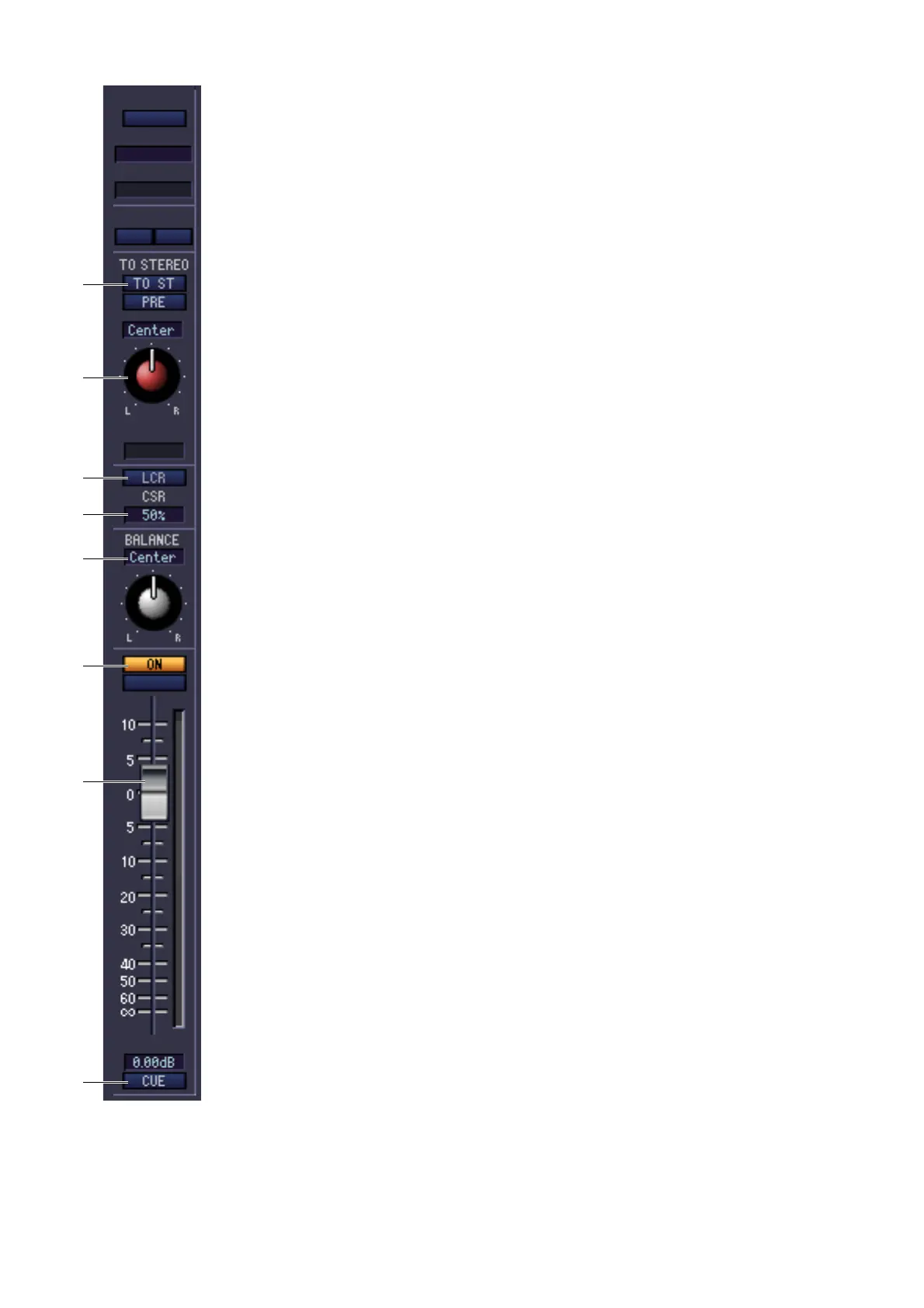
A TO ST (To stereo)
This is an on/off switch for the signal sent from the MIX channel to the STEREO bus.
The PRE button located below selects PRE (immediately before the MIX [ON] key) or
POST (immediately after the MIX [ON] key) as the point from which the signal is sent
from the MIX channel to the STEREO bus.
B TO ST PAN (To stereo pan)
Sets the panning of the signal sent from the MIX channel to the STEREO bus.
C LCR
Turns LCR mode on/off for each channel. If this is turned on for a channel, you can use
the TO ST PAN (
2) knob to simultaneously control the level of the signal sent to the
STEREO bus L/R channels and CENTER channel.
D CSR (Center Side Ratio)
This adjusts the level ratio (0–100%) of the CENTER channel relative to the STEREO
bus L/R channels. To change the value, drag upward or downward inside the numerical
box.
E BALANCE
This adjusts the left/right output balance of paired channels. This is not shown if pair-
ing is not specified.
F ON
Switches the MIX channel on/off. This is linked with the MIX [ON] keys in the MIX
section of the PM5D panel.
G Fader
Adjusts the output level of the MIX channel. This is linked with the MIX encoders on
the PM5D panel (if the [MIX MASTER] key is on). The current value is shown in the
numerical box immediately below. A level meter is shown beside the fader.
H CUE
This button cue-monitors the signal of the MIX channel. This is linked with the MIX
[CUE] keys in the MIX section of the PM5D panel. If SOLO is active, this will function
as SOLO.
1
2
3
4
5
6
7
8











 To Next Page