23
Advanced Features
Advanced Features
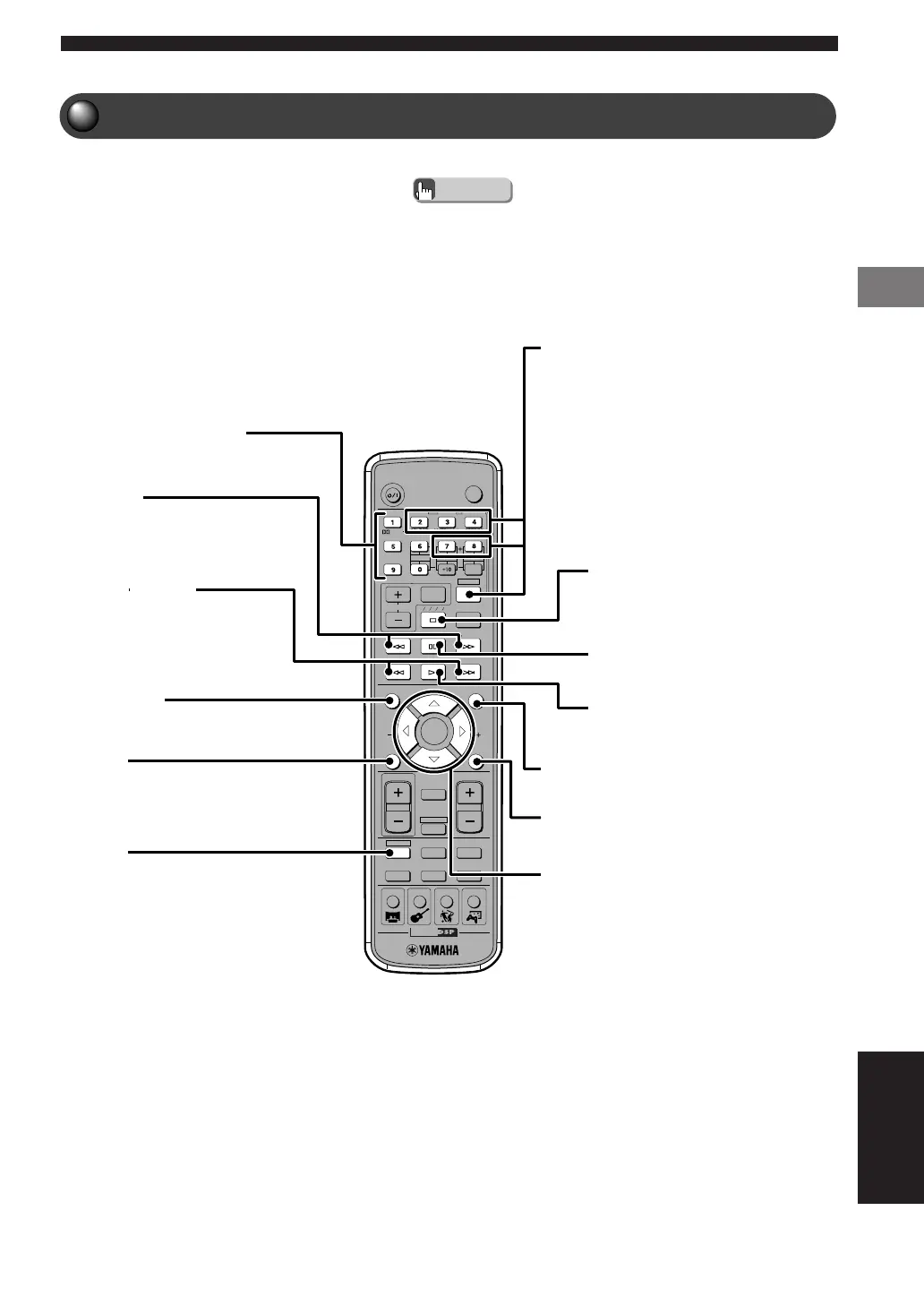
DVD/CD Mode Button Names and Functions
Press DVD/CD before starting operations.
• The green color on the Remote Control indicates DVD/CD mode.
Advice
TV
CH
CINEMA
CH
POWER
POWER
AUDIO
/
DTS
SELECT
NIGHT
SW
TV CH
TV INPUT
SLEEP
PRESET PRESET
A B C D E
CENTER
SURR
SHIFT
STEREOMATRIX 6.1
A-B
REPEAT
ANGLE
SUBTITLE
DVR-S200 WB56620
ON SCREEN MENU
TEST
RETURN
S TATU S
TV VOL
VOLUME
MUTE
AMP
DVD/CD
VCR
VIDEO 1
VIDEO 2TUNERMD/CD-R
MOVIE MUSIC SPORTS GAME
SET MENU
ENTER
STATUS
Shows type of disc, play/stop status, playing time
and other info.
DVD/CD
Puts the Remote Control in DVD/CD mode.
While holding down SHIFT, press one of the
following buttons to enable the corresponding
operation.
7→REPEAT: Enables Repeat Play.
8→A–B: Enables settings for A-B Repeat.
2→AUDIO: Switches the audio language of
the DVD video.
3→ANGLE: Switches the angle of the DVD
video.
4→SUBTITLE: Switches the subtitle
language of the DVD video.
s (Stop)
Stops disc playback.
e (Pause)
Pauses disc playback.
h (Play)
Starts disc playback.
MENU
Shows the Disc Menu on the TV.
RETURN
Returns the Disc Menu to one position before the
current screen.
h, g, q, w/ENTER
Adjusts On Screen Menu and other settings.
Number buttons (1-9, 0)
Input numerals for track numbers and others.
w, f
Fast forwards and reverses.
b, a (Skip)
Moves to the start of a disc track.
ON SCREEN
Shows the On Screen Menu on the TV.
(See pages 24 and 93.)
English
006DVX-S200-en 03.10.24, 0:32 PM23





 To Next Page