INSTRUMENT AND CONTROL FUNCTIONS
3-12
3
Select the transmission gear that
is appropriate for the vehicle
speed.
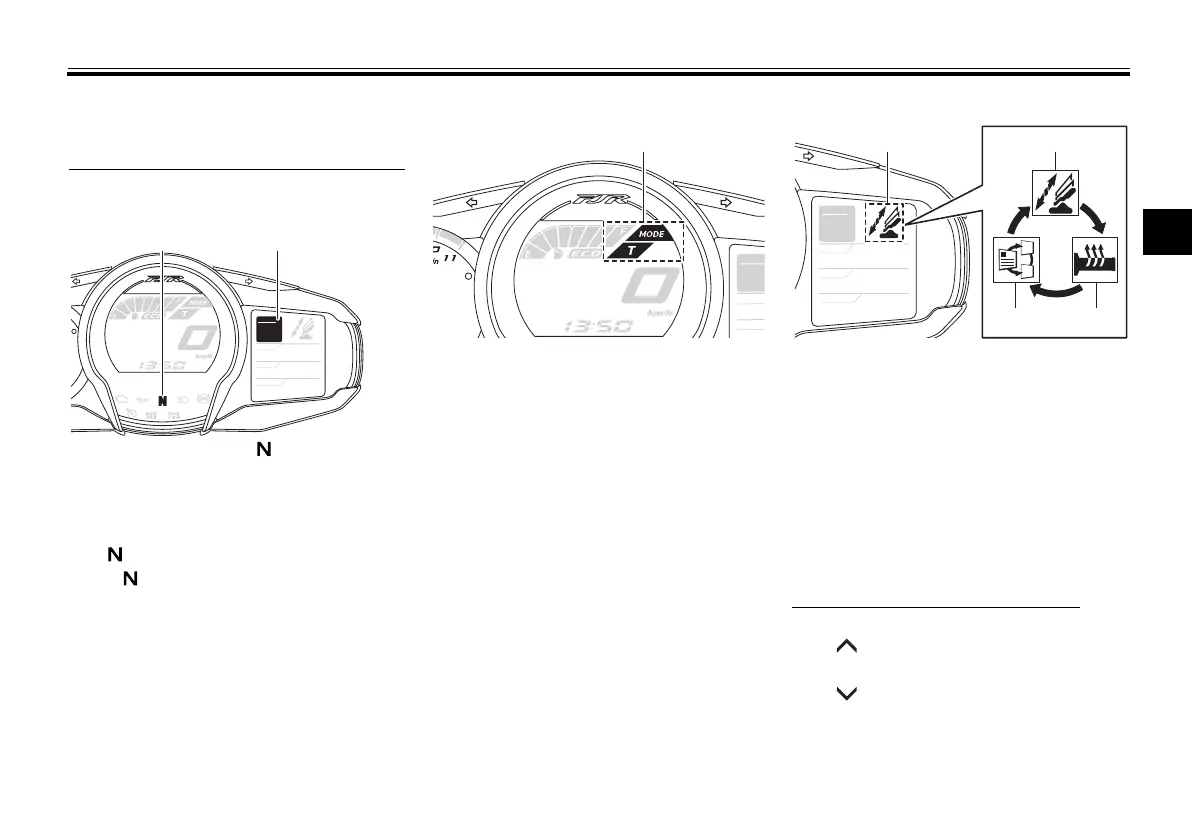
Transmission gear display
This display shows the selected gear.
The neutral position is indicated
by “ ” and by the neutral indicator
light “ ”.
Drive mode display
This display indicates which drive
mode has been selected: Touring
mode “T” or sports mode “S”. For
more details on the modes and on how
to select them, see pages 3-23 and
3-25.
Function display
Push the menu switch “MENU” to
switch the display between the wind-
shield adjusting function, grip warmer
adjusting function, and information
display selection function.
Adjusting the windshield position
To move the windshield up, push
the “ ” side of the select switch. To
move the windshield down, push
the “ ” side of the select switch.
1. Neutral indicator light “ ”
2. Transmission gear display
GEAR
N
25
A.TEMP ˚C
Lo
C.TEMP ˚C
0:06
TIME TRIP
1. Drive mode display
GEAR
A.TEM
C.TEM
1. Function display
2. Windshield adjusting function
3. Grip warmer adjusting function
4. Information display selection function
GEAR
N
25
A.TEMP ˚C
Lo
C.TEMP ˚C
0:06
TIME TRIP
U1MCE2E0.book Page 12 Monday, June 16, 2014 8:57 AM




 To Next Page