INSTRUMENT AND CONTROL FUNCTIONS
3-13
3
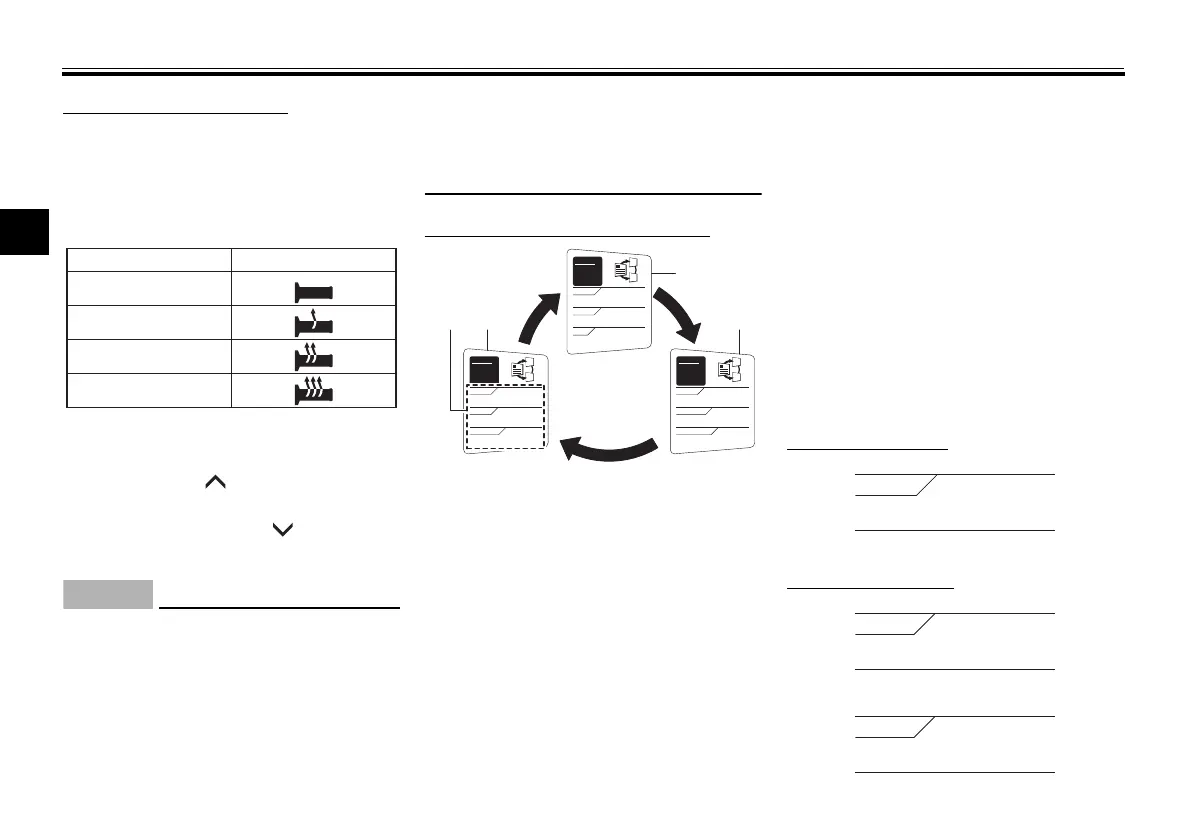
Adjusting the grip warmer
This vehicle is equipped with grip
warmers, which can only be used
when the engine is running. There are 4
grip warmer settings.
To increase the grip warmer tempera-
ture, push the “ ” side of the select
switch. To decrease the grip warmer
temperature, push the “ ” side of the
select switch.
ECA17931
Be sure to wear gloves when
using the grip warmers.
If the ambient temperature is 20
°C (68 °F) or higher, do not set
the grip warmer to the high set-
ting.
If the handlebar grip or throttle
grip becomes worn or dam-
aged, stop using the grip warm-
ers and replace the grips.
Selecting the information display
There are 3 information displays. The
selected information display can be
switched by pushing the select switch.
The following items are shown in the
information displays:
an odometer display
tripmeter displays
a fuel reserve tripmeter display
an estimated traveling range dis-
play
an elapsed time display
an ambient temperature display
a coolant temperature display
an average fuel consumption dis-
play
an instantaneous fuel consump-
tion display
The items shown in each information
display can be selected.
To set or select the items shown, see
page 3-16.
Odometer display:
Tripmeter displays:
Off
Low
Middle
DisplaySetting
High
1. Information display
2. Display–1
3. Display–2
4. Display–3
GEAR
N
5.0
TRIP-1 km
7.0
TRIP-2 km
km
20
ODO
GEAR
N
11
RANGE km
12.3
FUEL AVG km/L
km/L
12.3
CRNT FUEL
GEAR
N
25
A.TEMP ˚C
Lo
C.TEMP ˚C
0:06
TIME TRIP
U1MCE2E0.book Page 13 Monday, June 16, 2014 8:57 AM




 To Next Page