INSTRUMENT AND CONTROL FUNCTIONS
3-20
3
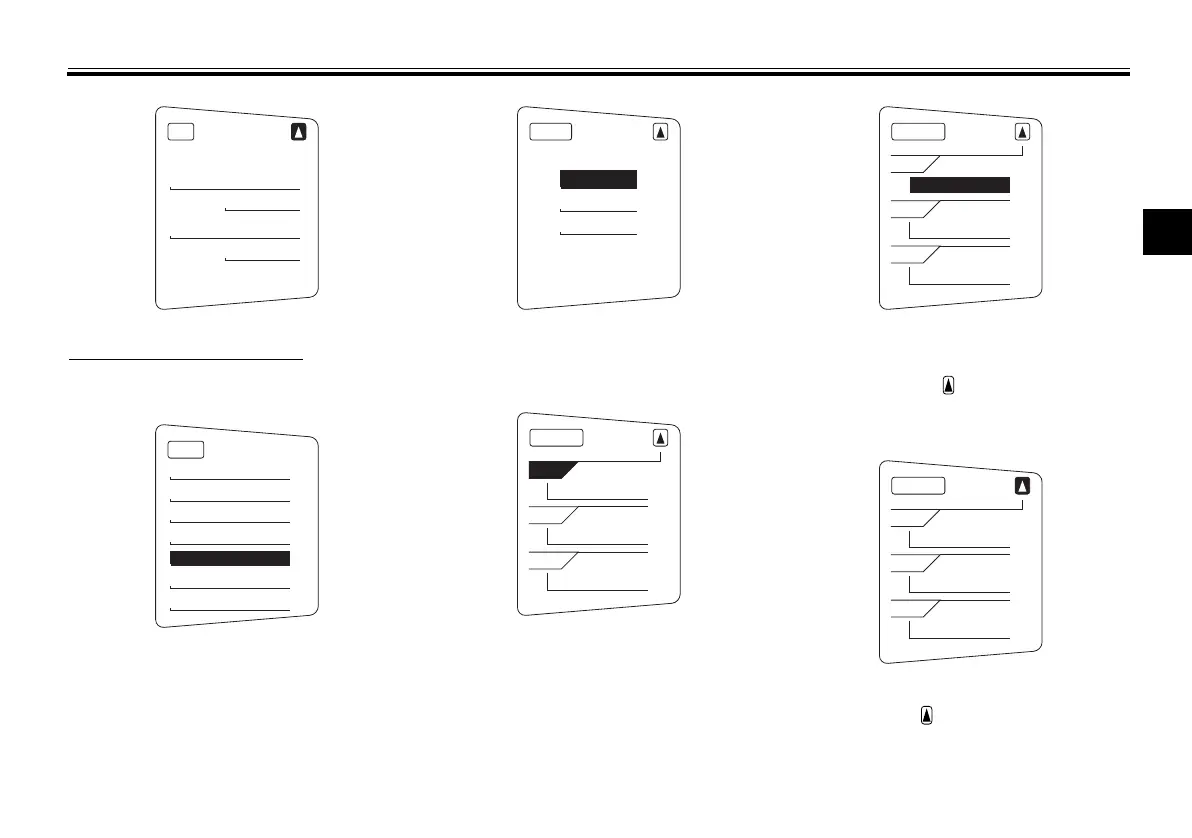
Selecting the display items
1. Use the select switch to highlight
“Display”.
2. Push the menu switch “MENU”,
use the select switch to highlight
the display to change, and then
push the menu switch “MENU”
again.
3. Use the select switch to highlight
the item to change, and then push
the menu switch “MENU”.
4. Use the select switch to select the
item to show, and then push the
menu switch “MENU”.
5. When you are finished changing
the settings, use the select switch
to highlight “ ”, and then push the
menu switch “MENU” to return to
the previous display.
6. Use the select switch to
highlight “ ”, and then push the
menu switch “MENU” to return to
the setting mode menu.
Unit
km or mile
km
km/L or L/100km
km/L
MENU
Grip Warmer
Maintenance
Time Trip
Unit
Display
Brightness
Clock
Display
Display-1
Display-2
Display-3
Display-1
1-1
A.TEMP
1-2
C.TEMP
1-3
TIME TRIP
Display-1
1-1
ODO
1-2
C.TEMP
1-3
TIME TRIP
Display-1
1-1
ODO
1-2
C.TEMP
1-3
TIME TRIP
U1MCE2E0.book Page 20 Monday, June 16, 2014 8:57 AM




 To Next Page