INSTRUMENT AND CONTROL FUNCTIONS
3-21
3
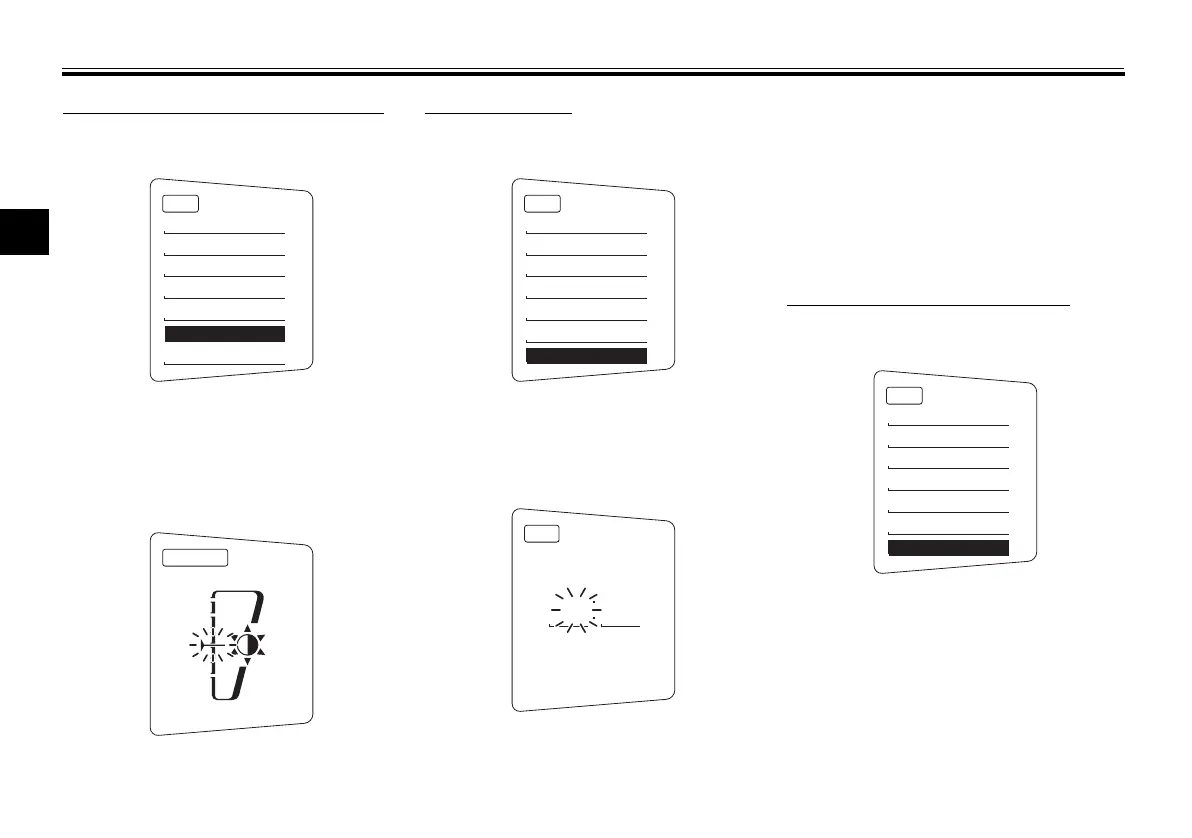
Adjusting the meter panel brightness
1. Use the select switch to highlight
“Brightness”.
2. Push the menu switch “MENU”.
3. Use the select switch to select the
desired brightness level, and then
push the menu switch “MENU” to
return to the setting mode menu.
Setting the clock
1. Use the select switch to highlight
“Clock”.
2. Push the menu switch “MENU”.
3. When the hour digits start flash-
ing, use the select switch to set
the hours.
4. Push the menu switch “MENU”,
and the minute digits start flash-
ing.
5. Use the select switch to set the
minutes.
6. Push the menu switch “MENU” to
return to the setting mode menu.
Resetting all of the display items
1. Use the select switch to highlight
“All Reset”.
2. Push the menu switch “MENU”.
3. Use the select switch to highlight
“YES”, and then push the menu
switch “MENU”.
MENU
Grip Warmer
Maintenance
Time Trip
Unit
Display
Brightness
Clock
Brightness
MENU
Grip Warmer
Maintenance
Time Trip
Unit
Display
Brightness
Clock
Clock
5 55
MENU
Maintenance
Time Trip
Unit
Display
Brightness
Clock
All Reset
U1MCE2E0.book Page 21 Monday, June 16, 2014 8:57 AM




 To Next Page