16
Normal Mode
How to Edit Memory
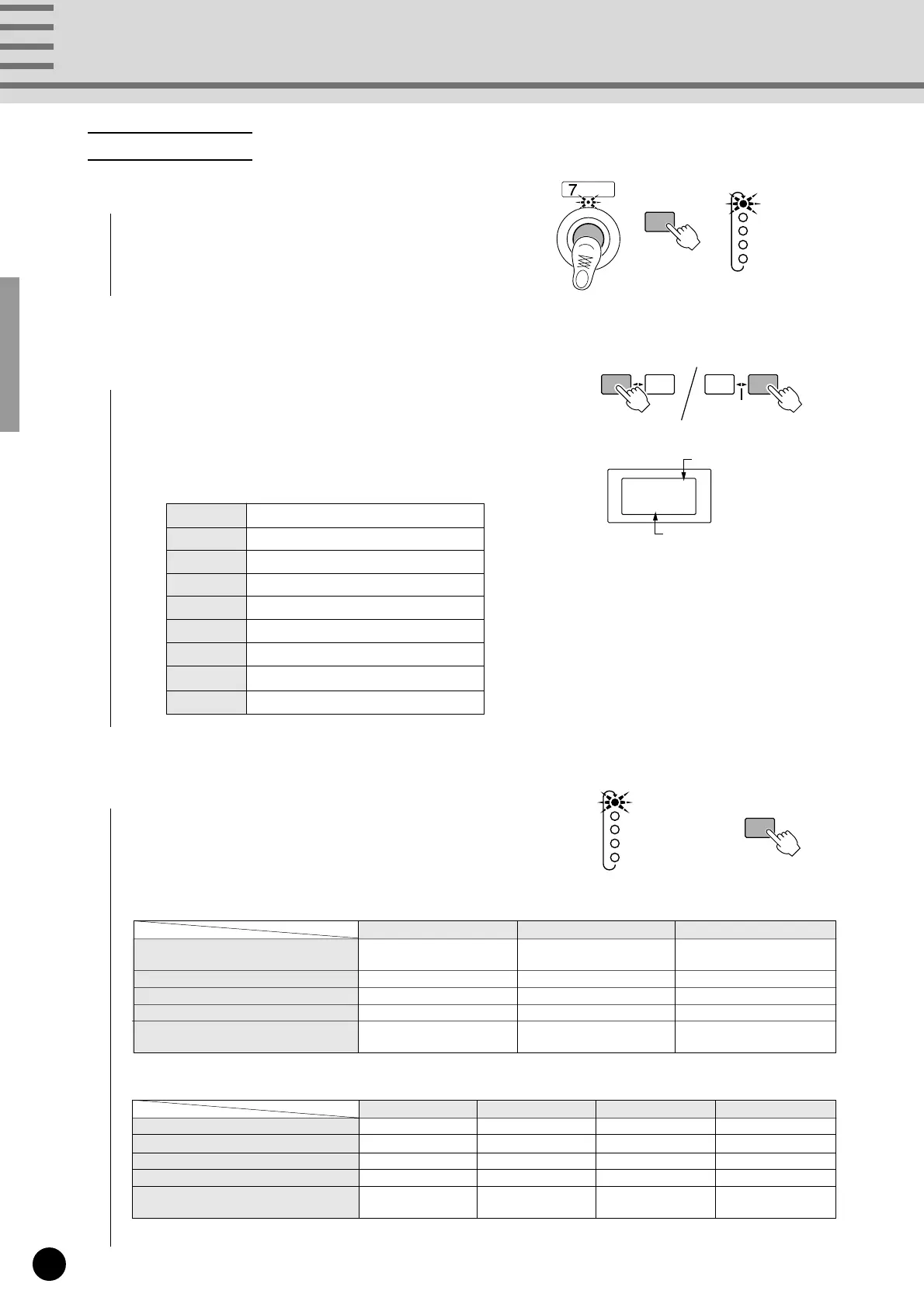
1
Select the Function Memory to be edited, press [MEMORY
EDIT], to begin editing that memory number. (The lamp above
the foot switch and the STATUS lamp will flash.)
2
Press [INC/YES] and [DEC/NO] to select the Status (transmit
MIDI data and MIDI channel number) (the STATUS lamp will
flash).
The 1's digit (MIDI channel number 1-16) of Status is shown in
hexadecimal. (see page 10)
3
Press [MEMORY EDIT] to select the parameters set in the
procedures above for editing (the lamp will flash).
Song Select Start Continue Stop
STATUS F3 FA Fb FC
DATA/CTRL 0-127 –– –
BANK MSB/MAX ––– –
BANK LSB/MIN ––– –
TOGGLE ON-OFF
––– –
/NUMBER OF PGM
Note On/Note Off Control Change Program Change
STATUS
90-9F b0-bF C0-CF
(0-F indicates MIDI channel numbers)
DATA/CTRL Note Number Control Number Program Number
BANK MSB/MAX Note On Velocity Switch On Data Bank MSB
BANK LSB/MIN Note Off Velocity Switch Off Data Bank LSB
TOGGLE ON-OFF
Pn1-Pn4
Toggle On/Off
Pn1-Pn4
/NUMBER OF PGM Pn1-Pn4
90...9F Transmit Note On/Off
b0...bF Transmit Control Change
CO...CF Transmit Program Change
F3 Transmit Song Select
FA Transmit Start
Fb Transmit Continue
FC Transmit Stop
FO Transmit Section Control
Ft Transmit Tempo Control
MEMORY
EDIT
MEMORY
EDIT
MIDI data
Channel number
90
STATUS
DATA/CTRL
BANK MSB/MAX
BANK LSB/MIN
TOGGLE ON-OFF
/NUMBER OF PGM
STATUS
DATA/CTRL
BANK MSB/MAX
BANK LSB/MIN
TOGGLE ON-OFF
/NUMBER OF PGM
DEC
/NO
INC
/YES
±10
DEC
/NO
INC
/YES
±10


 To Next Page