26 PSR-E323/YPT-320 Owner’s Manual
Reference
Basic Operation and Displays
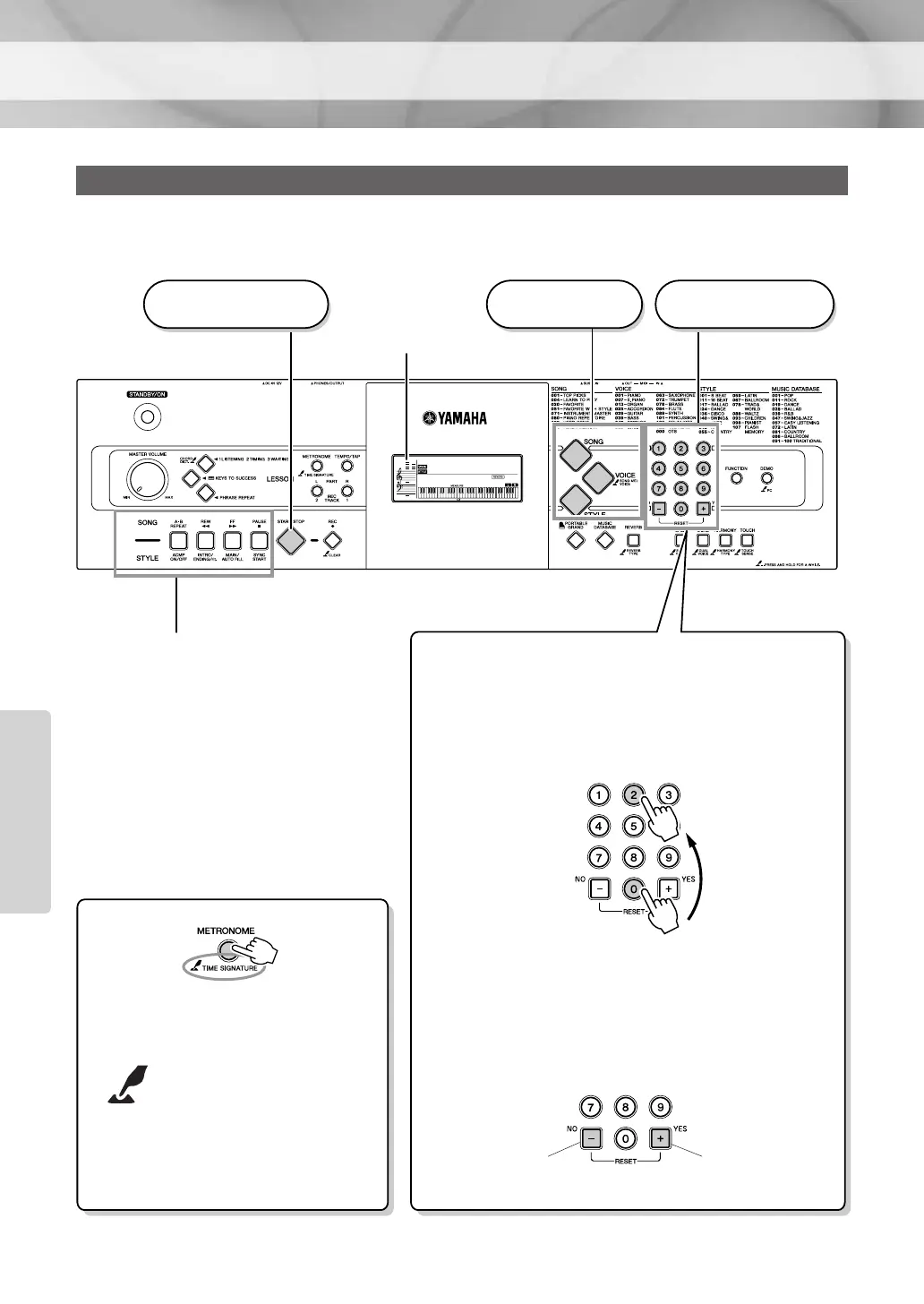
Press a button to select a basic function: Voice, Song or Style.
Basic Operation
GrandPno
001
001
3 Start a function.
1 Select a basic
function.
2 Select an item or
value.
Display
(page 27)
● The “Press & Hold” Symbol
Buttons having this indica-
tion can be used to call up
an alternate function when
the relevant button is
pressed and held.
Hold down this button
until the function calls up.
Press the [SONG] button to access the
SONG functions (printed above the
buttons), and press the [STYLE] but-
ton to access the STYLE functions
(printed below).
● Number buttons [0]–[9]
The number buttons can be used to directly enter a
Song, Style or Voice number or parameter value.
For numbers that start with one or two zeroes, the first
zeroes can be omitted.
● [+], [-] buttons
Press the [+] button briefly to increase the value by 1,
or press the [-] button briefly to decrease the value by 1.
Press and hold either button to continuously increase or
decrease the value in the corresponding direction.
Press number but-
tons [0], [0], [2].
Example:
Selecting Voice 002,
Bright Piano.
Press briefly to
decrease.
Press briefly to
increase.
Reference















 To Next Page