Panel Controls and Terminals
PSR-E463/PSR-EW410 Owner’s Manual
13
Setting Up
q [ ] (Standby/On) switch .................... page 16
w [MASTER VOLUME] control ................. page 16
e [QUICK SAMPLING] button .................. page 20
r [DEMO] button....................................... page 28
t [TRANSPOSE] button ........................... page 51
y [MELODY SUPPRESSOR] button......... page 46
u [AUDIO] button ...................................... page 41
i [REC] button.......................................... page 38
o [METRONOME] button.......................... page 21
!0 [TEMPO/TAP] button............................. page 61
!1 VOICE CONTROL section
[SPLIT] button.................................... page 21
[DUAL] button .................................... page 20
[HARMONY/ARPEGGIO] button ....... page 22
[DSP] button....................................... page 24
!2 LIVE CONTROL section
[KNOB ASSIGN] button..................... page 25
[A] and [B] knobs .............................. page 25
[TARGET] button ....................... pages 24, 25
!3 CATEGORY buttons .............................. page 18
!4 [FUNCTION] button ............................... page 66
!5 [PORTABLE GRAND] button................ page 20
!6 Number buttons [1]–[9], [-/NO],
[0/EXECUTE] and [+/YES] buttons ...... page 18
!7 REGISTRATION MEMORY buttons
[BANK/MEMORY] buttons................. page 44
[1]–[4] buttons.................................... page 44
!8 [VOICE] button ...................................... page 20
!9 [STYLE] button...................................... page 26
@0 [SONG] button....................................... page 28
@1 [GROOVE CREATOR] button................ page 30
@2 GROOVE CREATOR/SONG/STYLE Control
buttons
• When the [GROOVE CREATOR] lamp is on:
.................................. pages 30 and 61
• When the [SONG/AUDIO] lamp is on:
................................................ page 28
• When the [STYLE] lamp is on:
........................... pages 26, 59, and 60
@
3 TR
ACK CONTROL buttons
• When the [GR
OOVE CREATOR] lamp is on:
................................................ page 30
• When the [SONG/AUDIO] lamp is on:
........................................ pages 29, 38
• When the [STYLE] lamp is on:
................................................ page 60
@4 [PITCH BEND] wheel ............................ page 51
@5 Drum illustrations for the Drum Kit..... page 20
These indicate the drum or percussion instrument
assigned to the corresponding keys (in the case of “Stan-
dard Kit 1,” shown in the Drum/SFX Kit List of the online
material Data List).
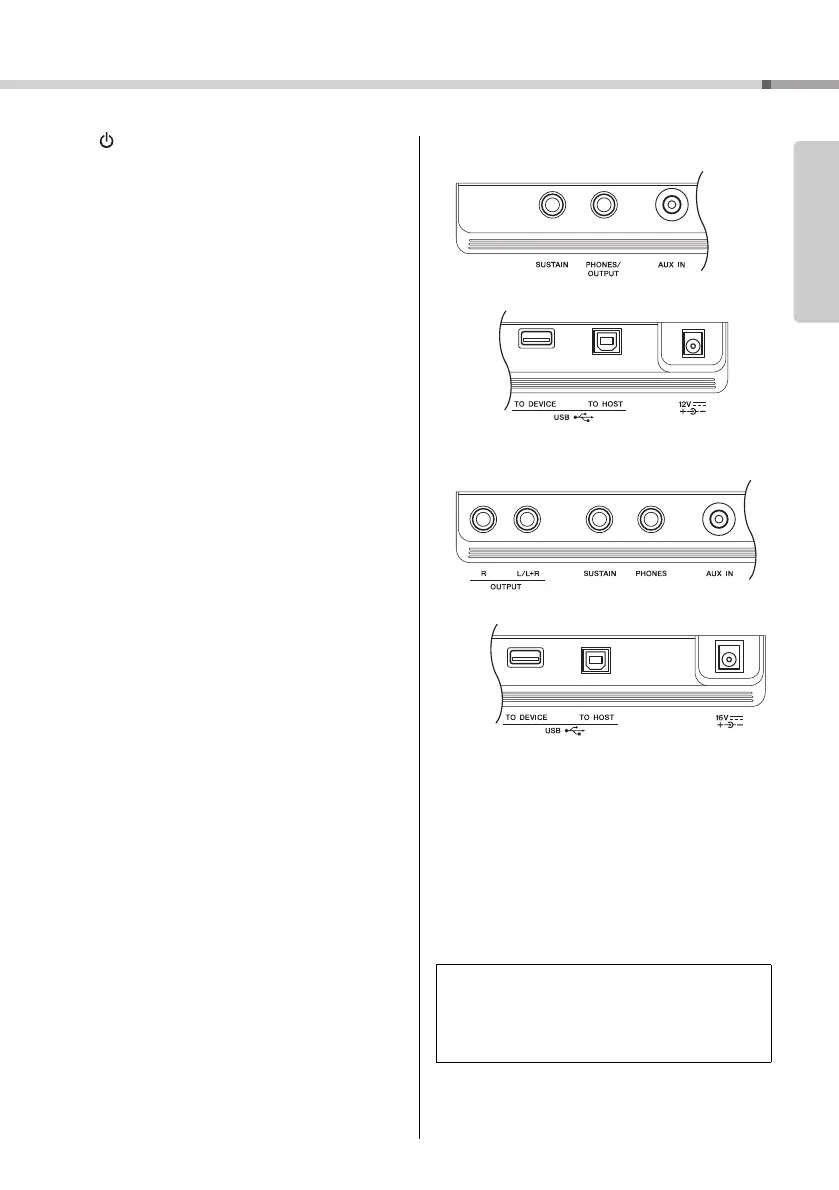
Rear Panel
@6 OUTPUT [L/L+R]/[R] jacks (PSR-EW410)
................................................ page 48
@7 [SUSTAIN] jack...................................... page 45
@8 [PHONES/OUTPUT] jack (PSR-E463),
[PHONES] jack (PSR-EW410) .............. page 45
@9 [AUX IN] jack ......................................... page 46
#0 [USB TO DEVICE] terminal .................. page 70
[USB TO HOST] terminal...................... page 47
#1 DC IN jack...............................................page 14
Panel Setup (Panel Settings)
By using the controls on the panel, you can make vari-
ous settings as described here. These settings of the
instrument are together referred to as “panel setup” or
“panel settings” in this manual.
@7 @8 @9
#0 #1
@7@6 @8 @9
#0 #1















 To Next Page