En 3
Connecting speaker cables
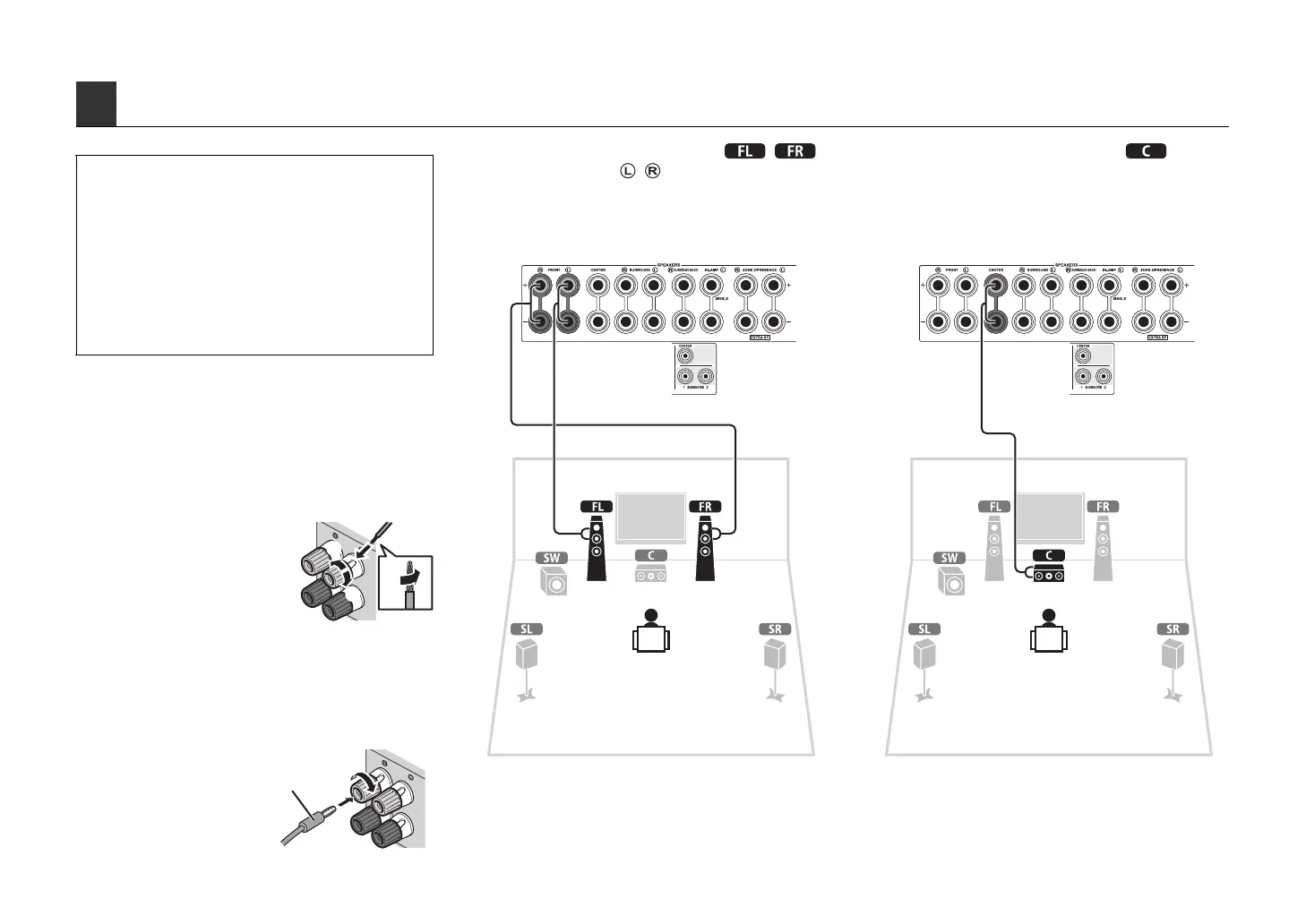
Speaker cables have two wires. One is for connecting
the negative (-) terminal of the unit and the speaker, and
the other is for the positive (+) terminal. If the wires are
colored to prevent confusion, connect the black wire to
the negative and the other wire to the positive.
a
Remove approximately
10 mm (3/8”) of
insulation from the ends
of the speaker cable,
and twist the bare wires
of the cable together
firmly.
b Loosen the speaker terminal.
c Insert the bare wires of the cable into the gap on the
side (upper right or bottom left) of the terminal.
d Tighten the terminal.
Using a banana plug
a Tighten the speaker
terminal.
b Insert a banana plug into
the end of the terminal.
1
Connect the front speakers ( / )
to the FRONT ( / ) terminals.
2
Connect the center speaker ( ) to the
CENTER terminal.
3 Connecting the speakers/subwoofer
• This unit is configured for 8-ohm speakers at the factory. When
connecting 6-ohm speakers, set the speaker impedance of this
unit to “6 Ω MIN”. For details, see “Setting the speaker
impedance” (p.16) in “Owner’s Manual”.
• Use a subwoofer equipped with built-in amplifier.
• Remove the power cable of this unit from an AC wall outlet and
turn off the subwoofer before connecting the speakers.
• Be careful that the core of the speaker cable does not touch
anything or come into contact with the metal areas of this unit.
This may damage this unit or the speakers. If the speaker
cables short circuit, “CHECK SP WIRES” will appear on the
front display when this unit is turned on.
aa
b
b
c
c
d
d
– (black)
+ (red)
aa
b
b
Banana plug
This unit (rear) This unit (rear)



 To Next Page