Connecting to a TV and to power
Connecting to a TV compatible with ARC
(
Before connecting devices, be sure to read the following precautions.
(
“Precautions for preparation”(p.18)
Connect to the TV using the included HDMI cable that is compatible with ARC.
The HDMI cable transmits the TV’s audio signal and the control signal for controlling the sound bar using the
TV’s remote control.
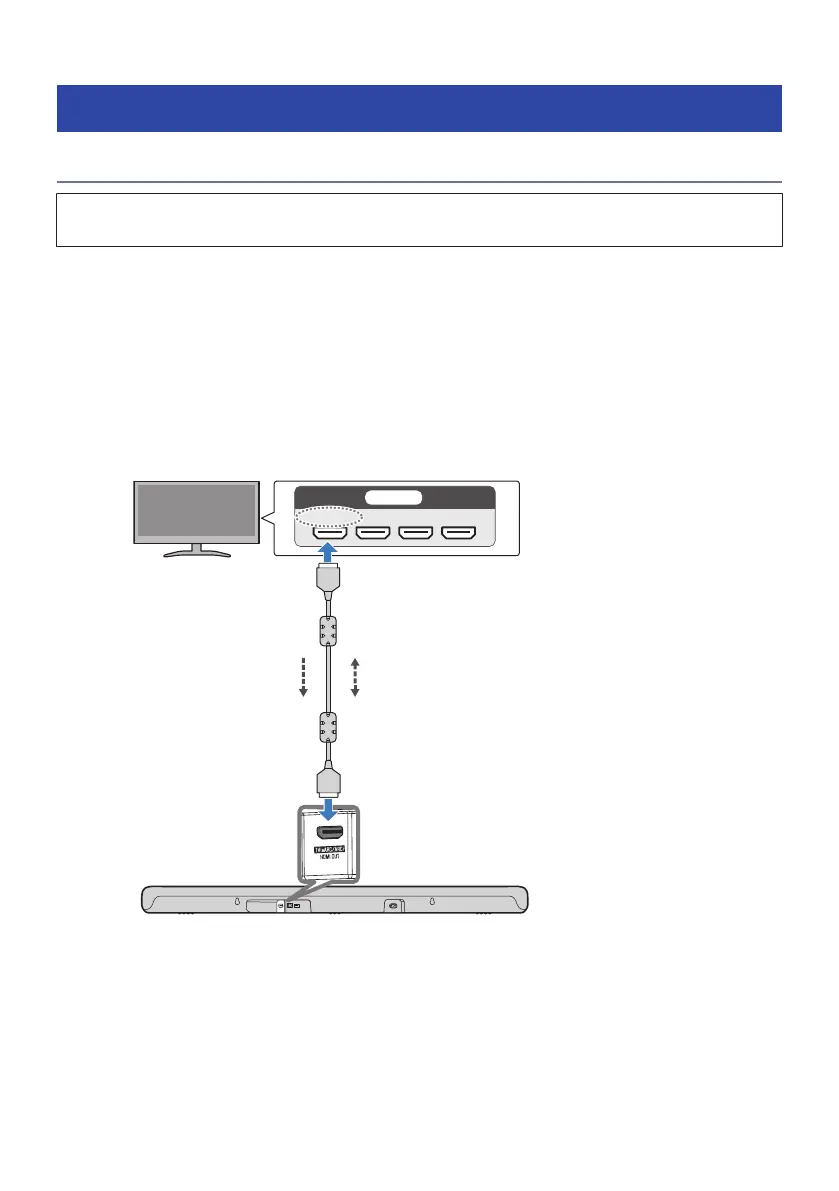
1 Connect the sound bar to a TV.
Connect the HDMI cable to the HDMI input jack compatible with Audio Return Channel
(labeled as “eARC” or “ARC”) on the TV.
HDMI OUT/TV (eARC/ARC) jack
Sound bar (rear)
TV HDMI input jack (compatible with eARC/ARC)
TV’s audio signal Control signal
23
PREPARATION FOR USE > Connecting to a TV and to power



 To Next Page