CHANGING AND INITIALIZING THE SETTINGS
Showing the type of audio signal and settings for
functions
The type of audio signal being played and settings for the sound bar’s functions can be checked.
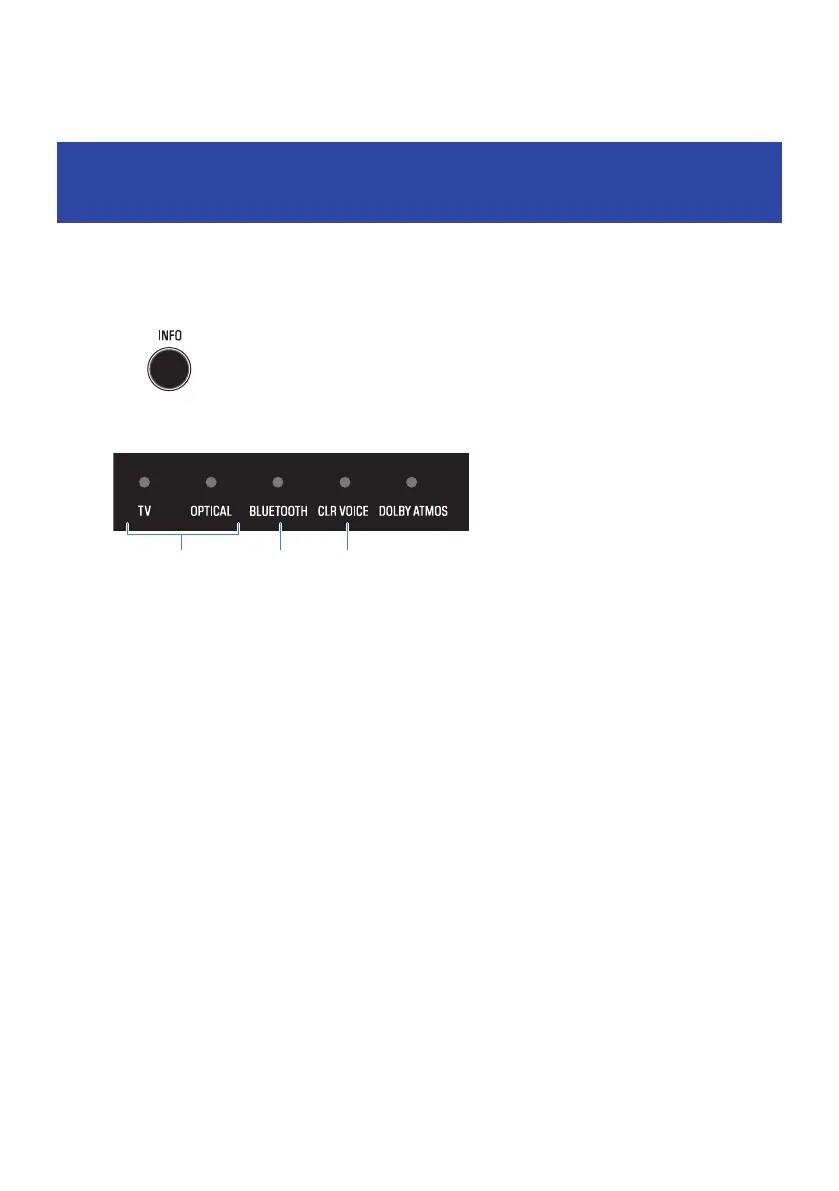
1 Press INFO button.
The indicators on the sound bar will show the following information on the type of audio
signal and the settings for functions for three seconds immediately after INFO is pressed.
a
Type of audio signal
TV glows red: Dolby Atmos
TV glows white: Dolby Audio (Dolby Digital, Dolby Digital Plus, Dolby TrueHD)
OPTICAL glows white: AAC
TV and OPTICAL off: PCM, other signal, or no input signal
b
Whether surround playback is enabled or disabled
Glows: Enabled
Off: Disabled (stereo playback)
c
Whether the Bass Extension function is enabled or disabled
Glows: Enabled
Off: Disabled
46
CHANGING AND INITIALIZING THE SETTINGS > Showing the type of audio signal and settings for functions



 To Next Page