4-4
still does not operate, check the
vehicle battery and then have a
Yamaha dealer check the vehicle.
t If the smart key continually re-
ceives radio waves, the smart key
battery will discharge quickly. (For
example, when placed in the vicin-
ity of electrical products such as
televisions, radios, or computers.)
t You can register up to six smart
keys for the same vehicle. See a
Yamaha dealer regarding spare
smart keys.
t If a smart key is lost, contact a
Yamaha dealer immediately to
prevent the vehicle from being
stolen, etc.
t ,FFQUIFTNBSULFZ BXBZ GSPN
TUSPOH NBHOFUJD ãFMET BOE
NBHOFUJD PCKFDUT TVDI BT LFZ
IPME
FST57TBOEDPNQVUFST
t ,FFQUIFTNBSULFZ BXBZ GSPN
FMFDUSJDNFEJDBMFRVJQNFOU
t %P OPU BMMPX PJMT QPMJTIJOH
BHFOUT GVFM PS BOZ TUSPOH
DIFNJDBMT UP DPNF JO DPOUBDU
XJUI UIF TNBSU LFZ 5IF TNBSU
LFZ CPEZ NBZ CFDPNF EJTDPM
PSFEPSDSBDLFE
5*1
t The smart key battery life is ap-
proximately two years, but this
may vary according to operating
conditions.
t Replace the smart key battery
when the smart key system indi-
cator light ashes for 20 seconds
when the vehicle is turned on, or
when the smart key indicator light
does not come on when the smart
key button is pushed. (See page
4-6.) After changing the smart key
battery, if the smart key system
EAU76470
4NBSULFZ
5PUVSOUIFTNBSULFZPOPSPGG
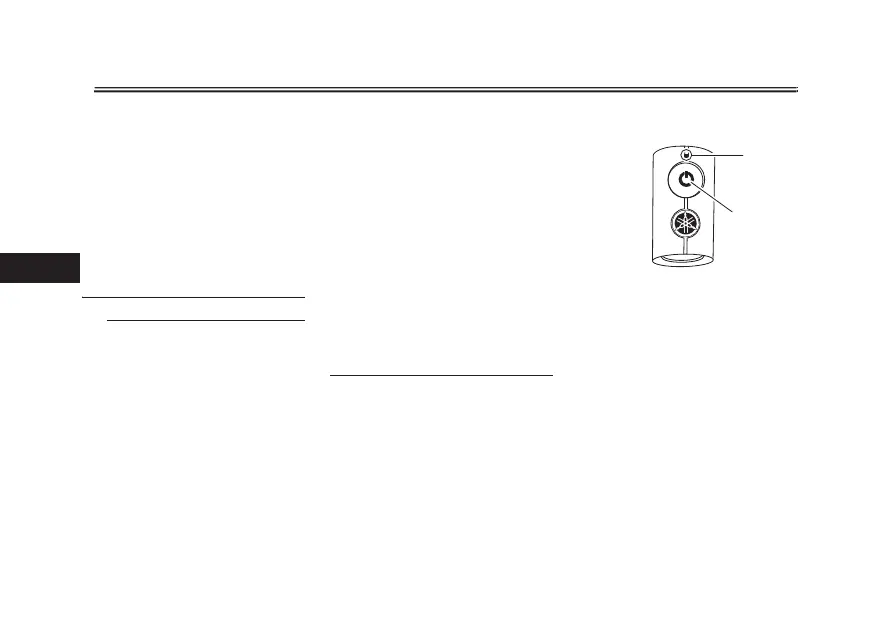
Push and hold the smart key button for
approx
imately 1 second to turn the
smart key on or off. When the smart
key is turned off, the vehicle cannot be
operated even if the smart key is within
operating range. To operate the vehi-
cle, turn the smart key on and bring it
within operating range. (See 0QFSBU
JOHSBOHFPGUIFTNBSULFZTZTUFN.)
1. Smart key indicator light
2. Smart key button
1
2
4NBSULFZTZTUFN



 To Next Page