*OTUSVNFOUBOEDPOUSPMGVODUJPOT
5-4
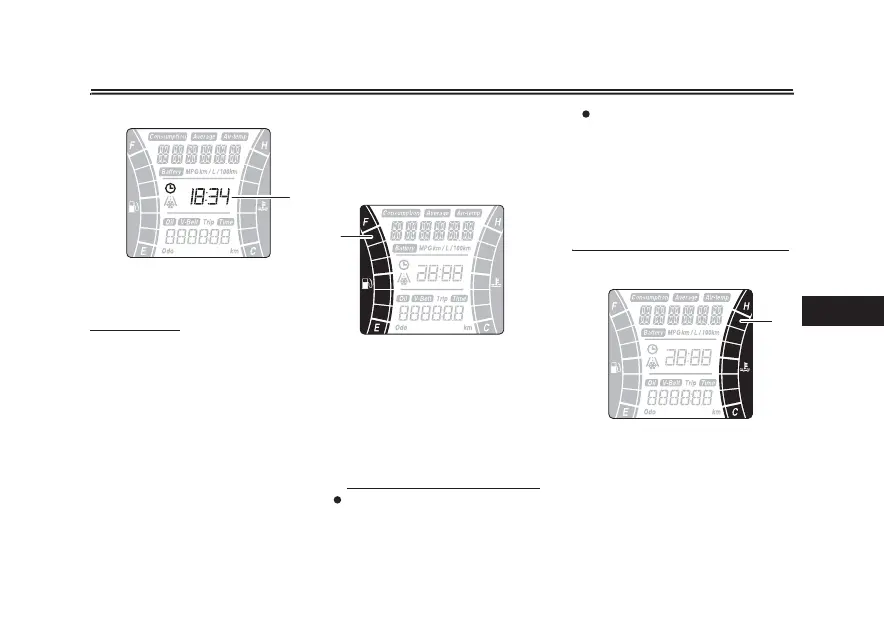
$MPDL
The clock uses a 24-hour time system.
To set the clock
1. Turn the main switch to “OFF”.
2. Push and hold the “TRIP” switch.
3. Turn the main switch to “ON”
while pushing the “TRIP” switch,
and then continue to push the
“TRIP” switch for eight seconds.
The hour digits will start ashing.
4. Use the “TRIP” switch to set the
hours.
5. Push the “TRIP” switch for three
seconds, and then release it. The
minute digits will start ashing.
6. Use the “TRIP” switch to set the
minutes.
7. Push the “TRIP” switch for three
seconds, and then release it to
start the clock.
'VFMNFUFS
The
fuel meter indicates the amount of
fuel in the fuel tank. The segments of
the fuel meter disappear from “F” (full)
towards “E” (empty) as the fuel level
decreases. When the last segment of
the fuel meter starts ashing, refuel as
soon as possible.
5*1
If a problem is detected in the fuel
meter, the all segments will ash
repeatedly. If this occurs, have a
Yamaha dealer check the vehicle.
1. Clock
1
1. Fuel meter
1
When approximately 2.4 L (0.63
US gal, 0.53 Imp.gal) of fuel re-
mains in the fuel tank, the last seg-
ment of the fuel meter will start
ashing. The display will automat-
ically change to the fuel reserve
tripmeter “F Trip” and start count-
ing the distance traveled from that
point.
$PPMBOUUFNQFSBUVSFNFUFS
The coolant temperature meter indi-
cates the temperature of the coolant.
If the top segment ashes, stop the ve-
hicle, then stop the engine, and let the
engine cool.
1. Coolant temperature meter
1



 To Next Page