*OTUSVNFOUBOEDPOUSPMGVODUJPOT
5-5
NOTICE
ECA10022
%POPUDPOUJOVFUPPQFSBUFUIFFO
HJOFJGJUJTPWFSIFBUJOH
5*1
If a problem is detected in the
coolant temperature meter, all
segments will ash repeatedly. If
this occurs, have a Yamaha dealer
check the vehicle as soon as pos-
sible.
The coolant temperature varies
with changes in the weather and
engine load.
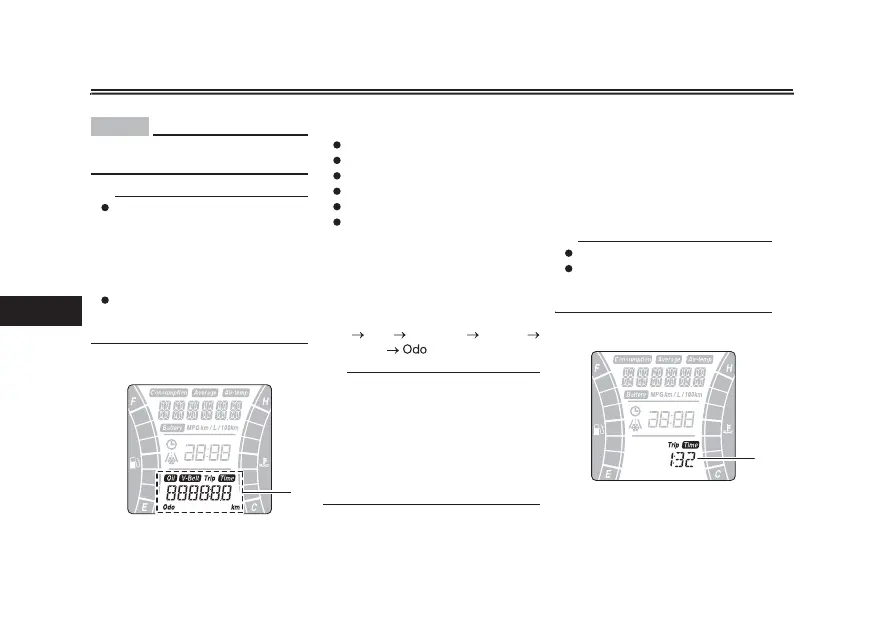
5SJQNFUFSEJTQMBZ
The tripmeter display is equipped with
the following:
odometer
tripmeter
time tripmeter
fuel reserve tripmeter
oil change tripmeter
V-belt replacement tripmeter
Push the “TRIP” switch to change the
display between the odometer “Odo”,
tripmeter “Trip”, time tripmeter “Trip
Time”, oil change tripmeter “Oil Trip”,
and V-belt replacement tripmeter “V-
Belt Trip” in the following order:
Odo
Trip Trip Time Oil Trip
V-Belt Trip
5*1
When approximately 2.4 L (0.63 US
gal, 0.53 Imp.gal) of fuel remains in the
fuel tank, the last segment of the fuel
meter will start ashing. The display
will automatically change to the fuel re-
serve tripmeter “F Trip” and start
counting the distance traveled from
that point.
1. Tripmeter display
1
0EPNFUFS i0EPw BOE USJQNFUFS
i5SJQw
The odometer shows the total distance
traveled by the vehicle.
The tripmeter shows the distance trav-
eled since it was last reset.
To reset the tripmeter, select it by
pushing the “TRIP” switch, and then
push the “TRIP” switch for three sec-
onds.
5*1
The odometer will lock at 999999.
The tripmeter will reset and conti-
nue counting after 9999.9 is
reached.
5JNFUSJQNFUFSi5JNFw
The time tripmeter displays the time
that has elapsed while the main switch
was in the “ON” position since it was
last reset.
1. Time tripmeter
1



 To Next Page