3-2. Taking Measurements
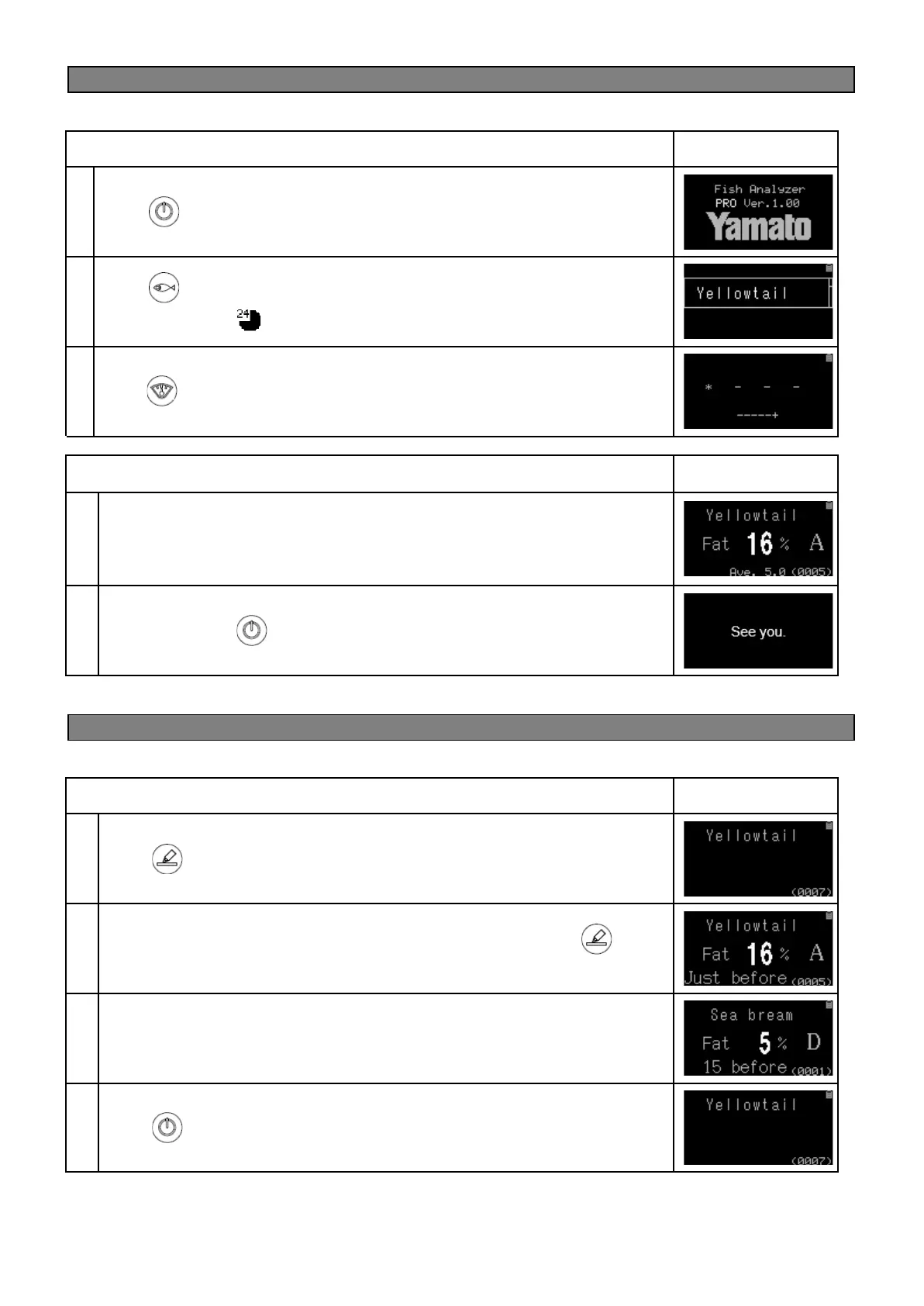
As an example, let’s measure Yellowtail fish
Press key to select “Yellowtail”.
Choose ”Yellowtail ”. (day of the catch, within 24 hours)
Go back to the home screen and place the sensor electrode onto the fish and
press key to measure.
During measurement, the “*” symbol moves to indicate the device is measuring.
When the measurement is finished, the fish fat percentage is displayed. When
the average value display function is enabled, the average value is displayed at
the bottom center of the screen (displayed to one decimal place).
Fish Analyzer
TM
PRO, it displays the “status of the fish” or the fish freshness in 5
levels/grades.
Long press on the key to turn off the device when finished.
3-3. See results from past measurements
● How to find past measurement results
Press key from the home screen.
Each of the past measurement results are displayed when the key is
pressed.
Note: Up to 50 past measurement results are stored.
The number of measurements is displayed up to 9999 times on the lower right of
the screen and returns to 0 after 9999 times.
Press key to return to the home screen.


 To Next Page