4-2. Energy saving mode for longer battery life
Settings for saving energy
Automatically turn off the power after a set time.
The screen display turns off automatically after a set time has passed. When the screen
display is off, press any key turn it back on to the previously displayed screen. (The
power will be turned off if the Auto Off 1 is selected)
Choose the display brightness level from “Saving energy”, “Normal” or “Bright” mode.
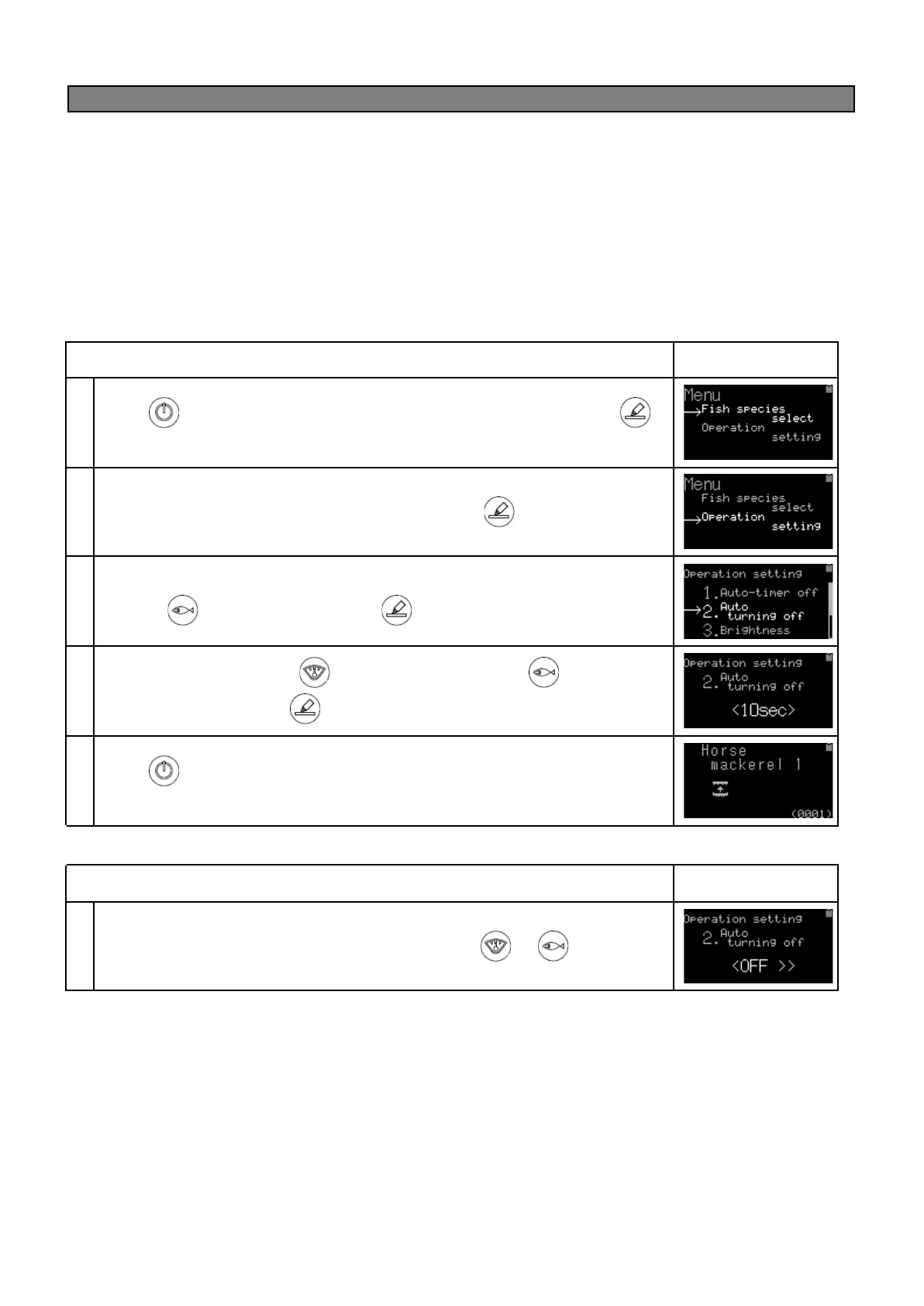
(ex)If you want to turn off the display after 10 seconds of use. (set Auto off 2 at 10 seconds).
Press key to power on the device. From the home screen, hold down
key until Menu is displayed.
Match a cursor(→)to Operation setting and then press key.
When the operation settings are displayed, move the cursor(→)to 2. Auto off 2 by
pressing key twice and then press key.
Set 10 seconds by pressing (for decreasing)or pressing (for
increasing)and then press key.
Press key under operation setting screen to return to the home screen.
Then the setting is completed.
● Cancelling the setting for Auto off 1 or Auto off 2
Choose<OFF> to cancel Auto off 1 or Auto off 2 with or key.


 To Next Page