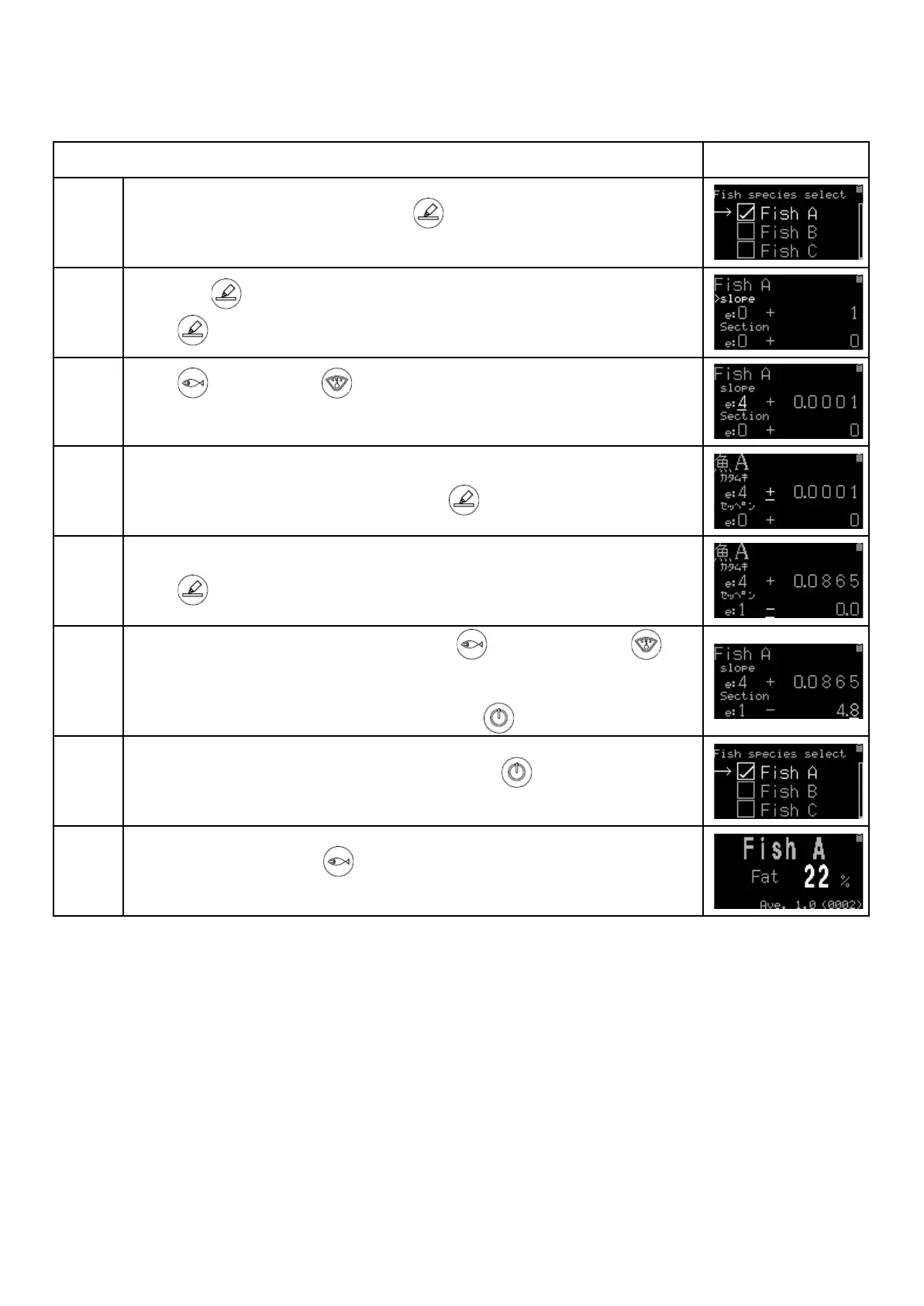
Example: Making an algorithm for “Fish A” by entering “0.0865” for slope and “-4.8” for section
Move the cursor(→)to Fish A and press key. Then put a check mark ”レ”
(check mark) on Fish A.
Hold down key awhile to go to slope and section screen.
Press key to enter a value for slope.
Press (decreasing)or (increasing)to enter the value.
“e” means digits after the decimal point. Enter "4" for 4 digits after the decimal
point.
Next enter the sign (+ or -).
In this case, no need to change from +, press key.
Finally enter a numerical value.
Press key to move the digit and enter "0.0865".
Next match a cursor(>)to section by pressing key and then press
key.
Taking the same procedures ③~⑤, enter 「-4.8」 for section.
After entry the cursor(>)locates on section, press key.
After returning to fish species selection screen, press key to return to the
home screen.
Choose Fish A by pressing key and measure.
The fish fat percentage based on the original algorithm is displayed.


 To Next Page