42
4. Operating procedure
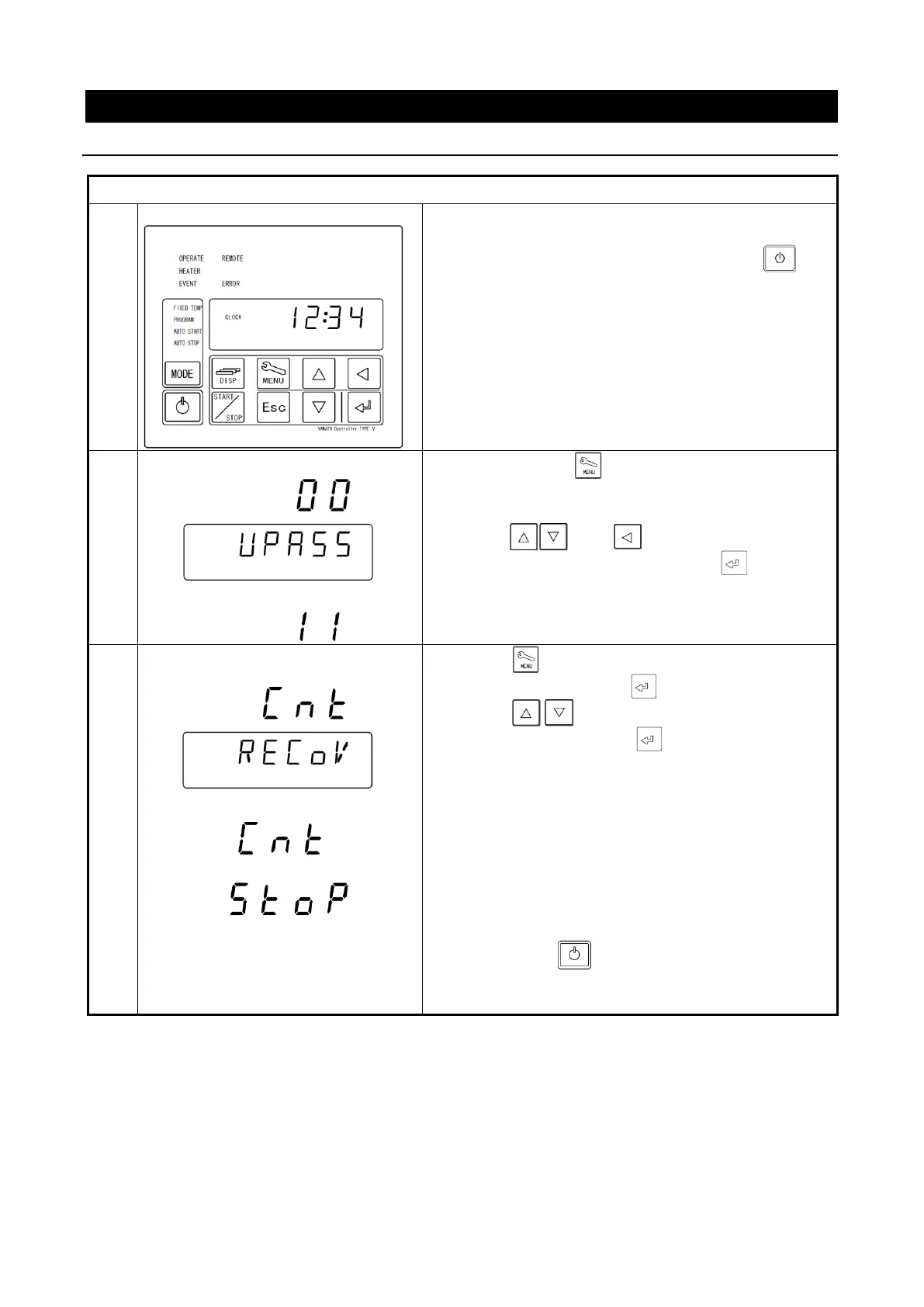
Setting the recovery mode
※ Describe the recovering operation at power failure.
Turning the controller power off
Turn the ELB on the right side of the main unit [ON(|)].
The Bottom screen will show the current time.
While the unit is being operated, press the key
longer to turn the controller power off.
Show [
UPASS
] on Bottom Screen and [
00
] flashing
on Top Screen.
②
Press and keys to enter password
“11” on Top Screen and press key (The
password is fixed to “11”.).
Setting recovery from a power
outage
①
Press key to display [
RECOV
] on Bottom
Screen and then press key.
②
Press key to select recovery type at
power failure and press key.
CNT:The operation will resume right at power failure
after power recovery. (set at factory)
STOP:The operation will terminate as Idle State after
power recovery.
③
Pressing the key longer will return to the time
display screen.



 To Next Page