| Charge Headset/Charging Case | 12
• Use the charging case to charge
Do one of the following:
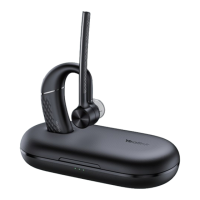
a. Stand the headset on/put the headset into the case to charge.
b. Stand the headset on/put the headset into the case and charge it via the USB cable.
LED indicator Description
Flash green
Charging
Off Charging is complete
Note:
• The carrying case of BH71 cannot directly charge the headset and requires an external USB
cable. The charging case of BH71 Pro can directly charge the headset.
• When the headset is not in the case or undocked to the charging case, the LED indicator
indicates the remaining power of the charging case.
• When the headset is in the charging case or docked to the charging case, the LED indicator
indicates the remaining power of the headset.


 To Next Page
 Loading...