1
E
N
G
L
I
S
H
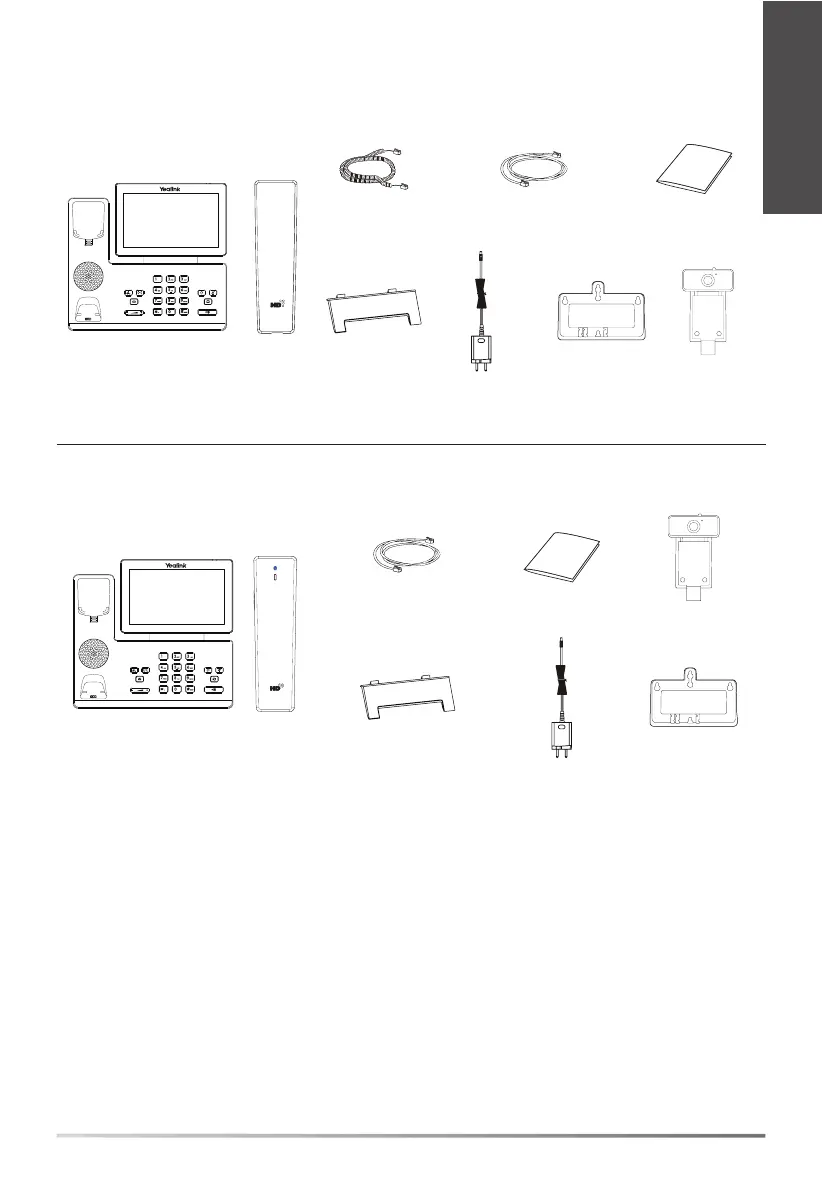
SIP-T58W/SIP-T58W with camera
Quick Start Guide
Power AdapterIP Phone Handset
Handset Cord
Stand
Note: We recommend that you use the accessories provided or approved by Yealink. The unapproved third-party
accessories may result in reduced performance.
Wallmount Bracket
(Optional)
Ethernet Cable
(2m CAT5E FTP cable)
(Optional)
SIP-T58W Pro/SIP-T58W Pro with camera
IP Phone
Bluetooth
Handset (BTH58)
CAM50
*
Quick Start Guide
Power AdapterStand Wallmount Bracket
(Optional)
(Optional)
CAM50
*
* The Yealink USB camera CAM50 is a standard accessory for the SIP-T58W with camera/SIP-T58W Pro with
camera IP phone.
Package Contents
Ethernet Cable
(2m CAT5E FTP cable)



 To Next Page
 Loading...