OPERATION
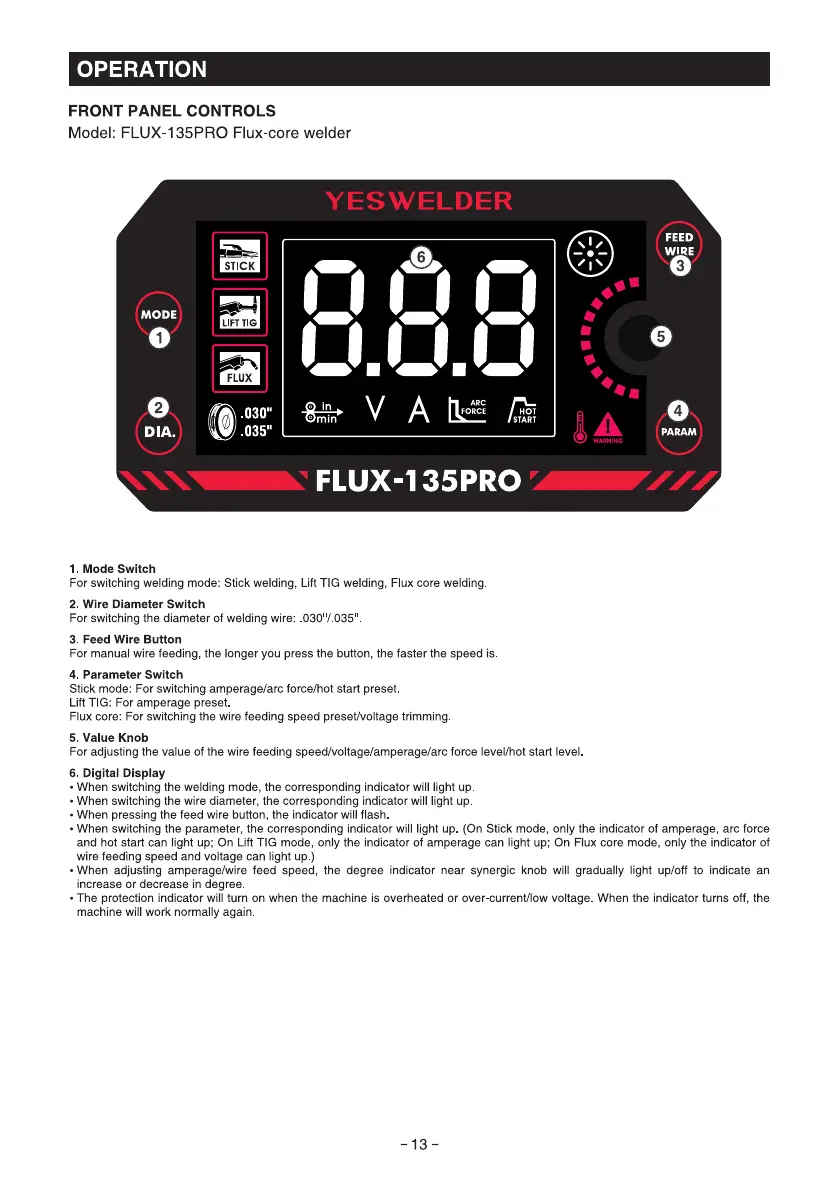
FRONT PANEL CONTROLS
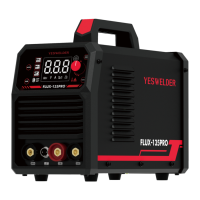
Model: FLUX-135PRO Flux-core welder
YESWELDER
.ä8.01 •
MODE
2
DIA.
1. Mode Switch
FEED
WIRE
3
4
PARAM
WARNING
FLUX-135PRO
For switching welding mode: Stick welding, Lift TIG welding, Flux core welding
2. Wire Diameter Switch
For switching the diameter Ofwelding wire: 030'/ 035
3. Feed Wire Button
For manual wire feeding, the longer you press the button, the faster the speed is
4. Parameter Switch
Stick mode: For switching amperage/arc force/hot start preset
Lift TIG: For amperage preset
Flux core: For switching the wire feeding speed preset/voltage trimming
5. Value Knob
For adjusting the value Ofthe wire feeding speed/voltage/amperage/arc force level/hot start level
6. Digital Display
• When switching the welding mode, the corresponding indicator will light up
• When switching the wire diameter, the corresponding indicator will light up
• When pressing the feed wire button, the indicator will flash
• When switching the parameter, the corresponding indicator will light up. (On Stick mode, only the indicator of amperage, arc force
and hot start can light up; On Lift TIG mode, only the indicator Of amperage can light up; On Flux core mode, Only the indicator Of
wire feeding speed and voltage can light up.)
• When adjusting amperage/wire feed speed, the degree indicator near synergic knob will gradually light up/off to indicate an
increase or decrease in degree.
• The protection indicator will turn on when the machine is overheated or over-current/low voltage When the indicator turns Off, the
machine will work normally again
-13-



 To Next Page