OPERATION
Flux Core (Gasless) Welding Steps
• Insert the MIG torch into the MIG torch socket and screw in clockwise Install the torch control switch onto the panel switch socket
• Connect the work clamp cord to positive (+) terminal.
• Install the welding wire, then turn on the power switch, and the fan will work
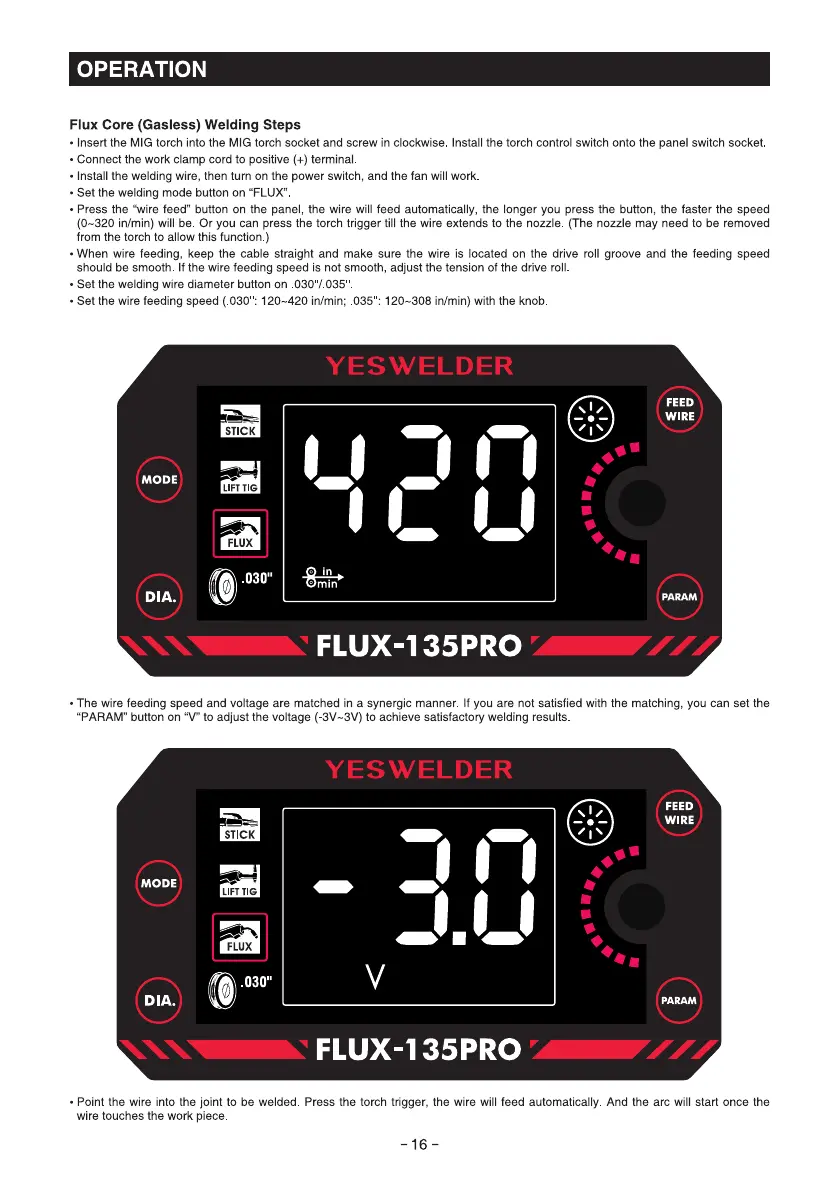
• Set the welding mode button on "FLUX"
• Press the "wire feed" button on the panel, the wire will feed automatically, the longer you press the button, the faster the speed
(0-320 in/min) will be. Or you can press the torch trigger till the wire extends to the nozzle. (The nozzle may need to be removed
from the torch to allow this function.)
• When wire feeding, keep the cable straight and make sure the wire is located on the drive roll groove and the feeding speed
should be smooth. If the wire feeding speed is not smooth, adjust the tension of the drive roll
• Set the welding wire diameter button on .030"/.035
• Set the wire feeding speed ( 030 : 120—420 in/min; 035 : 120—308 in/min) with the knob
STICK
MODE
LIFT TIG
FLUX
0
.030"
DIA.
YESWELDER
FEED
WIRE
min
FLUX-135PRO
• The wire feeding speed and voltage are matched in a synergic manner. If you are not satisfied with the matching, you can set the
"PARAM" button on "V" to adjust the voltage (-3V—3V) to achieve satisfactory welding results
YESWELDER
STICK
MODE
LIFT TIG
FLUX
.030"
DIA.
FLUX-135PRO
FEED
WIRE
PARAM
• Point the wire into the joint to be welded. Press the torch trigger, the wire will feed automatically. And the arc will start once the
wire touches the work piece
-16-



 To Next Page