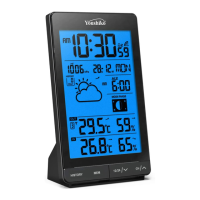
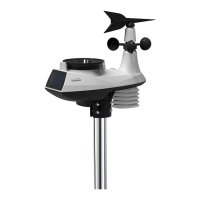
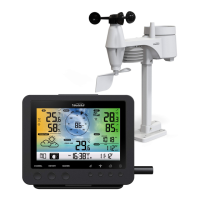
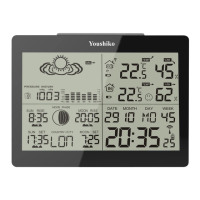
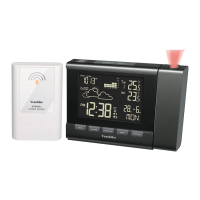
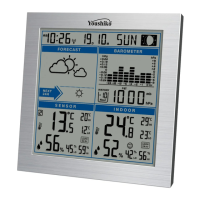
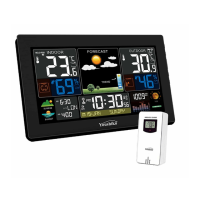
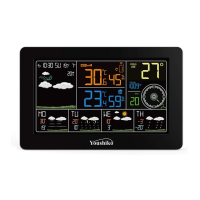
The Youshiko YC9343 Radio Control Weather Station is a comprehensive device designed to provide accurate weather information and timekeeping functions. It features a main display unit and three remote outdoor sensors, allowing for monitoring of indoor and outdoor conditions across multiple locations.
Function Description:
The primary function of the Youshiko YC9343 is to display time, date, day of the week, indoor temperature and humidity, and outdoor temperature and humidity from up to three remote sensors. It incorporates an MSF Radio controlled clock function, which automatically synchronizes the time, including automatic time changes for Spring and Autumn. This radio control function can also be switched on and off. The weather station provides weather forecasting based on barometric pressure fluctuations and includes an ice alert feature. Daily alarm and snooze functions are also integrated. The display unit includes an indoor comfort indicator and a low battery indicator.
Important Technical Specifications:
- Time Format: Optional 12/24 hour format.
- Perpetual Calendar: Up to Year 2099.
- Humidity Range: Indoor & Outdoor measurable range: 20%RH ~ 95%RH.
- Indoor Temperature Range: -9.9°C (14.2°F) ~ 50°C (122°F).
- Outdoor Temperature Range: -25°C (-13°F) ~ 50°C (122°F).
- Temperature Units: Alternatively displayed in °C or °F.
- Remote Sensors: Supports 3 remote sensors for temperature/humidity and comfort display on the same screen.
- Wireless Outdoor Sensor Features:
- Wall Mount or Table Stand.
- 3 Channel selectable.
- 433.92MHz RF transmitting frequency.
- 60 meter transmission range in an open area.
- Power Supply:
- Weather Station: 2 x AA Batteries (Not included).
- Wireless Outdoor Sensor: 2 x AA Batteries (Not included).
- Ice Alert: Activates and flashes when outdoor temperature is between -1°C to +3°C (30.2°F to 37.4°F).
Usage Features:
- One-Step Automatic Setup: Insert batteries into the display unit, then select a channel (1, 2, or 3) for each of the three supplied sensors. Insert batteries into all sensors. The sensors will connect to the display unit within 1 to 3 minutes. The weather station will then automatically set itself via the MSF Radio control system, typically within minutes to hours, or by 05:00 AM at the latest, depending on signal strength and location. Automatic time changes for Spring & Autumn and time checks are handled automatically.
- Manual Time Settings: Once connected, the time and date format (Month/Date to Date/Month) can be adjusted through manual settings.
- Interference Avoidance: Keep the display unit away from TVs, computers, Wi-Fi hubs, and mobile phones to prevent interference. A minimum distance of 2.5 meters (8.2 feet) from interference sources is recommended.
- MSF Signal Reception: The clock automatically searches for the MSF signal after 3 minutes of restart or battery change. Synchronization attempts occur at 1:00 AM, 2:00 AM, and 3:00 AM to correct time deviations. If unsuccessful, it retries every hour, up to 5 times. Manual signal reception can be initiated by pressing and holding the "-" button for 3 seconds. A flashing radio mast icon indicates reception has started, while a continuously displayed icon means it was successful.
- Daily Alarm Function: Two alarms (Alarm1 and Alarm2) can be set. Pressing the alarm button allows toggling alarms ON or OFF. The alarm time can be set by pressing and holding the alarm button for 2 seconds, then using the "+" or "-" buttons to adjust the hour and minute.
- Snooze Function: When an alarm is ringing, touching the "SNOOZE" key will activate snooze mode, and the alarm will sound again after 8 minutes.
- RF Transmission Procedure: The weather station automatically receives data from outdoor remote sensors after batteries are inserted. If transmission fails (indicated by "-.-" and "- -" on the display), press the "CH" button to select the channel, then press and hold "CH" for 2 seconds to rescan the launch signal.
- Maximum/Minimum Value Record: The weather station records and displays maximum and minimum temperature and humidity values. Pressing the "MEM" button cycles through maximum and minimum values. These records are automatically cleared at 12:00 AM every night.
- Temperature Unit Transfer: The "°C/°F" button allows switching between Celsius and Fahrenheit units.
- Weather Forecasting: The station displays weather symbols (Sunny, Slightly cloudy, Cloudy, Rainy, Heavy rainy, Snowy) indicating weather fluctuations over the next 8 hours. It's advised to cross-reference with local weather services, as the station's forecast is based on barometric pressure changes and may deviate from actual conditions.
- Comfort Level Indicator: Displays icons for dry (humidity below 40%), comfort (temperature 20~28°C and humidity 40~70%), and wet (humidity above 70%) conditions. The icon will not display if the temperature is outside the 20~28°C range and humidity is outside the 40~70% range.
- Barometric Pressure Trend Display: Arrows indicate if the barometric pressure is rising or falling. No arrow means it's steadying.
- Background Lighting: Pressing the "LIGHT" button illuminates the backlight for 15 seconds.
Maintenance Features:
- Battery Replacement: Use alkaline batteries only and observe correct polarity. Replace low batteries promptly to prevent damage from leakage. Batteries contain harmful acids; wear protective glasses and gloves when handling leaked batteries.
- Disposal: Do not dispose of old electronic devices and empty batteries in household waste. Utilize retail stores or appropriate collection sites for recycling.
- Care of Item:
- Avoid exposure to extreme temperatures, water, or direct sunlight.
- Prevent contact with corrosive materials.
- Do not subject the unit to excessive force, dust, or humidity.
- Do not open the inner back case or tamper with components.
- Troubleshooting Reception: Wireless reception can be affected by long transmitting distances, nearby mountains/valleys, tall buildings, freeways, railways, airports, high voltage cables, construction sites, concrete buildings, electrical appliances, moving vehicles, and metallic structures. For optimal signal, place the station near a window and away from metal surfaces or electrical appliances. Obstructions between the transmitter and station (roofs, walls, floors, ceilings, wooded areas) can reduce transmission range.

 Need help?
 General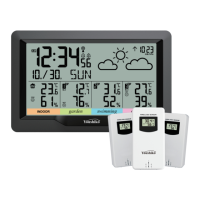

 To Next Page