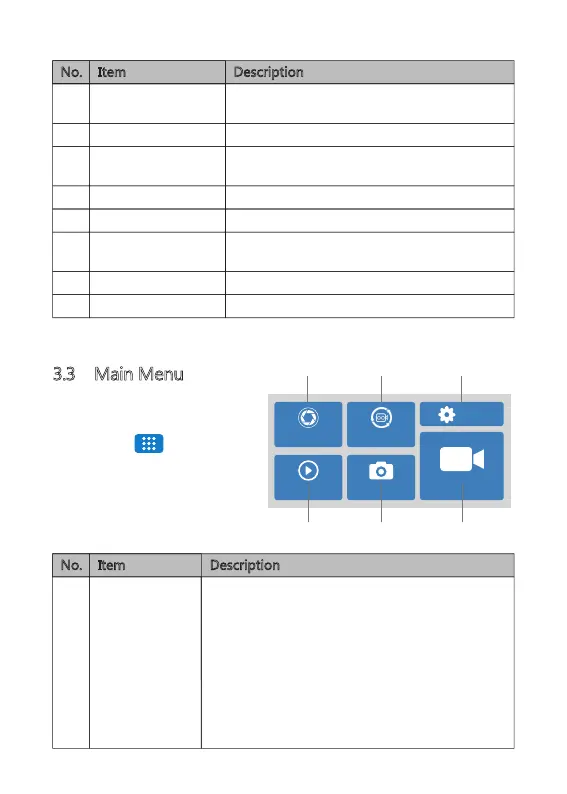
3.3 Main Menu
Tap anywhere on the Screen to
bring up the Shortcuts. Tap on the
Main Menu ' ' icon to
enter the Main Menu.
Select one of the following options:
Video Resolution
2K+1080P+1080P
Loop Recording
-3 mins-
Playback Photo Capture
REC
Settings
Item DescriptionNo.
Switch between Drive, Scenic, Park and
Standard modes (see 4.3 for more details).
Protect the currently recorded video file from
being overwritten (see 4.7 for more details).
Take a snapshot while recording or in
standby mode.
Set Sound Recording on/off.
Go to Main Menu.
Enter Screen Saver.
Change the display view on the screen.
Start or pause video recording.
No. Item Description
I Video Resolution
Front Camera + Inner Camera + Rear Camera:
2K+1080P+1080P
1080P+1080P+1080P
Front Camera + Inner Camera/Rear Camera
4K+1080P
2K+1080P
1080P+1080P
Front Camera
5K/4K/2K/1080P
L M N
I J K
-10-
A
B
C
D
E
F
G
H
Mode
Start/Pause
Video Protect
Microphone
Main Menu
Snapshot
Screen Saver
View


 To Next Page