4.4 Adjusting the Settings
If you'd prefer to customize each dash cam setting yourself, you can do so in
the Setting menu:
1. Tap anywhere on the Screen to bring up the shortcuts.
2. Tap on the Main Menu ' ' icon, and select Settings ' ' icon
from the menu.
• Scroll the menu by tapping the ' ' or ' ' icon.
• Tap on a feature to enter and customize it.
• Make a selection to automatically save and return to the Settings menu.
• From the Settings menu tap ' ' icon to return to the Main Menu.
• Tap ' ' icon to exit and return to the Screen.
4.5 Loop Recording
• Videos are recorded and saved to the TF/Micro SD card at set recording time.
• Once the TF/Micro SD card is full, Loop Recording will automatically overwrite
the oldest unprotected saved file. This prevents long duration video clips from
being lost in a single overwrite.
• Video files can be saved to the memory card in 1, 3 or 5 mins.
Main Menu > Loop Recording > 1 Minute / 3 Minutes / 5 Minutes
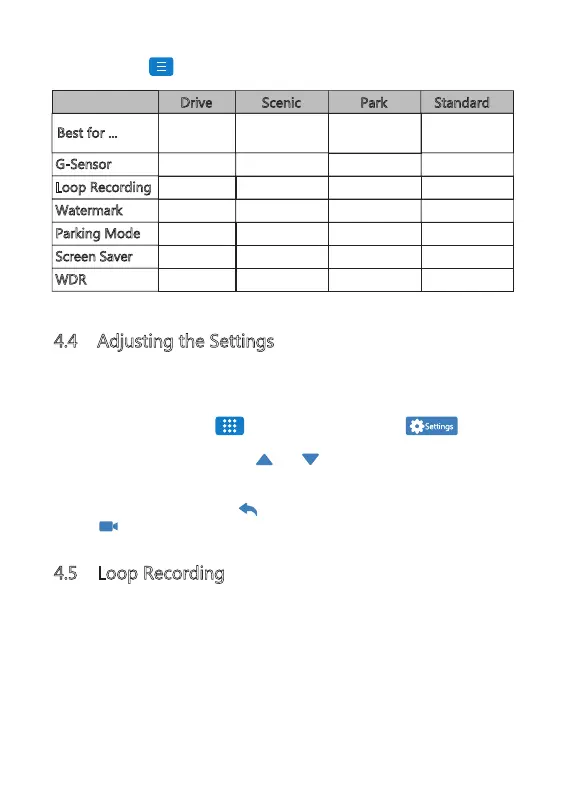
Everyday
Driving
Scenic Driving
Monitoring your
Parked car
Standard Driving
(Factory Default)
Drive Scenic Park
Standard
Best for ...
Medium
3 Mins
On
On
1 Min
On
Low
5 Mins
Off
On
Always On
On
High
1 Min
On
On
1 Min
On
Medium
3 Mins
On
Off
3 Mins
On
Watermark
Loop Recording
G-Sensor
Parking Mode
Screen Saver
WDR
-13-
Tap the Mode ' ' icon on the middle left side. From here, switch between:


 To Next Page