2 GETTING STARTED
2.1 Inserting the TF/Micro SD Card
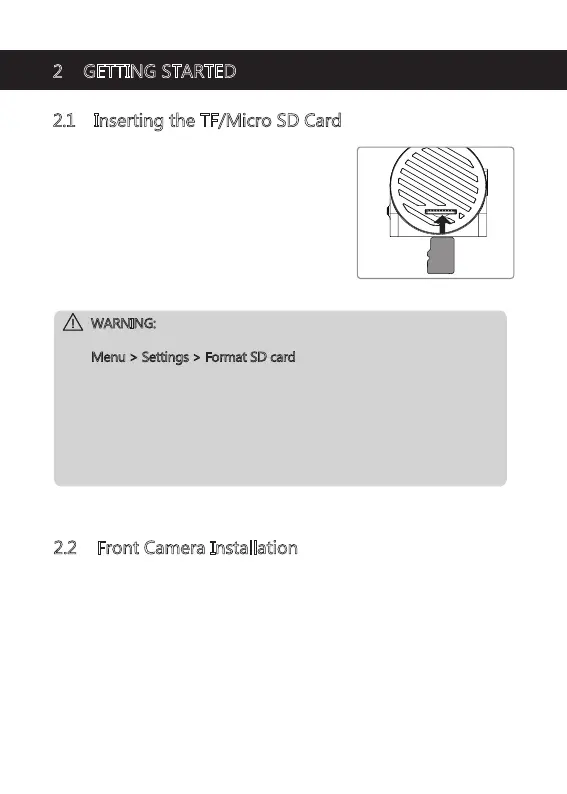
• Insert a TF/Micro SD card into the TF/Micro SD
Card Slot (9), with the pins facing towards the
front of the device, until it clicks into place.
• To remove the card, push the edge of the TF/
Micro SD card inward until you feel it click, then
allow it to push out until you can remove it from
the slot.
WARNING:
• It is recommended to format the memory card in the dash cam directly
in Menu > Settings > Format SD card
before initial use.
• Please note that all data saved on the TF/Micro SD card will be erased
after formatting.
• Do not remove or insert the TF/Micro SD card whilst the device is
powered on - this may damage the TF/Micro SD card.
• Supports Micro SDXC card up to 512GB (Class 10 or above).
• We recommend using the included memory card or well-known brand
Micro SD card.
-4-
2.2 Front Camera Installation
Please follow the below instructions for mounting your dash cam to your
vehicles windshield:
1. Slide the car mount into the slot on top of the device until a click sound is
heard.
2. Press the suction cup firmly against your windshield, and rotate the lever
clockwise (12 o'clock) to secure.


 To Next Page