Product operation
1
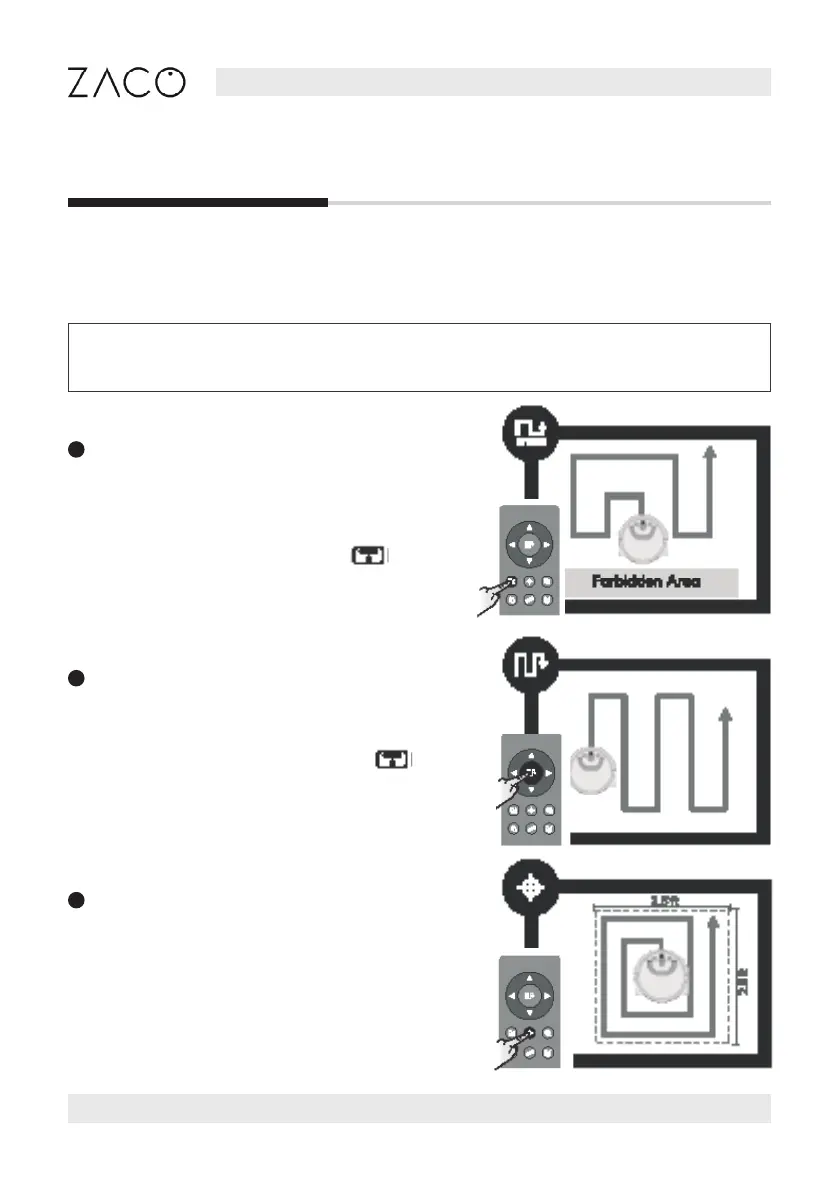
Area mode
Recommended to clean a specic area.
The robot will clean the area ahead of its starting
point at zigzag path. It will return to the starting
point when cleaning nished. Press button
to pause the robot. (The below right picture shows
the cleaning path of area mode, subject to the
actual situation.)
2
Path mode
Recommended to clean large area. The robot cleans
in zigzag path and return to the starting point when
cleaning nished automatically. Press button
to pause the robot.
(The below right picture shows the cleaning path of
path mode, subject to the actual situation. )
3
Spot mode
Recommended to clean a localized area with heavy
stains. The robot cleans in „spiral“ path and return to
the starting point and goes into standby mode when
cleaning nished automatically.
(The below right picture shows the cleaning path of
Spot mode, subject to the actual situation.)
Cleaning modes
To ensure the best cleaning experience, the robot comes with dierent cleaning modes.
The dierent modes can be activated by using the remote control or the ZACOHome app.
Note: To start any of the modes described below, please make sure that the robot
is turned on and that the Auto button indicator is flashing.
English
16 Find more information at www.zacorobot.eu



 To Next Page