Cancer Institute Microscopy Core Facility
V1.0
ANNOTATIONS
Axiovision can annotate images for publication. Things like Text, Arrows, Scale bars
and geometric shapes can be added to your choice of colour, size and style. These can be
chosen from the annotations tab in the tool bar – Fig 4
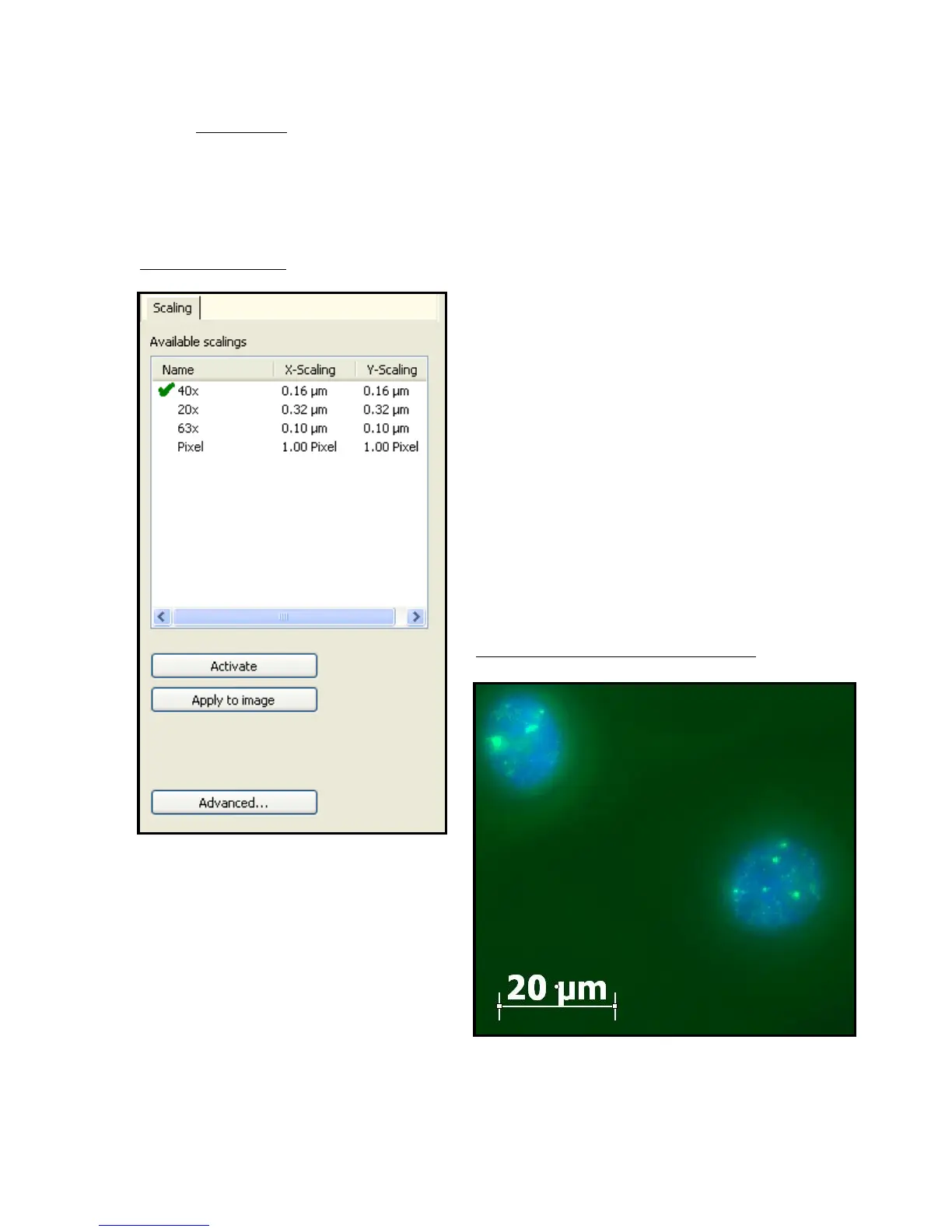
Fig 14 – Scaling Tab
a) When adding a scale bar the scale of
the pictures is not automatically
chosen to be the right magnification.
When you choose to annotate with a
scale bar a scaling tab needs to be
opened. This allows you to set the
scale of the image
b) Select scale and click apply to image
or both activate and apply to image
for multiple images of same
magnification.
c) Draw scale bar on image as desired
Fig 15 – Example of Annotated Image
Size of scale bars can be chosen by clicking
On end of bar and dragging it to a larger
size
Other annotations such a text or geometric
Shapes do not require setting to use.


 To Next Page