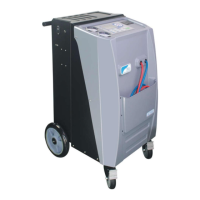
The ZELL AC2000 Automobile Air-Con Service Solution is a comprehensive device designed for the maintenance and servicing of vehicle air-conditioning systems. It offers a range of functions including recovery, vacuum, purge, oil injection, and recharge, all integrated into a user-friendly interface. The device is equipped with a printer and a heat belt, enhancing its utility and efficiency.
Function Description:
The core functionality of the ZELL AC2000 revolves around its ability to manage refrigerant within a vehicle's A/C system.
- Recovery: This process extracts refrigerant from the vehicle's A/C system into the device's internal working tank. It's a crucial step to prevent refrigerant release into the atmosphere and to prepare the system for further service. The device automatically detects if there's enough gas for the operation. After the initial recovery phase, a waiting period allows more refrigerant to evaporate into gas, ensuring maximum recovery.
- Vacuum: The vacuum operation evacuates the vehicle's A/C system to a vacuum state, removing any remaining gases. This is essential for detecting leaks and ensuring the system is free of non-condensable gases before recharging. The device can automatically detect if the pressure is suitable for operation. A vacuum test function is also available to confirm the A/C system's integrity after evacuation, identifying any leaks. The vacuum time can be adjusted, with suggestions provided for systems that have been opened to air versus those that haven't. The optional heat belt can be used during the vacuum process to improve efficiency, with a suggested minimum of 10 minutes.
- Purge: This function is designed to discharge mixed non-condensable gases from the internal tank. High tank pressure due to these gases can be detrimental to the A/C station's performance. The purge operation helps maintain the internal tank pressure at a normal level. It's recommended to check the tank pressure daily before use.
- Oil Injection (PAG Oil): This operation allows for the injection of new PAG oil into the vehicle's A/C system. It requires the A/C system to be in a vacuum state to facilitate the oil's entry. The quantity of oil to be injected can be adjusted.
- Recharge: This function refills the refrigerant into the vehicle's A/C system. The quantity of refrigerant is measured by a load cell, and the A/C system must be in a vacuum state for this operation. The internal work tank should contain at least 3 kg of gas, and a tank pressure over 6 bar is ideal for quick recharging. The device can also recharge gas from the low side port without measurement if needed.
- Auto Mode: This feature provides a one-press operation that automatically executes all service steps: recovery, oil drain, vacuum, oil injection, and recharging. Before initiating, it's crucial to confirm that sufficient new PAG oil is available to prevent air from being sucked into the vehicle's A/C system.
- Pressure Up/Down: These functions allow for fine-tuning the A/C system pressure. "Pressure Up" adds gas to the A/C system from the LP service port if the pressure is lower than desired due to refrigerant shortage. "Pressure Down" removes gas from the system to the inner tank via the LP service port if the pressure is too high due to excess refrigerant. Neither of these operations measures the gas quantity.
- Record Print: The device can store and print records of the last three operations, including recovery and recycle gas amount, vacuum minutes, new oil injection amount, and recharge gas amount. This feature is particularly useful for providing receipts to customers, especially with the optional printer.
Important Technical Specifications:
- Dimensions (width x height x depth): 600 mm x 1150 mm x 780 mm
- Weight: 95 kg
- Power Supply: 220 V - 50 Hz
- Refrigerant Type: R134a
- Vacuum Pump: 120 L/min
- Compressor: 3/8 P
- Filling Cylinder Accumulator Capacity: 80 kg
- LCD Back-lit Display: 192*64
- Manometers: 80mm (High and Low Pressure), 40mm (Tank Pressure)
- Scale Resolution: 5g
- Service Hose Length: 3m
Usage Features:
- User Interface: The device features an LCD back-lit display (192*64) and a control panel with dedicated keys for each function (Recovery, Vacuum, Purge, Recharge, PAG Oil, Function, Auto, Pressure Up/Down, Vacuum Test, Record Print). Plus/minus keys are used for adjusting values, and start/stop keys control operations. An "INFO" key provides help information.
- Safety Features: Includes a pressure monitor that switches off the compressor if normal operation pressure is exceeded, and a tank with a pressure relief function as an additional safety mechanism. Users are warned against pumping compressed air into refrigerant lines due to flammability/explosive risks.
- Setup and First Start-up: Requires proper grounding of the 220V or 110V power supply. Initial setup involves putting new oil into bottles and filling the internal refrigerant container. The device displays refrigerant quantity in the working tank and prompts for zero balance if needed.
- Refrigerant Bottle Connection: The manual details how to connect external refrigerant bottles for refilling the internal tank, illustrating different bottle types (bottom-up, top-up, liquid connection).
- Error Handling: The device provides error messages (e.g., "ERROR! ELECTRONIC SCALE FAULT," "INNER TANK FILLED," "TANK PRESSURE IS TOO HIGH") with corresponding remedies, guiding the user through troubleshooting.
Maintenance Features:
- Inner Tank Refill: A dedicated service task for refilling the internal refrigerant tank from an external source.
- Language Select: Allows users to choose between Chinese and English.
- Zero Balance: Essential for accurate measurements, this function resets the electronic scale. It should be performed regularly, especially after transport or if the device has been on an uneven surface.
- Vacuum Pump Oil Change: A detailed procedure is provided for draining old oil and feeding new oil into the vacuum pump, including instructions on how to access the pump and identify the oil drain and outlet plugs. The oil level should be maintained at the middle of the sight glass.
- Filter Drier Replacement: Instructions are given for replacing the filter cartridge, emphasizing the correct flow direction.
- Hose Compensation: A setting to compensate for refrigerant remaining in the service hoses after recharging.
- Pressure Rise Wait: A feature that allows time for refrigerant to evaporate into gas during recovery, improving efficiency.
- Cleaning and Maintenance: Regular cleaning of the device exterior with a damp cloth and checking service hoses and adapters for damage are recommended.
- Disposal: Guidelines for disposing of used fluids (hazardous waste), packaging material (cardboard and plastic), and the old unit itself (recycling).
- Other Service: Password-protected operations, including electronic scale calibration, which require a specific password for access.
The ZELL AC2000 is designed for professional use in servicing vehicle air-conditioning systems, requiring operators to have the necessary professional ability and to adhere to safety guidelines and local regulations regarding refrigerant handling.

 Need help?
 General

 To Next Page