7
Station Main Settings
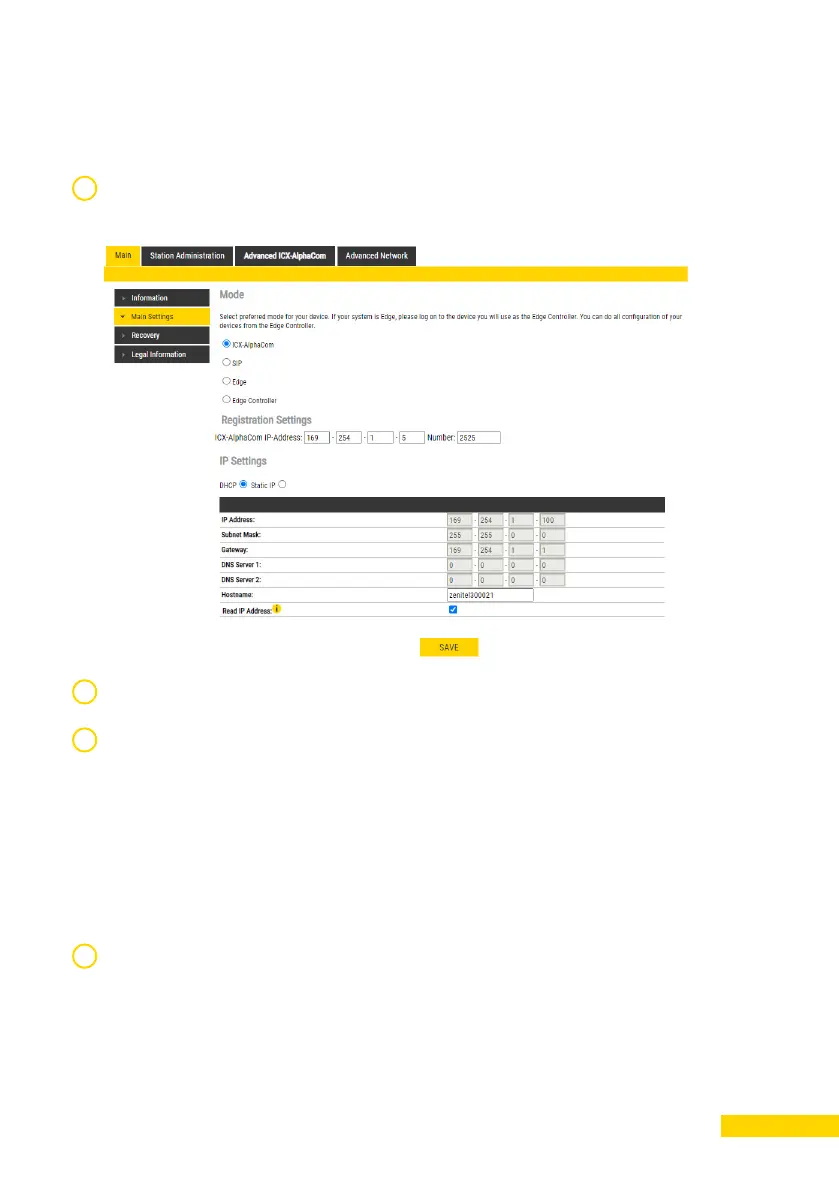
Click Station Main > Main Settings to access the page for configuring
station mode and IP parameters.
1
2
Under Mode, select ICX-AlphaCom.
Registration Settings. Enter the IP address of the ICX-AlphaCom
server in which the IP station is to be a subscriber in the ICX-AlphaCom
IP-addresses field. Then enter the directory of the station in the
Directory Number field.
If a directory number is not entered, the station will register with its MAC
address. The MAC address is found on the Station Information page
and needs to be entered into the AlphaPro programming tool.
IP Settings:
• DHCP - Use this option if the station shall obtain an IP address from
a DHCP server.
• Static IP - Use this option if the IP station shall use a static IP
address. Enter values for IP-address, Subnet-mask, Gateway.
Click Save followed by Apply to apply the new configuration settings.
3
4




 To Next Page